

Short answer: no, QuickBooks is not an ERP. It’s accounting software — very good accounting software — and for a lot of small businesses it’s all you need. The question .behind the question is usually more interesting: “we run on QuickBooks and things are starting to creak — is this the ceiling, and what’s above it?” That’s what this post answers.
The whole answer in 50 seconds
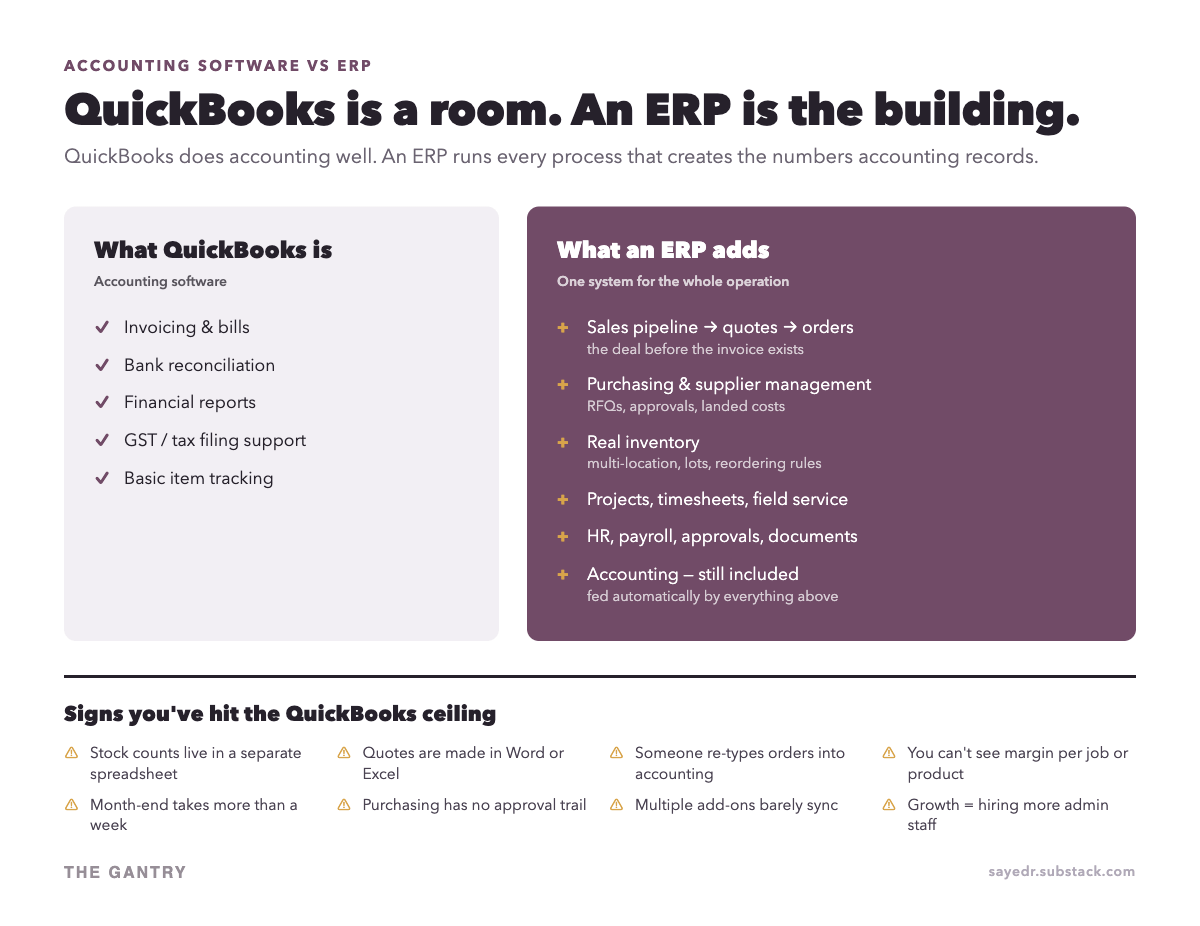
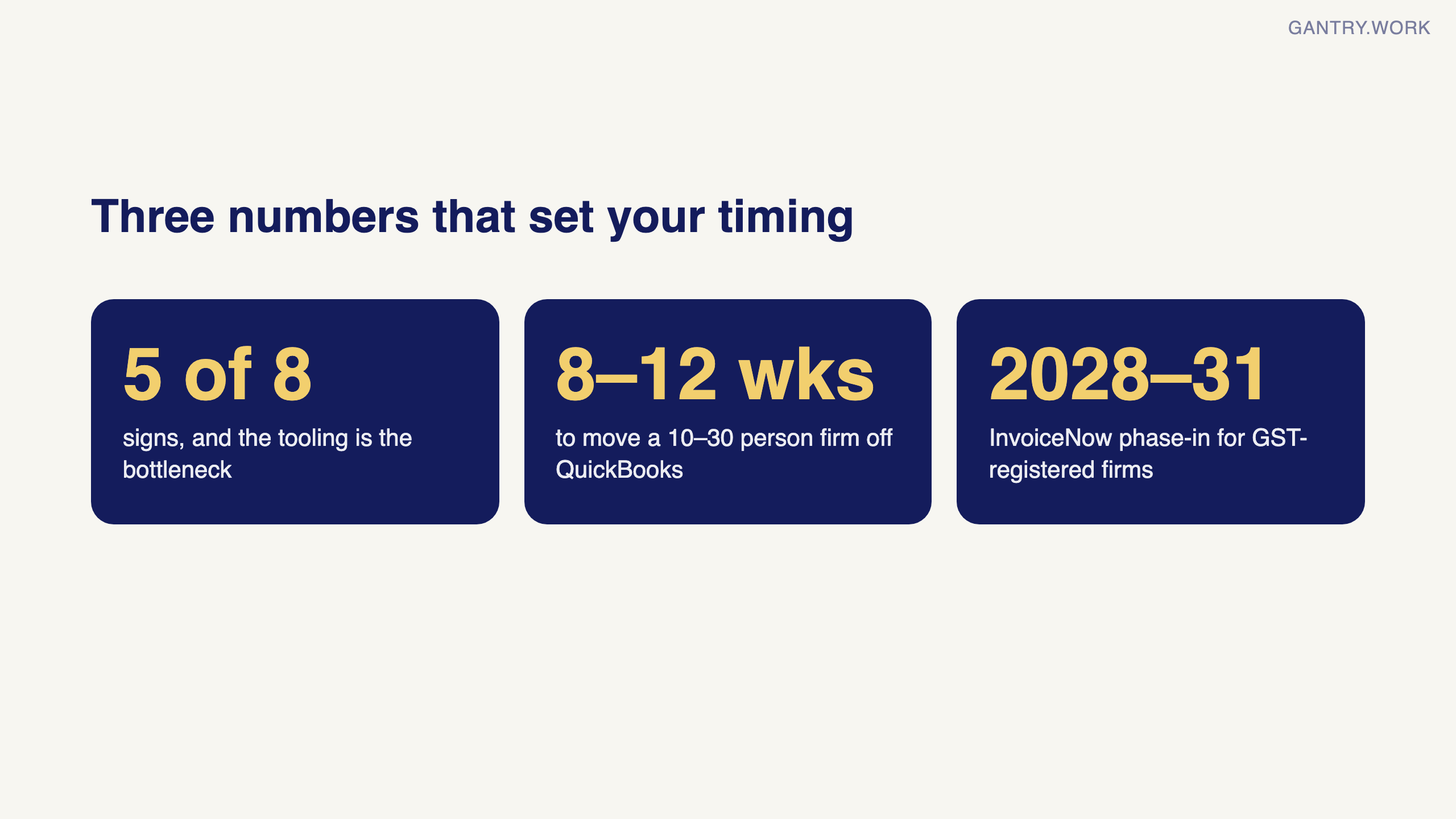
The short version: QuickBooks keeps the books, an ERP runs the operations that create them, and the move becomes worth it when five or more of the eight signs below describe your week. The detail, the Singapore prices and what the move involves are below.
What QuickBooks actually is
QuickBooks records financial transactions: invoices out, bills in, bank reconciliation, GST, financial statements. That’s the accounting layer of a business — the scoreboard. It’s genuinely good at this, which is why it’s everywhere.
But look at what happens in your company before anything reaches the scoreboard: a lead becomes a quote, a quote becomes an order, stock gets reserved and picked, a purchase order goes to a supplier, goods arrive, a technician logs hours on a job. QuickBooks sees none of it. It only sees the financial residue — the invoice at the end.
Wondering if your business has outgrown QuickBooks? In a free 20-minute systems review, you walk me through how sales, stock and accounts run today, and I tell you honestly whether you need an ERP yet, and which one. No pitch. Book a free 20-minute review
What makes something an ERP
ERP (enterprise resource planning — the name is terrible, ignore it) means one system that runs the operational processes AND the accounting they generate. When a salesperson confirms an order in an ERP, the system reserves stock, schedules the delivery, drafts the invoice, and posts to the ledger — one record, no re-typing. The defining feature isn’t a module list; it’s that data flows instead of being re-entered.
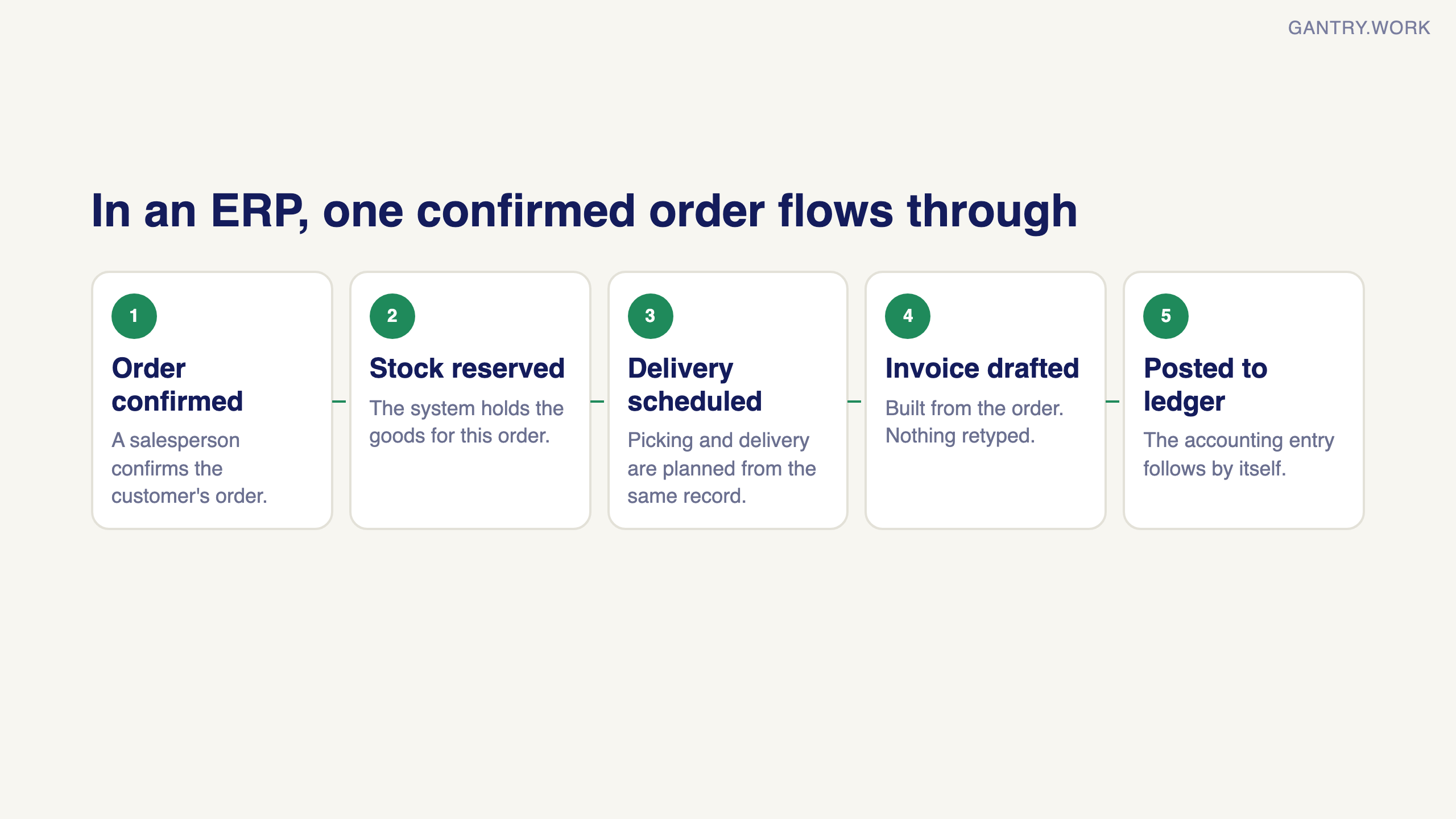
That’s the real test for “is X an ERP”: if your team re-types information between tools, you don’t have one.
The overlap that confuses everyone
QuickBooks has “items” and basic stock counts, so people assume it does inventory. It tracks quantities; it doesn’t manage inventory — no reordering rules, no multi-location, no lot/serial tracking, no landed costs, no picking workflows. Similarly, its add-on marketplace can bolt on CRM-ish and project-ish tools, but each bolt-on is another subscription, another login, and another sync that breaks quietly at the worst time. A stack of five add-ons is not an ERP; it’s five ceilings.
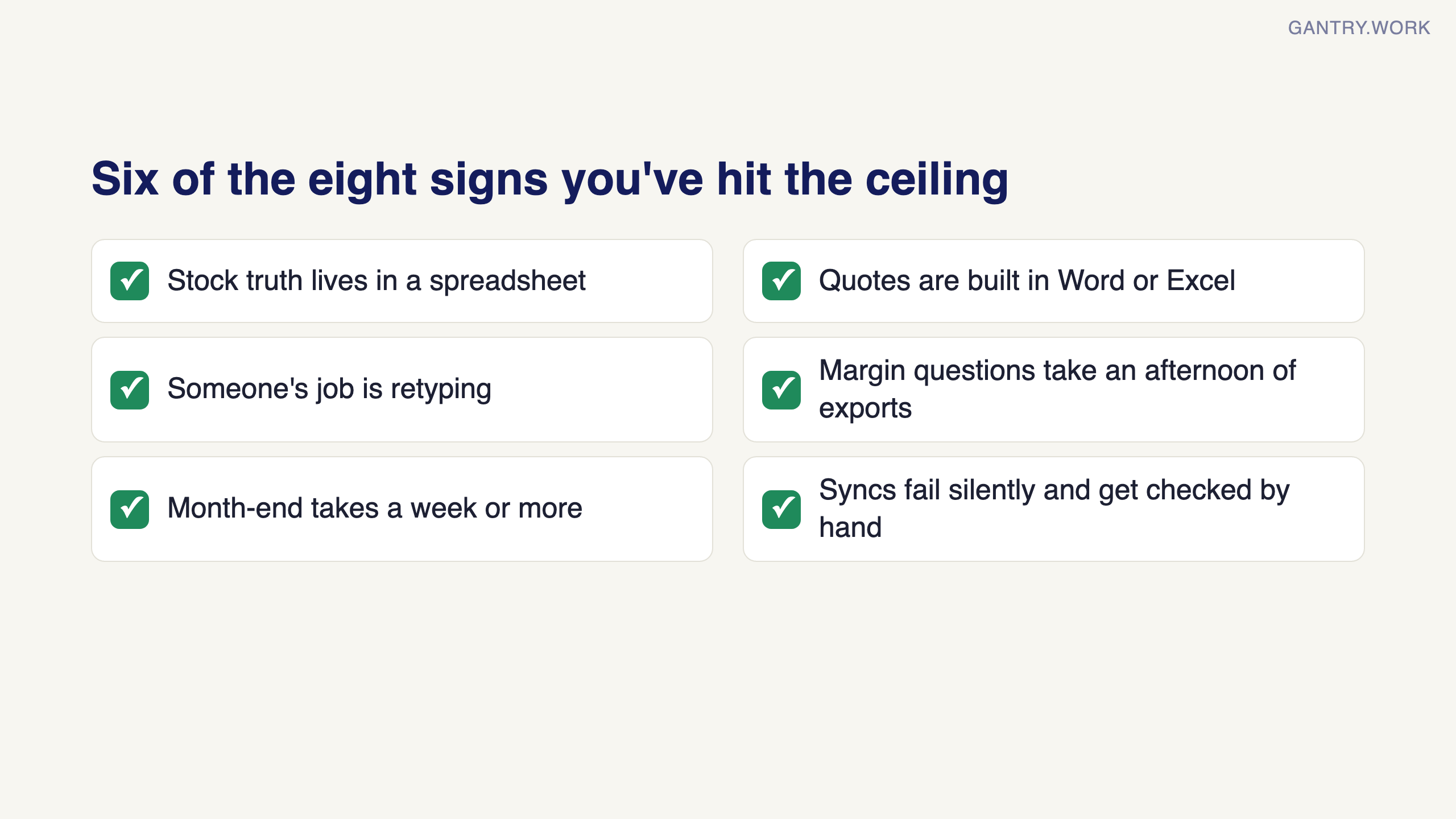
The eight signs you’ve hit the ceiling
Stock truth lives in a spreadsheet, and it disagrees with QuickBooks and with the shelf.
Quotes are built in Word or Excel, so nobody can see the pipeline or what was actually quoted.
Someone’s job is re-typing — orders into accounting, supplier invoices into the ledger, timesheets into billing.
You can’t answer margin questions — profit per product, per job, per customer — without an afternoon of exports.
Month-end takes a week or more because the numbers have to be reconciled across systems first.
Purchasing is invisible — no approval trail, no committed-cost view, surprises when supplier bills arrive.
Your “integrations” need babysitting — the sync between your webshop / inventory tool / accounting fails silently and someone checks it manually.
Growth means hiring admin staff — each new salesperson or warehouse hire needs a fraction of an extra coordinator to shuffle their data.
Two or three of these are normal growing pains. Five or more means the tooling — not the team — is the bottleneck.
What are your options?
Option 1: Stay and patch. If only one thing hurts (say, inventory), a single well-chosen add-on can buy you a year or two. Cheapest now, but every patch adds a sync to babysit, and you’ll do the ERP move eventually with more data to migrate.
Option 2: Move to a mid-market ERP. NetSuite, Dynamics, Acumatica — genuine ERPs, priced for companies with six-figure software budgets. Powerful, but most SMEs under ~50 staff find both the licence and the implementation out of range.
Option 3: Move to an SME-priced ERP. This is the category QuickBooks graduates usually land in — systems like Odoo or ERPNext where licences cost about what you already pay for your current stack of subscriptions, and the implementation is a five-figure project, not a six-figure one.
Before you outgrow QuickBooks, plug the gaps. Much of the work that pushes a small business off QuickBooks is retyping between it and everything else. Free Make templates remove the most common ones: Shopify orders to QuickBooks invoices, Stripe payments to QuickBooks and new QuickBooks invoices to Google Sheets. When the connections themselves become the problem, that is the sign this article describes.
Affiliate links: if you sign up to Make through them, The Gantry may earn a commission at no extra cost to you. How I test tools and how this site makes money.
Can Odoo replace QuickBooks?
Yes — Odoo’s accounting module does invoicing, bank feeds, GST and financial reporting, so it replaces QuickBooks outright rather than sitting next to it. The honest caveats: the migration itself is a real project (your history, chart of accounts and open items have to move carefully), and if all you need is accounting, QuickBooks is simpler and you shouldn’t move. You move when you need the operational layer — inventory, sales, purchasing — connected to the books. I’ll cover the full comparison and what the migration actually involves in an upcoming post.
Is QuickBooks Desktop going away?
This is the question I now get more than the ERP one, and the answer is more nuanced than the panic suggests.
QuickBooks Desktop is being wound down, but not switched off. Intuit stopped selling new Pro Plus, Premier Plus and Mac Plus subscriptions in September 2024. Support for Desktop 2023 ended on 31 May 2026. Desktop 2024, the last non-Enterprise version, was due to lose support in 2027, but in August 2026 Intuit reversed that: it now keeps Desktop 2024 supported with ongoing in-product updates and no announced end date. Enterprise runs on its own timeline and is the one edition Intuit still actively sells.
Here is the part that matters operationally when a version does lose support, as Desktop 2023 already has. Your installation does not stop opening. You can still look at your history. What stops is everything that connects it to the outside world: bank feeds disconnect, payroll tables stop updating, online payment processing halts, and security patches end.
So it does not die. It becomes an island. A filing cabinet with your numbers in it, sitting next to a business that has moved on.
If you are still on Desktop 2023 or older, that has already happened. If you are on Desktop 2024, the reversal removes the deadline, not the decision: new customers can now only buy Enterprise or move online, and if you were already seeing five or more of the eight signs above, it was never the sunset forcing your hand — it was the operational signs, and they do not wait for a support date.
The deadline nobody mentions
If you are GST-registered in Singapore, there is a separate clock running, and it is easy to miss because it has nothing to do with ERP.
Every GST-registered business will have to send invoice data to IRAS through the InvoiceNow network, phased between April 2028 and April 2031 depending on your annual supplies. That is a separate obligation from anything in this article.
Where it intersects with QuickBooks is worth stating precisely, because both simple versions are wrong. QuickBooks does not currently appear on IMDA’s accredited solution provider list. But Intuit has built a native InvoiceNow experience for Singapore and describes it, in its own words, as pending full accreditation with IMDA, noting that direct IRAS reporting is not yet available.
So the honest status is not “absent”. It is “built, waiting on accreditation”. If your InvoiceNow date is 2030 or 2031, waiting is entirely reasonable. If it is 2028, you want a date in writing and a fallback plan.
Two decisions, different clocks. The mistake is treating the systems move and InvoiceNow as one project — or, more commonly, discovering InvoiceNow halfway through the move. Work out your InvoiceNow date before you plan anything, and check where your software actually stands while you are at it.
On Xero rather than QuickBooks? The same question with Singapore prices and a 3-year cost example: Odoo vs Xero in Singapore.
QuickBooks vs ERP at a glance
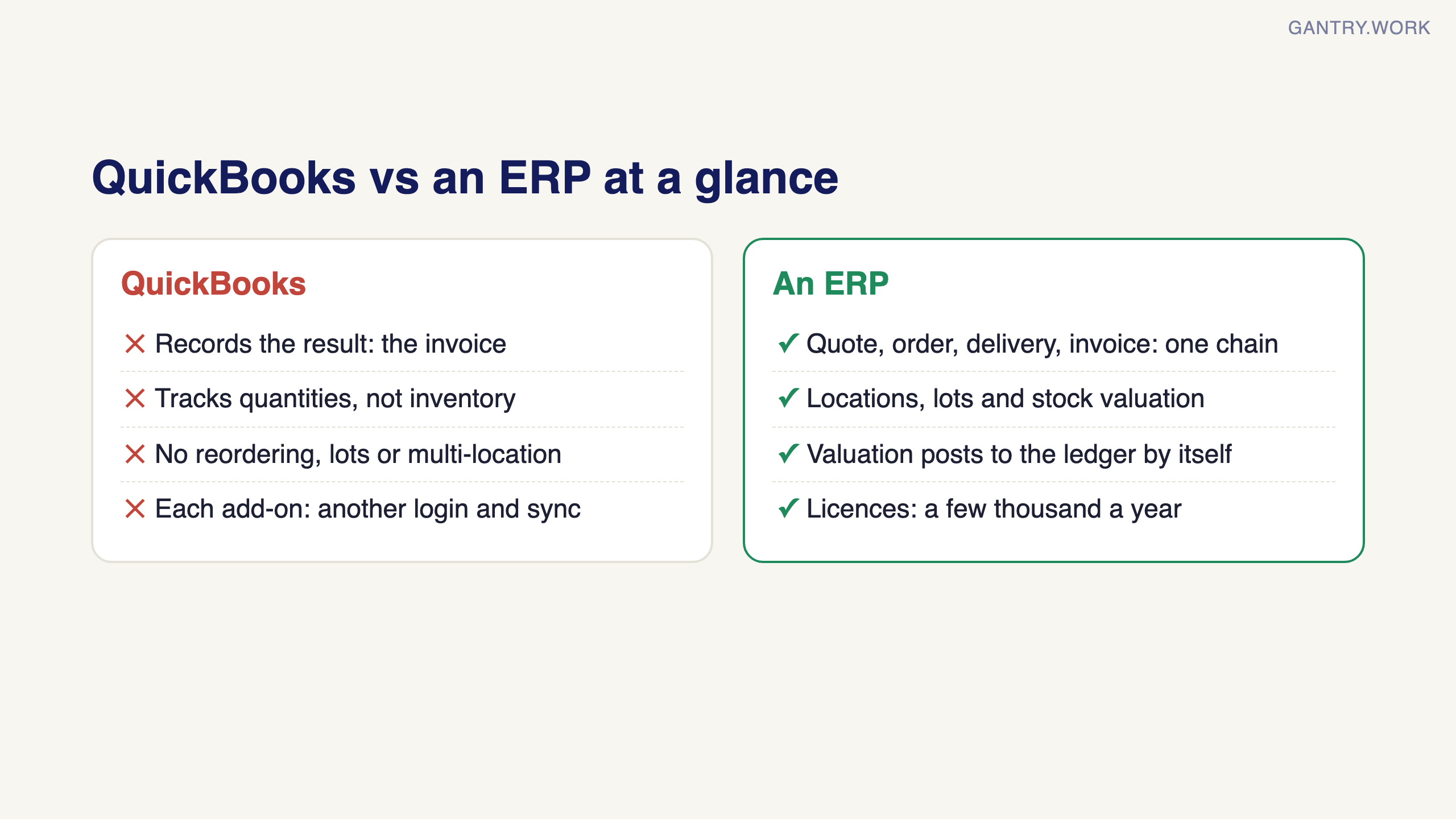
The short version of everything above, for anyone who arrived here from a search:
What it records. QuickBooks: money in, money out, GST, financial statements. An ERP: the operations that create those transactions, plus the books.
Where stock lives. QuickBooks: a basic quantity field or a separate app. An ERP: locations, lots and a valuation that posts to the ledger by itself.
Quote to cash. QuickBooks: the invoice at the end. An ERP: quote, order, delivery and invoice as one chain with nothing retyped.
Who it is for. QuickBooks: firms whose operations fit in one person’s head. An ERP: firms where two or more people touch the same order.
What it costs. QuickBooks Online in Singapore: S$31 to S$124 a month at list price (checked 7 October 2026). A small-business ERP: a few thousand a year in licences and a five-figure implementation, most of it data and training.
Is QuickBooks Online an ERP?
No. QuickBooks Online is cloud accounting software. Its app marketplace lets you bolt on inventory, projects and CRM tools, and that bundle can behave like a light ERP for a while, but every app is a separate database with a sync someone has to babysit. The test is the same as above: if a person retypes between the apps, it is not an ERP.
Is QuickBooks Enterprise an ERP?
Closer, but still no. QuickBooks Enterprise adds advanced inventory, pricing rules and more users, which is why it is marketed to product businesses. It remains an accounting package with inventory features rather than one system that runs purchasing, warehouse, manufacturing and sales on the same record. Firms that outgrow Enterprise usually do so on the operations side, not the accounting side.
QuickBooks to ERP: what the move actually involves
Moving from QuickBooks to an ERP is mostly a data and process project, not a software one. Master data (customers, suppliers, products, chart of accounts) and open items (unpaid invoices, unpaid bills, stock on hand) move across; history stays in QuickBooks as read-only. Done at a quarter end with a short parallel run, it takes a 10 to 30 person firm eight to twelve weeks. The sequence is in how to switch ERP systems without stopping the business, the head-to-head is in Odoo vs QuickBooks: the real comparison, and if you want to know what an implementer really thinks of the system most of these firms move to, my honest review of Odoo covers what frustrates as well as what holds up.
QuickBooks vs ERP: what does each one cover?
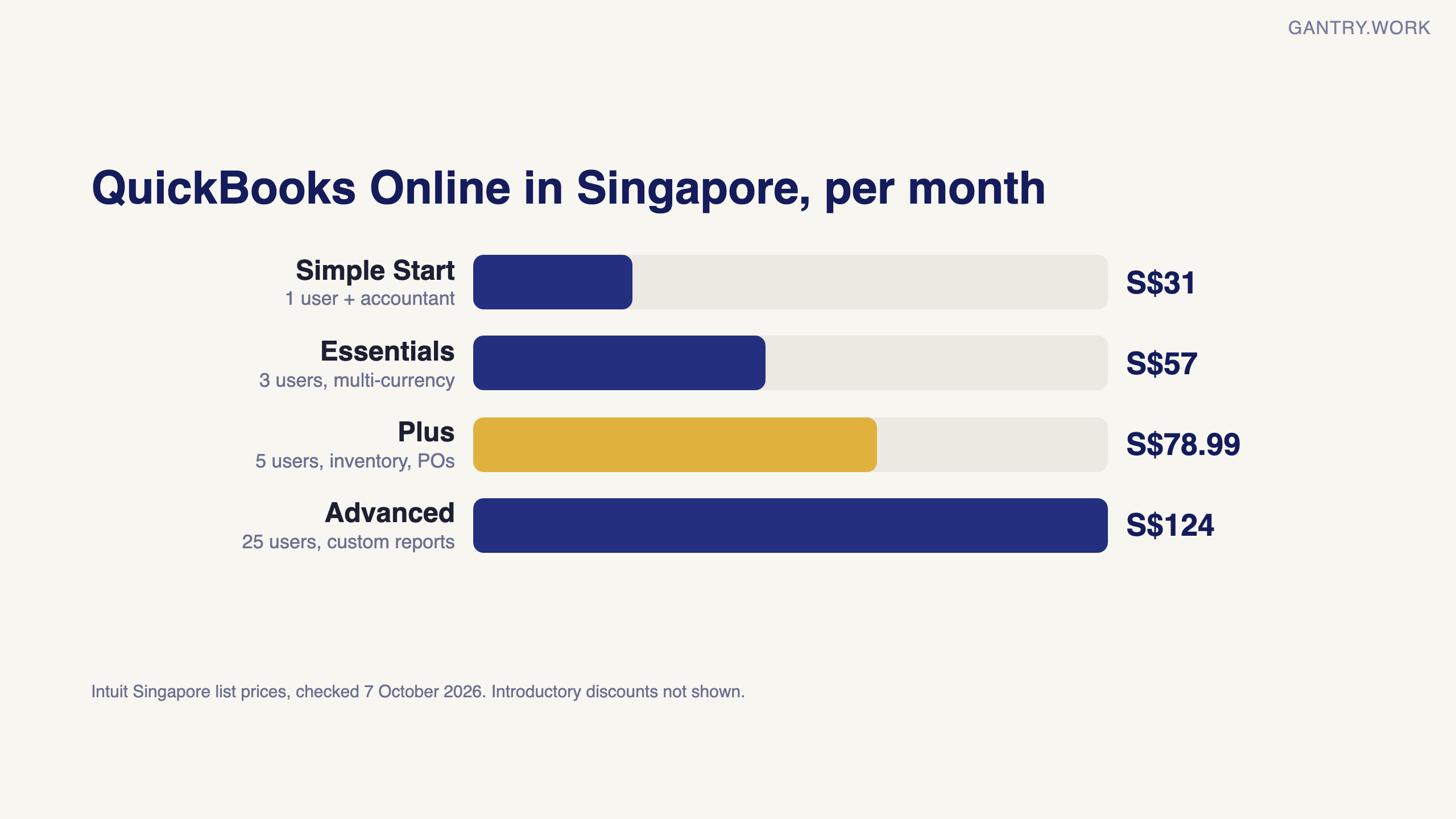
QuickBooks covers your accounting plus light operations; an ERP runs accounting and the operations that create the transactions in one database. Here is how QuickBooks Online's four Singapore plans compare with an ERP, from Intuit's Singapore pricing page, checked 7 October 2026:
QuickBooks Simple Start: S$31 a month, 1 user plus accountant access. Bank feeds, bookkeeping, invoicing and customer records.
QuickBooks Essentials: S$57 a month, 3 users. Adds multiple currencies, bill management and recurring invoices.
QuickBooks Plus: S$78.99 a month, 5 users. Adds inventory tracking, purchase orders, sales orders and project profitability.
QuickBooks Advanced: S$124 a month, 25 users. Adds a custom report builder, workflow automation and revenue recognition.
An ERP: sales, purchasing, warehouse, manufacturing, projects and accounting on one record, with a goods receipt between the purchase order and the bill and stock valuation posting to the ledger by itself.
Those are list prices on 7 October 2026; Intuit was offering 90% off for the first 6 months to new customers, so check the page for the current offer.
When should you replace QuickBooks with an ERP?
Replace QuickBooks with an ERP when your operations, not your accounting, have outgrown it, and staff retype orders, stock and supplier bills between tools. The signs that matter most:
Stock lives in a spreadsheet that disagrees with QuickBooks and with the shelf.
Two or more people touch each order between quote and invoice.
You need batch, expiry or bin tracking that your current setup cannot do.
Three or more apps sync into QuickBooks, and someone checks the syncs by hand.
You are already on Advanced and still retyping.
What moving from QuickBooks to an ERP involves
Moving from QuickBooks to an ERP is a data and process project. The usual sequence:
Pick a cutover date, ideally a quarter or year end.
Clean and export master data: customers, suppliers, items and the chart of accounts.
Map accounts and GST tax codes to the new system.
Load opening balances: the trial balance, open invoices and bills, and stock quantities with their values.
Test real transactions on your own data before go-live.
Run a short parallel period, then keep QuickBooks read-only for history.
What moves across and what stays behind is covered line by line in QuickBooks to Odoo migration: what transfers.
Sources, checked 7 October 2026: QuickBooks Singapore, Pricing (plan names, users included, features per plan, live pricing).
Frequently asked questions
Is QuickBooks an ERP system? No. It is accounting software, with inventory, purchase orders and project features on its higher plans. An ERP runs purchasing, warehouse, production and sales on the same record as the books.
Can QuickBooks Advanced replace an ERP? For a services firm, sometimes. It adds workflow automation and custom reporting, but it is still accounting software, so check it against your receiving, warehouse and production steps first.
What ERP do companies move to from QuickBooks? Small and mid-sized firms usually look at SME-priced systems such as Odoo or ERPNext, larger ones at NetSuite or Microsoft Dynamics 365. I implement Odoo, so weigh my view with that in mind.
How long does it take to move from QuickBooks to an ERP? Typically eight to twelve weeks for a 10 to 30 person firm, with most of the time spent on data cleaning, testing and training.
The bottom line
QuickBooks isn’t an ERP, and that’s fine — until the day your operations outgrow your accounting software’s view of the world. If you counted five or more signs above, start budgeting for the move now, on your own timeline, rather than in a panic when the spreadsheet empire finally falls over.
I’m Sayed — I work closely with business owners to automate their operations and build workflows that actually make sense. I write The Gantry about ERP and automation for SMEs. Last week: what Odoo actually costs. Coming up: Odoo vs QuickBooks in detail, and how to switch ERP without stopping the business. Subscribe to follow the series.What QuickBooks actually is
If you recognise the moment described above, the next question is not which system to buy. It is whether you are ready to move at all.

The free ERP readiness scorecard at work: a few honest answers and a score with what to fix first. Click the animation to try it.
The jargon in this post, from three-way matching to landed cost and perpetual inventory, is explained in plain English in the ERP glossary.
Working on something similar? Connect with me on LinkedIn and tell me what you are working on. I read and reply to every message, and the questions people send become the next guides.
How I test everything and how this site makes money: How The Gantry works.