

Comparing Odoo and QuickBooks feature-by-feature misses the point, because they’re not in the same category. QuickBooks is accounting software. Odoo is a business system that includes accounting. The real comparison is between two ways of running a company — a bookkeeping tool surrounded by spreadsheets and add-ons, versus one connected system. Which is right depends on where your business is, so let’s be precise about it.
The whole comparison in 50 seconds
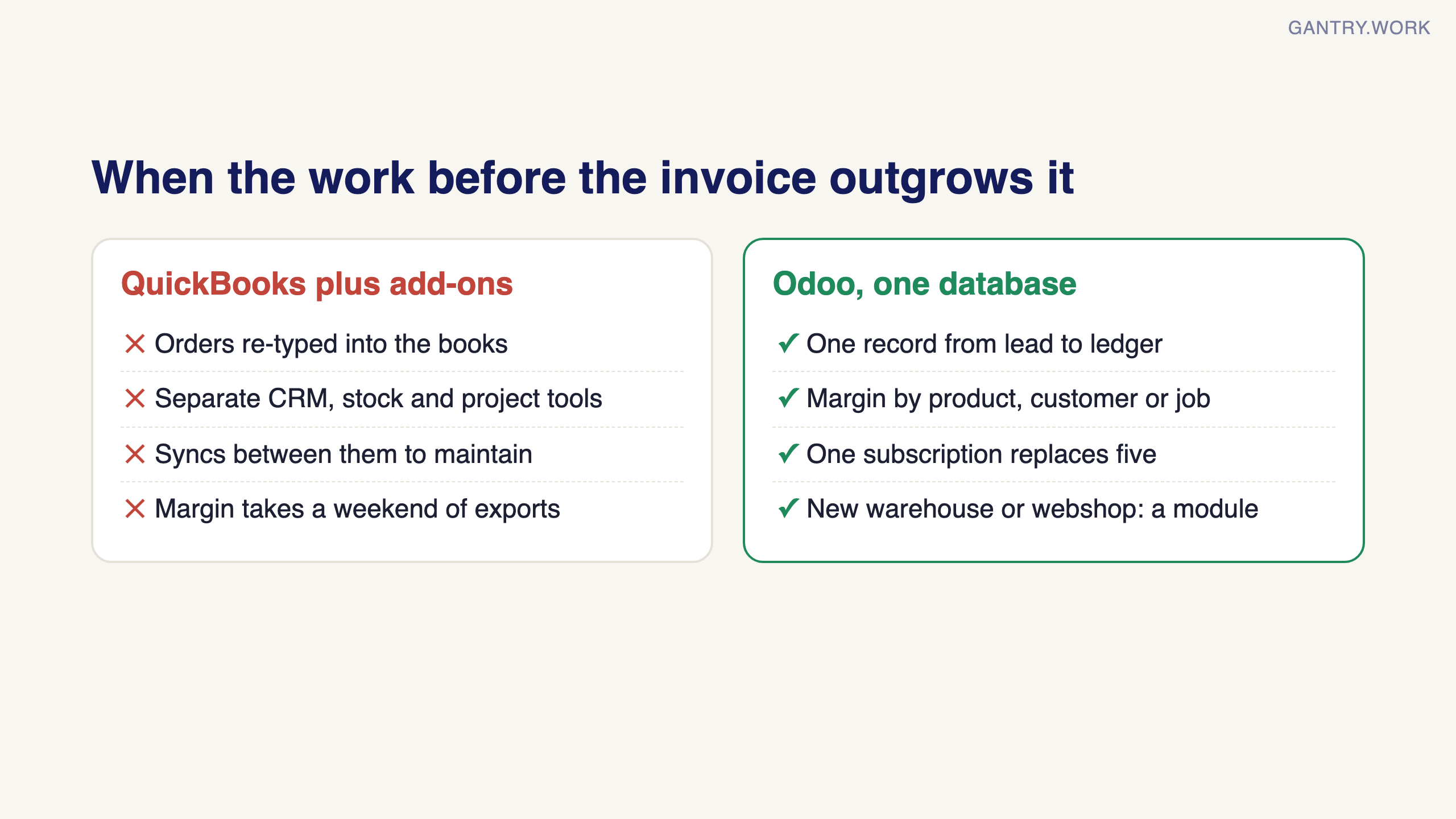
The short version: keep QuickBooks while your business is simple, move when the work before the invoice has outgrown the spreadsheets. The subscriptions cost about the same; the migration is where the effort goes.
Where QuickBooks wins
Simplicity. If your business is services, low transaction volume, no inventory — QuickBooks plus a good bookkeeper is genuinely hard to beat. Setup is days, not weeks.
Your accountant already knows it. The ecosystem of bookkeepers and accountants fluent in QuickBooks is enormous. That familiarity has real value.
Cost at the very small end. For 1–3 users doing pure accounting, QuickBooks is cheaper than any ERP project will ever be.
If that’s you, keep QuickBooks. Genuinely. The rest of this post is for the companies that have outgrown that description.
Wondering if your business has outgrown QuickBooks? In a free 20-minute systems review, you walk me through how sales, stock and accounts run today, and I tell you honestly whether you need an ERP yet, and which one. No pitch. Book a free 20-minute review
Where Odoo wins
Everything before the invoice. CRM, quotes, sales orders, purchasing, inventory, manufacturing, projects — the operational layer QuickBooks never sees. One record flows from lead to ledger without re-typing.
Margin visibility. Because operations and accounting share one database, “what’s our margin on this product / job / customer?” is a report, not a weekend of exports.
One subscription replaces five. The typical QuickBooks graduate is also paying for a CRM, an inventory tool, a project tracker, and a scheduling app — plus the syncs between them. Odoo’s per-user licence usually costs less than that stack combined.
It grows with you. Adding warehouse number two, a webshop, or a service team is switching on a module, not shopping for another SaaS.
Is Odoo’s accounting as good as QuickBooks?
The honest answer: for SME purposes, yes — invoicing, bank feeds, GST, multi-currency, financial reporting are all there and solid. Two caveats. First, your external accountant may need a short adjustment period if they’ve only ever seen QuickBooks. Second, Odoo’s accounting shines brightest because it’s fed automatically by the operational modules — if you only ever use the accounting app alone, you’re carrying an ERP to do a bookkeeping job, and QuickBooks does that job with less ceremony.
How do I migrate my data from QuickBooks to Odoo?
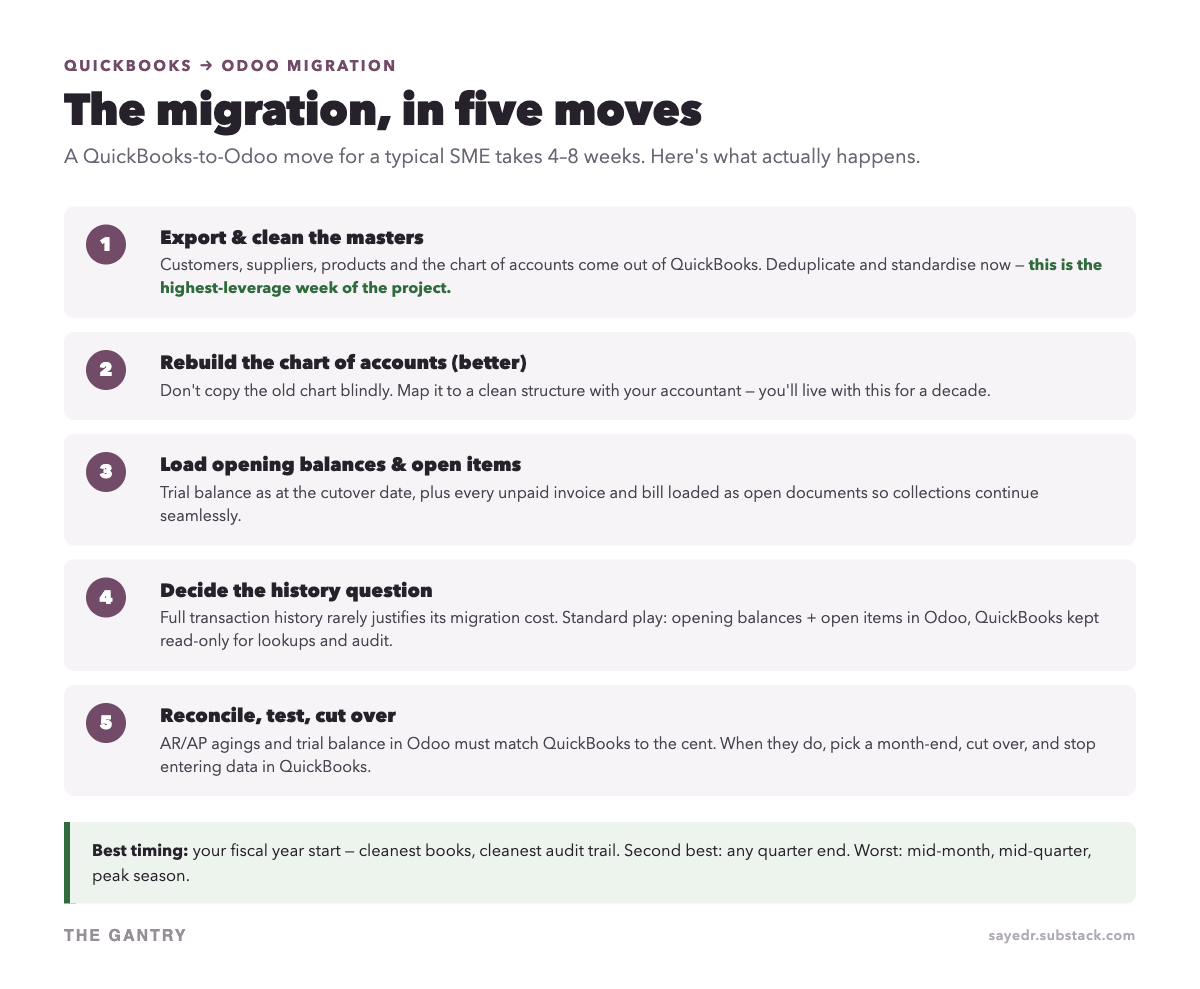
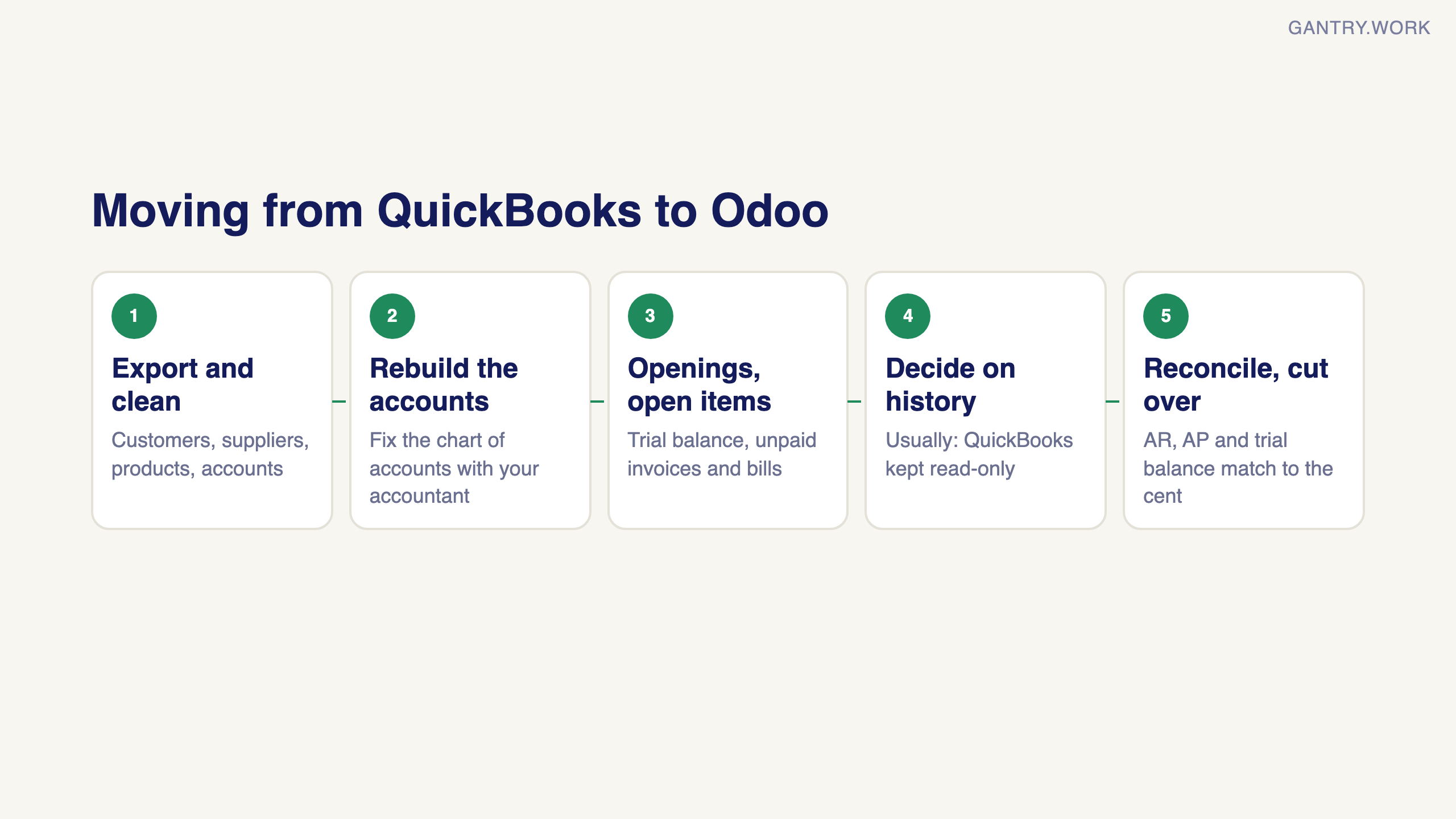
The five moves in the graphic above, in prose:
Export and clean the master data. Customers, suppliers, products, chart of accounts. Deduplicate before import — this is the highest-leverage work in the whole project and it’s work only you can do.
Rebuild the chart of accounts properly. The migration is your once-a-decade chance to fix account structure. Do it with your accountant.
Load opening balances and open items. Trial balance at the cutover date, plus every unpaid invoice and unpaid bill as live documents — so collections and payments continue without a hiccup.
Decide the history question deliberately. Migrating full transaction history is possible but rarely worth the cost. The standard play: openings + open items in Odoo, and QuickBooks kept read-only for reference and audit.
Reconcile, test, cut over. AR aging, AP aging and trial balance in Odoo must match QuickBooks to the cent. When they do — and only then — pick a month-end and switch.
Elapsed time for a typical SME: four to eight weeks, most of it cleaning and reconciliation rather than technology. Best cutover date is your fiscal year start; any quarter-end is a good second choice.
The decision in one paragraph
Stay on QuickBooks while your business is simple enough that accounting software plus a spreadsheet or two covers it comfortably. Move to Odoo when the operational layer — quotes, stock, purchasing, jobs — has outgrown the spreadsheets and the re-typing has become someone’s job. And if you’re in between: read the eight ceiling signs in my earlier QuickBooks post, count honestly, and let the count decide.
Odoo vs QuickBooks: which should you choose?
Choose QuickBooks Online for accounting only, with a few users and no stock or production; choose Odoo when sales, stock, purchasing or projects must reach the books without re-typing. Disclosure: I implement Odoo, so weigh my view accordingly.
Pick QuickBooks Online if:
You sell services or a small range of products and do not track stock in detail.
One to five people touch the books, and your accountant already works in QuickBooks.
Your other tools work and the syncs between them hold.
Pick Odoo if:
Someone re-types orders, deliveries or purchase bills from one system into another every week.
You need stock by location, purchasing, manufacturing or job costing tied to the ledger.
You want margin by product, customer or project as a report, not a spreadsheet.
You expect to add a warehouse, a webshop or a second company.
If no Odoo line describes you today, stay on QuickBooks and look again in a year. The signs you have outgrown it are in is QuickBooks an ERP?
How much do Odoo and QuickBooks cost in 2026?
QuickBooks Online in Singapore lists from S$31 a month for one user; Odoo Standard is US$16.90 per user per month billed yearly, with every app included.
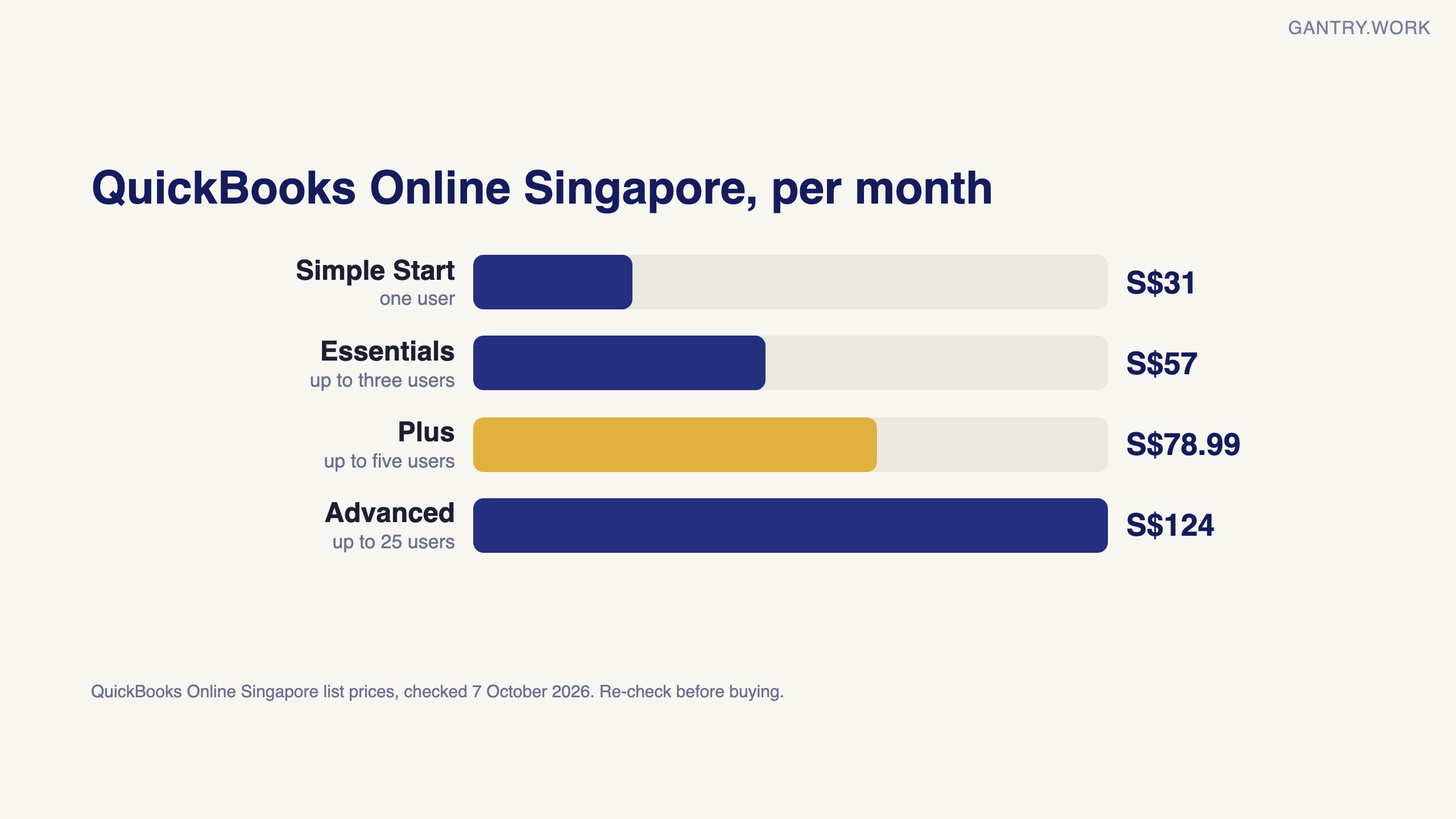
QuickBooks Online, Singapore list prices per month (checked 7 October 2026; the page loads prices live, so re-check before buying):
Simple Start: S$31, one user.
Essentials: S$57, up to three users.
Plus: S$78.99, up to five users.
Advanced: S$124, up to 25 users.
New-customer discounts revert to the then-current price when they end.
Odoo Online, per user per month (checked 9 October 2026):
One App Free: US$0 for a single app with unlimited users.
Standard: US$16.90 billed yearly or US$21.10 billed monthly, with a 12-month discount to US$13.50 for the users in the first order. All apps.
Custom: US$32.00 billed yearly or US$40.00 monthly (US$25.50 for the first 12 months). Adds Odoo Studio, multi-company, the external API and the option of Odoo.sh or on-premise hosting; Odoo.sh hosting is charged separately.
An illustrative five-user comparison. QuickBooks Plus: S$78.99 × 12 = S$947.88 a year. Odoo Standard: 5 × US$16.90 × 12 = US$1,014 a year, or 5 × US$13.50 × 12 = US$810 in year one. The subscriptions are close; the real difference is implementation. QuickBooks is usually set up in days; Odoo needs configuration and data migration, covered in what Odoo actually costs.
Sources, checked 9 October 2026 unless stated: Odoo pricing (all Odoo plan prices, the 12-month discount terms, Odoo.sh hosting extra); QuickBooks Online Singapore pricing, checked 7 October 2026 (plan prices; user limits and discount terms rechecked 9 October 2026).
Frequently asked questions
Is Odoo cheaper than QuickBooks? For one to three users doing accounting only, usually not once implementation is counted. For a team also paying for separate CRM, inventory and project tools, Odoo's all-apps licence often costs less in total.
Can Odoo replace QuickBooks for accounting? Yes: invoicing, bank feeds, GST, multi-currency and financial reports are included. It pays off most when sales, stock and purchasing feed the accounts automatically.
Is QuickBooks Online priced per user? No. Each plan has a fixed monthly price with a user limit, from one user on Simple Start to 25 on Advanced. Odoo charges per user.
How long does it take to move from QuickBooks to Odoo? Typically four to eight weeks for a small company, mostly cleaning master data and reconciling opening balances to the cent.
I’m Sayed — I work closely with business owners to automate their operations and build workflows that actually make sense. I write The Gantry about ERP and automation for SMEs. Also in this series: how to switch ERP without stopping the business, what Odoo actually costs, and Community vs Enterprise. Subscribe for the rest.
Working on something similar? Connect with me on LinkedIn and tell me what you are working on. I read and reply to every message, and the questions people send become the next guides.
How I test everything and how this site makes money: How The Gantry works.
Before comparing systems, check whether your business is ready for one. The free ERP Readiness Scorecard takes about three minutes and tells you what to fix first.

The free ERP readiness scorecard at work: a few honest answers and a score with what to fix first. Click the animation to try it.