

Nobody switches ERP for fun. You switch because the current system — or the spreadsheet empire standing in for one — is costing you real money in re-typed data, invisible margins, and month-ends that take a week. And the fear that keeps companies stuck for years is always the same: “we can’t stop the business to change the engine.”
Here’s the reassuring truth from someone who runs these projects: you never stop the business. A well-run ERP switch happens alongside normal operations, and the only “switch” moment is one planned cutover weekend. This is the playbook, phase by phase.
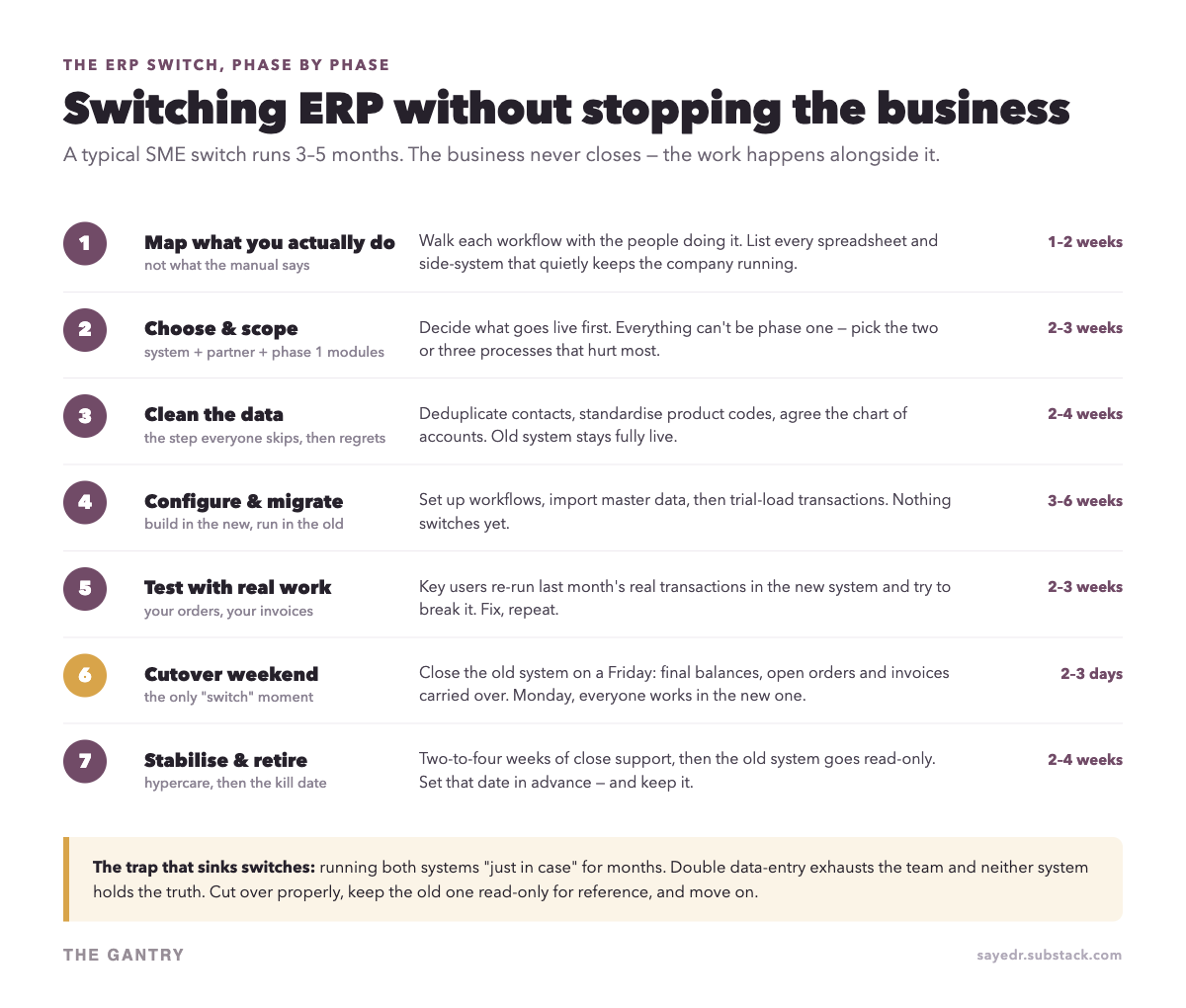
The whole plan in 55 seconds
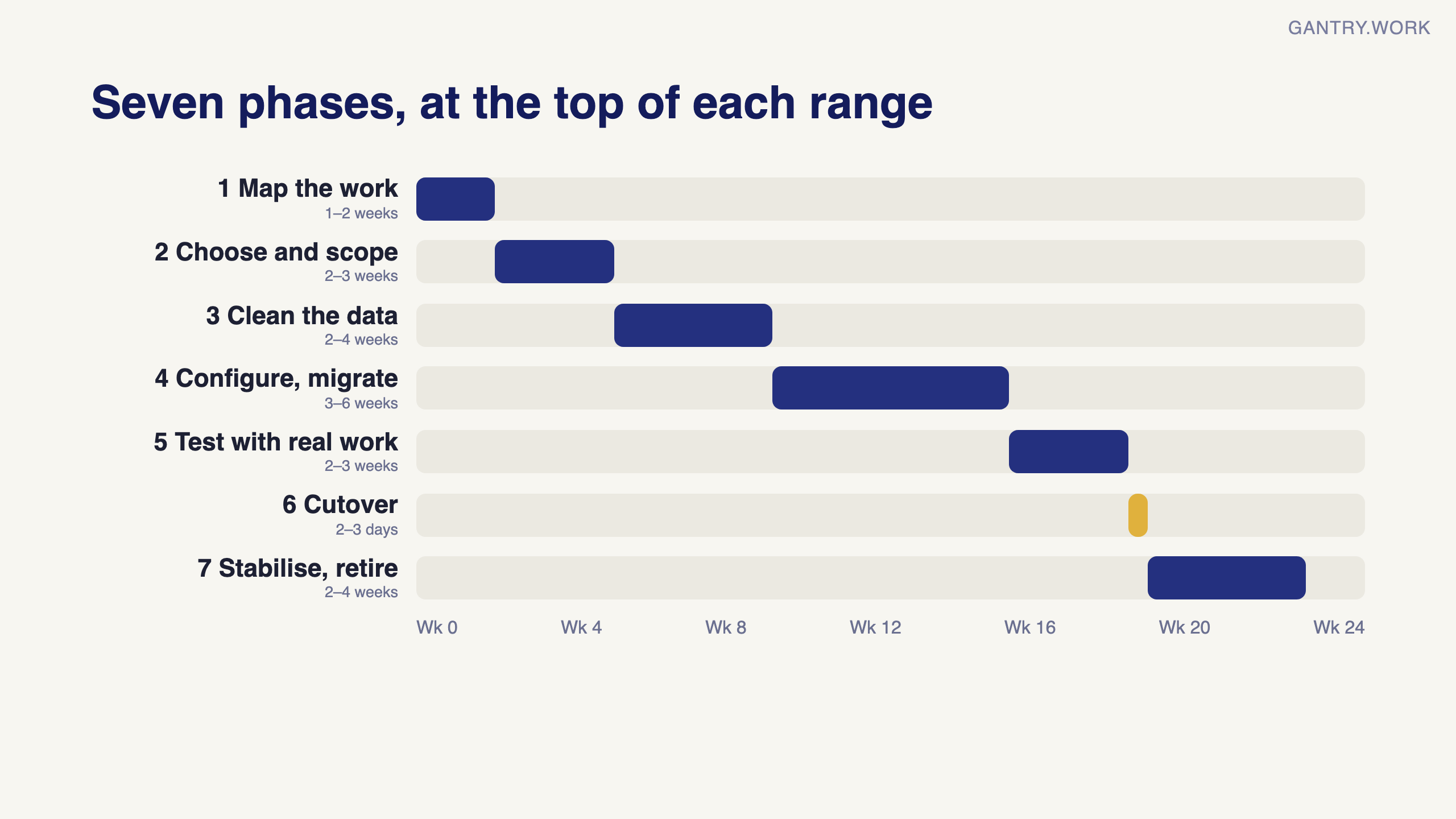
The short version: seven phases run alongside normal operations, the only real switch is one cutover weekend, and the old system gets a kill date. Each phase is below.
Phase 1: Map what you actually do (1–2 weeks)
Before touching any software, walk each workflow with the person who does it — not their manager. Where does an order come from? Who touches it? Which spreadsheet does it visit? You’re building two lists: the processes the new system must handle, and the shadow-tools (spreadsheets, WhatsApp threads, paper) that quietly run the company today. Every shadow-tool you miss now becomes a nasty surprise at cutover.
Deciding on a system for your own business? In a free 20-minute systems review, you walk me through how sales, stock and accounts run today, and I tell you honestly which system fits, or whether you need one yet. No pitch. Book a free 20-minute review
Phase 2: Choose and scope (2–3 weeks)
Pick the system, the implementation partner, and — most importantly — what goes live in phase one. The instinct is “everything at once”; resist it. Choose the two or three processes that hurt most (usually sales-to-invoice and inventory, or accounting itself) and defer the rest to phase two. Smaller first bites cut cost, risk, and training shock simultaneously.
Phase 3: Clean the data (2–4 weeks)
This is the phase everyone skips and then regrets. Deduplicate your contacts. Standardise product codes. Decide what your chart of accounts should look like — the switch is your once-a-decade chance to fix it. Archive what you don’t need: migrating ten years of dead leads costs money and helps nobody. Your old system stays fully live throughout; this is internal homework, and internal hours are far cheaper than consultant hours.
From our projects: phase three, done properly
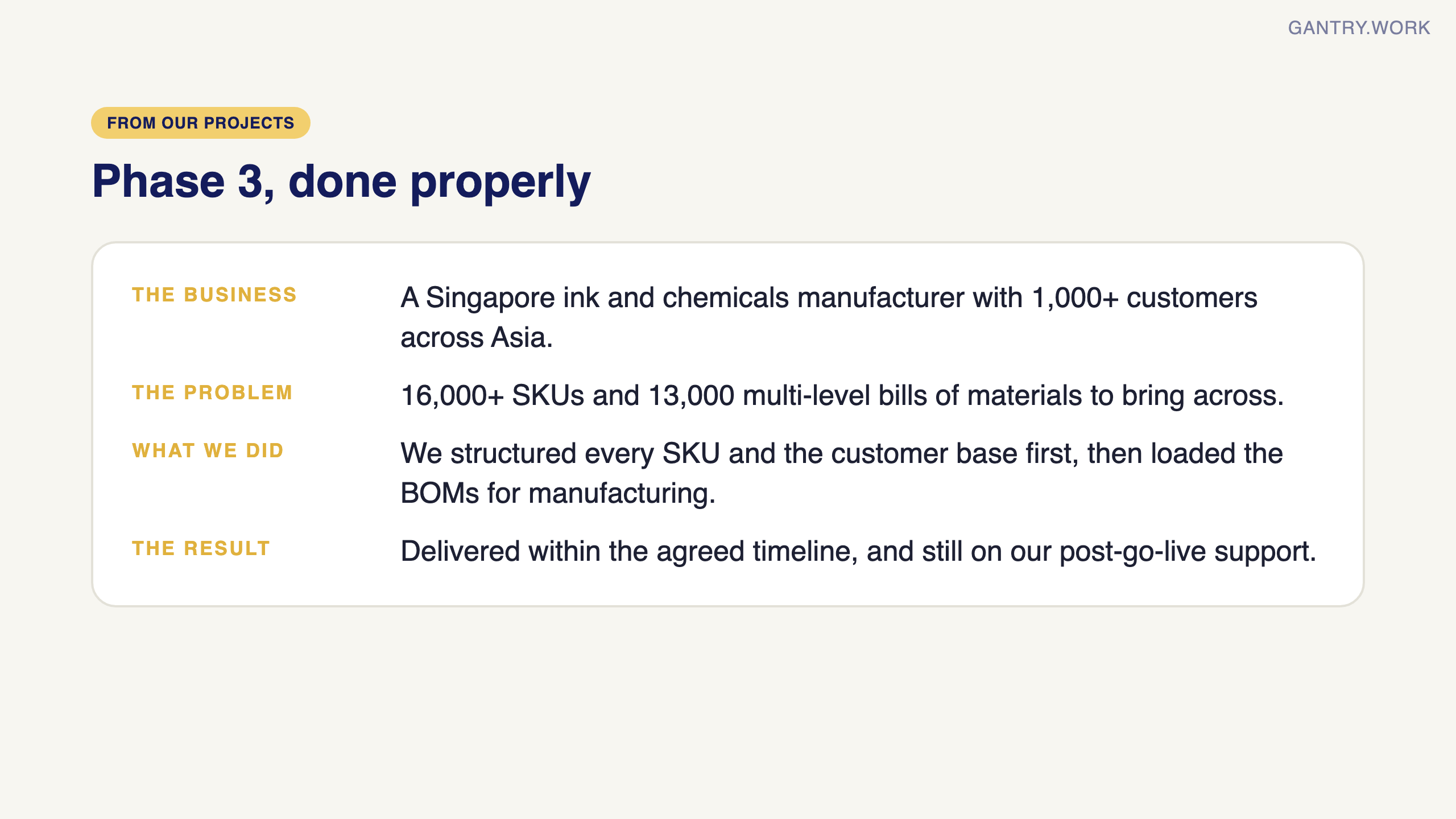
Phase three is where the timeline is won or lost. For a Singapore ink and chemicals manufacturer with more than 1,000 customers across Asia, the data ran to 16,000+ SKUs and 13,000 multi-level bills of materials. We structured every SKU and the customer base for inventory, sales and reporting before loading the BOMs for manufacturing. The project was delivered within the agreed timeline, and the client is still on our post-go-live support.
Phase 4: Configure and migrate (3–6 weeks)
Your partner configures workflows in the new system and imports master data — customers, suppliers, products, opening structures. Trial transaction loads follow. The key discipline: nothing switches yet. The team keeps working in the old system exactly as before while the new one takes shape next door.
Phase 5: Test with real work (2–3 weeks)
Generic demos prove nothing. Take last month’s actual orders, deliveries and invoices, and have your key users re-run them in the new system, trying to break it. Every failure found here is a five-minute fix; the same failure found after cutover is a fire. This is also where training happens naturally — people learn the system by doing their own job in it.
Phase 6: The cutover weekend (2–3 days)
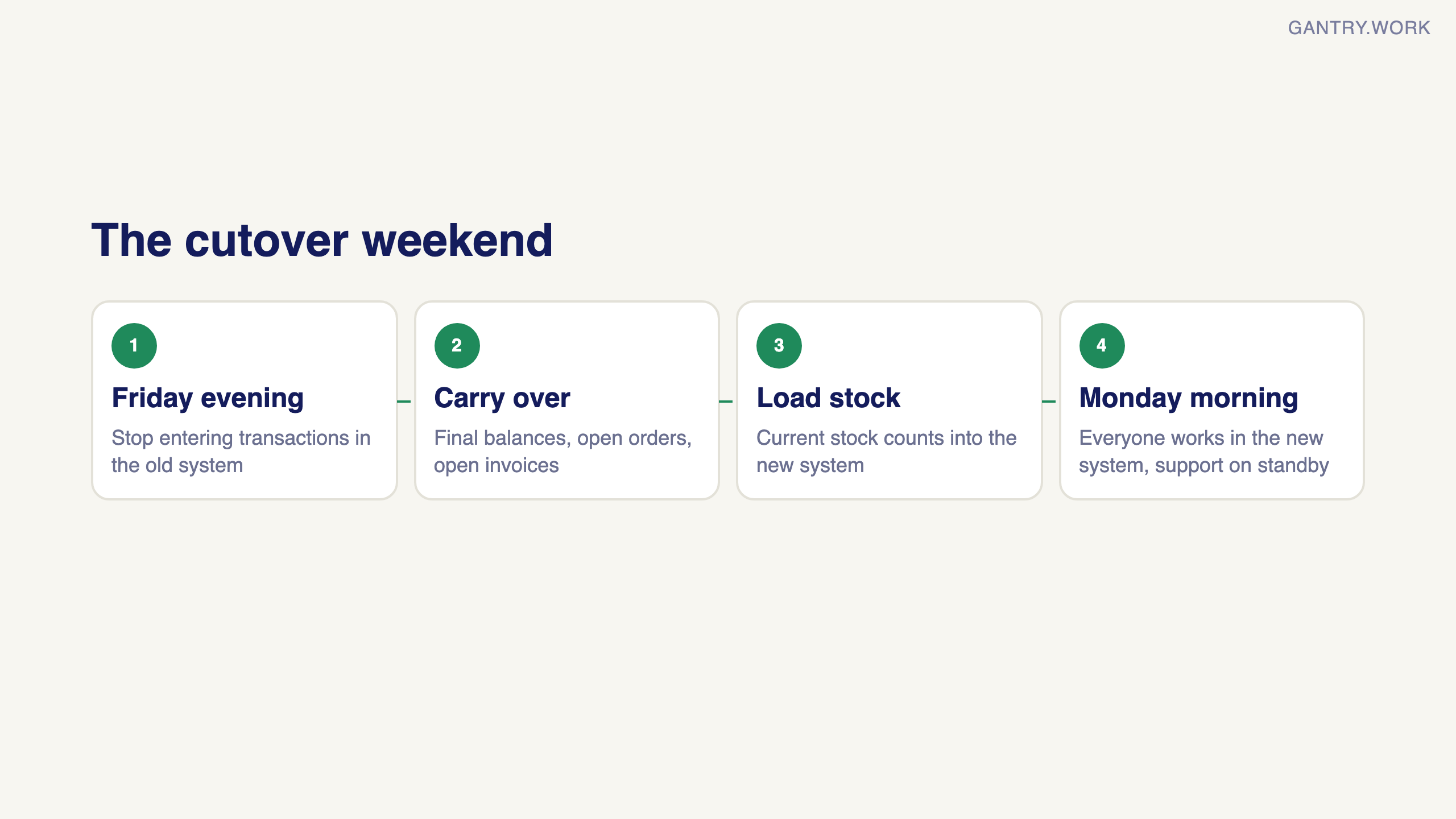
The only genuine “switch” moment, and it’s a weekend, not a month. Friday evening: stop entering new transactions in the old system, carry over final balances, open orders, open invoices and current stock counts. Monday morning: everyone works in the new system, with support on standby. Done properly it’s an anticlimax — which is exactly the goal.
Phase 7: Stabilise, then retire the old system (2–4 weeks)
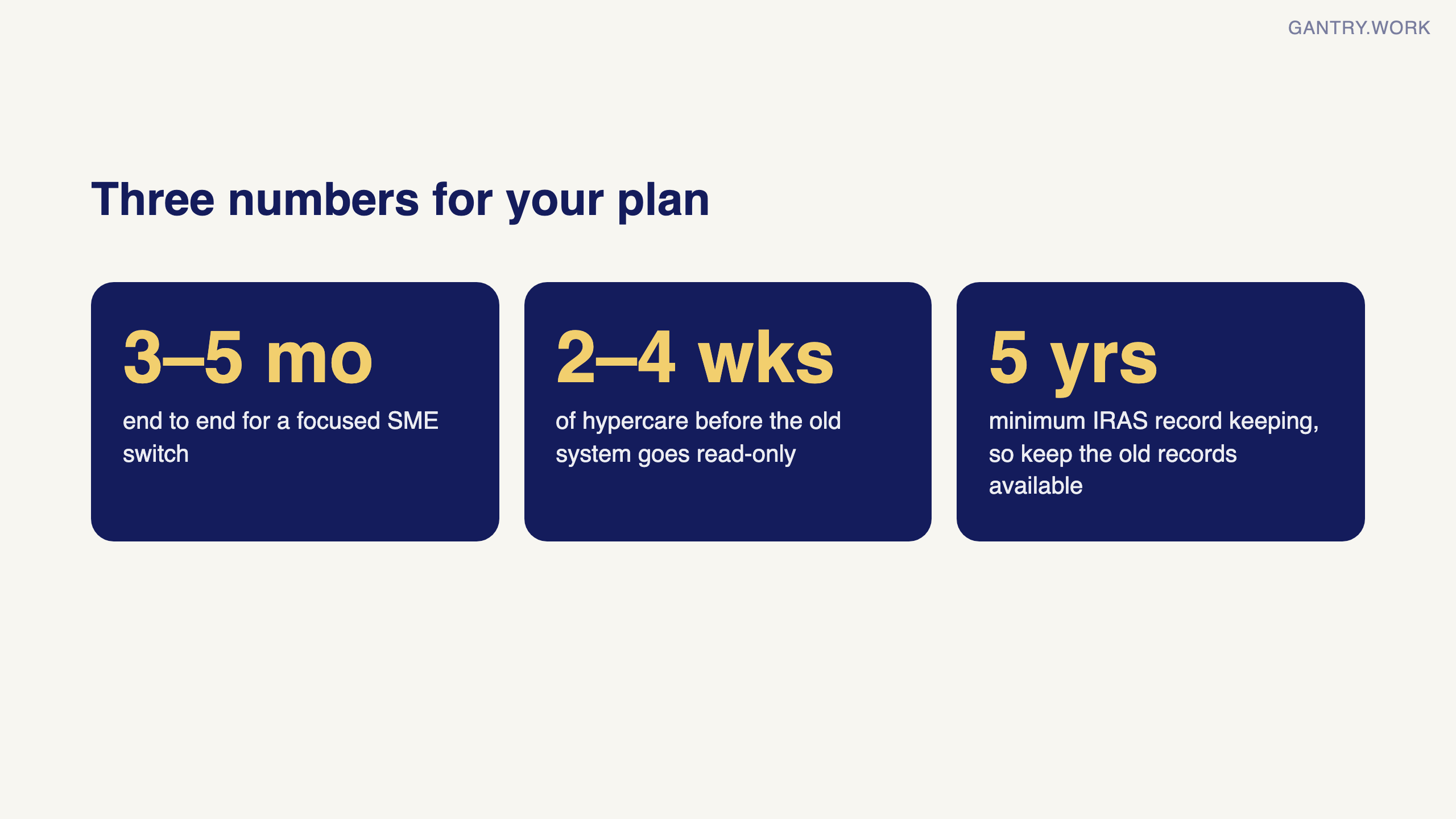
Expect two to four weeks of “hypercare”: quick answers, small fixes, a growing list of nice-to-haves for later. Then the step that takes actual discipline: the old system goes read-only on a pre-agreed kill date. Keep it accessible for reference and audit, but nobody enters data there again.
Why switches really fail (it’s not the software)
Parallel-running forever. Keeping both systems “just in case” doubles everyone’s work and guarantees neither holds the truth. Set the kill date in phase two and honour it.
No internal owner. If every decision waits for a committee, the project stalls — and stalled projects bleed budget and morale.
Recreating the old system. If you customise the new ERP until it behaves exactly like the old one, you’ve paid a five-figure sum for your existing problems with a fresh coat of paint. Adapt processes to the tool where you reasonably can.
Skipping phase 5. Testing with real transactions is the cheapest insurance in the whole project. Cutting it to save two weeks is how go-lives make the news.
Real-world case: Haribo's gummy bear shortage
In October 2018 the German confectioner Haribo began moving 16 factories in 10 countries onto SAP S/4HANA. After the switch it struggled to track raw materials and stock, supermarket deliveries were delayed, and sales of its Gold Bears fell by about 25% in 2018, partly because of the disruption (TechRepublic).
Haribo's scale is nothing like a 30-person distributor's, but the risk is the same one this guide is built around: switching everything at once, heading into your busiest period, before the new system has proven it can track the basics.
The lesson for a small company: if you have more than one site, warehouse or company, switch one first and let it run a full month-end before moving the next. Choose the quietest quarter of your year for the first go-live, and make "we can see stock correctly in the new system" the gate for the second.
Already mid-project and worried? Run through the 12 warning signs that an ERP project is failing and what to do this week for each.
When should you start?
Count backwards from when you want to be live. A focused SME switch is three to five months end to end — so a January 1st go-live (clean fiscal-year start, a genuinely good idea) means starting the mapping work in August or September. If you’re reading this in the creaking-spreadsheets stage: the best time to start was last quarter; the second-best time is this one.
The evaluation step deserves its own guide. Before you shortlist, read how to run an Odoo demo that actually tells you something, which covers the brief to send a partner and the red flags to walk away from.
Why do companies make an ERP switch?
An ERP switch moves your sales, stock, purchasing and accounts from one system, or from spreadsheets, onto a new ERP, usually because the old setup has stopped scaling. It is rarely one big failure; it is small costs piling up.
The reasons that come up most often in small and mid-sized companies:
Re-keying between tools. Orders live in one place, stock in a spreadsheet and invoices in the accounting package, so the same data is typed two or three times.
No live view of stock or margin. The owner finds out what a job or a product really made weeks after month-end, if at all.
Growth the system cannot carry. A second company, a second warehouse, foreign currency or an online channel that the old software handles badly or not at all.
The vendor or version is ending. A desktop edition loses support, or years of customisation make every upgrade a project of its own.
Compliance changes. IRAS is extending the GST InvoiceNow Requirement to all GST-registered businesses by April 2031, so any system you keep or choose needs to handle it.
Cost that grows with headcount. Per-user licences, add-ons and integrations that cost more each year than one connected system would.
What should be on an ERP switch checklist?
Work through these steps in order; each assumes the one before it is finished.
Name one internal owner who can make decisions without a committee.
Map every current process with the person who does it, including the spreadsheets and chat groups nobody mentions.
Pick the phase-one scope: the two or three processes that hurt most.
Set the go-live date in a quiet month, and the date the old system becomes read-only.
Clean master data: remove duplicate customers, vendors and products, matching on UEN rather than names. See master data vs transactional data.
Decide what migrates: masters, opening balances and open items, not years of closed history. See opening balances in an ERP migration.
Configure the new system, then trial-load the data at least twice.
Re-run last month's real orders, deliveries and invoices in the new system with your key users.
Train key users first and let them train their teams.
Plan the cutover weekend: freeze entries in the old system, load final balances, then reconcile stock, receivables and payables.
Run two to four weeks of close support, then switch the old system to read-only and keep its records available for at least 5 years, as IRAS requires.
Sources, checked 8 October 2026: IRAS, Record keeping requirements for companies (records kept at least 5 years); IRAS, Committee of Supply 2026: Extension of GST InvoiceNow Requirement to All GST-registered Businesses by April 2031 (InvoiceNow for all GST-registered businesses by April 2031).
Frequently asked questions
How long does an ERP switch take? For a focused small-business switch, three to five months end to end is typical, with the actual cutover done over one weekend. More companies or heavy customisation take longer; these are typical ranges, not a promise.
Can we run the old and new ERP in parallel? Only briefly, to compare results in testing. Running both for months doubles the work and splits the truth.
When is the best time to switch ERP? At the start of a financial year or in your quietest quarter.
Should we migrate all our historical data? Usually not. Load opening balances and open items, and keep the old system read-only for reference and audit.
I’m Sayed — I work closely with business owners to automate their operations and build workflows that actually make sense. I write The Gantry about ERP and automation for SMEs. This guide is the spine of a whole series: what Odoo costs, whether QuickBooks is an ERP, Odoo vs ERPNext, and Community vs Enterprise are already out. Subscribe — the next posts cover specific migrations in detail.
Every stage of a switch has its own term, explained with diagrams in the ERP glossary: fit-gap analysis, opening balances, user acceptance testing, the cutover plan and hypercare.
Working on something similar? Connect with me on LinkedIn and tell me what you are working on. I read and reply to every message, and the questions people send become the next guides.
How I test everything and how this site makes money: How The Gantry works.
Before comparing systems, check whether your business is ready for one. The free ERP Readiness Scorecard takes about three minutes and tells you what to fix first.

The free ERP readiness scorecard at work: a few honest answers and a score with what to fix first. Click the animation to try it.