

I have sat through a lot of ERP demos, first as the person watching and now as the person giving them. The pattern is remarkably consistent. Someone shares a screen, opens a beautiful sample company selling furniture in Belgium, clicks through Sales, Inventory and Accounting for fifty minutes, and closes with "any questions?" The prospect says it looks great. Three months later they are still on spreadsheets, because nothing in that hour told them whether the system handles their actual Tuesday.
An Odoo demo can tell you a great deal. But you have to run it, not attend it. This post is the preparation I now ask every prospective client to do before I show them anything, and the questions I would want asked of me.
The whole guide in 60 seconds
The short version: use the public demo to look around, a free trial to load your own records, and a partner demo, prepared with a written brief, to judge fit. The detail, the agenda and the questions are below.
The three kinds of Odoo demo, and what each is for
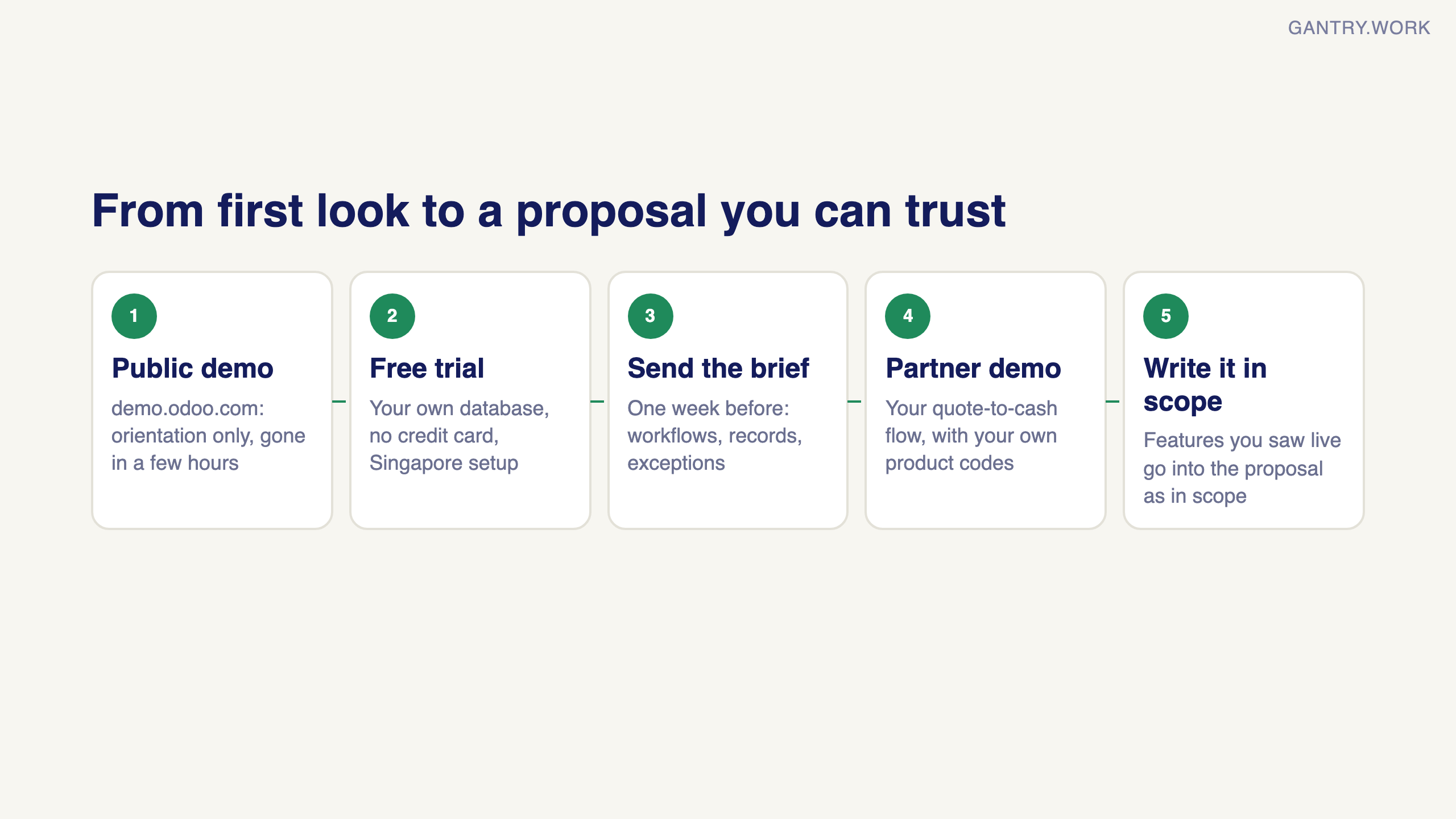
The self-serve demo. Odoo hosts a public sandbox with sample data, and the free trial gives you your own empty database for a couple of weeks. This is for orientation. Click around, see what a sales order looks like, get a feel for the navigation. Do not try to judge fit here. An empty system with no configuration tells you what is possible, not what is easy.
The vendor webinar. Odoo runs recorded and live product tours by app. Useful for learning vocabulary, useless for decisions. Everything in a webinar works, because it was built to.
The partner demo. This is the one that matters, and the one this post is about. A partner (the implementer you would actually hire) walks through the system with you. Done badly it is the furniture company in Belgium. Done well it is your own quote-to-cash flow, with your own product codes, on a screen, before you have paid anyone.
If you have been offered a partner demo without being asked a single question about your business first, you are about to watch the Belgian furniture company. Ask to reschedule and send them the brief below instead.
Deciding on a system for your own business? In a free 20-minute systems review, you walk me through how sales, stock and accounts run today, and I tell you honestly which system fits, or whether you need one yet. No pitch. Book a free 20-minute review
What to send the presenter one week before
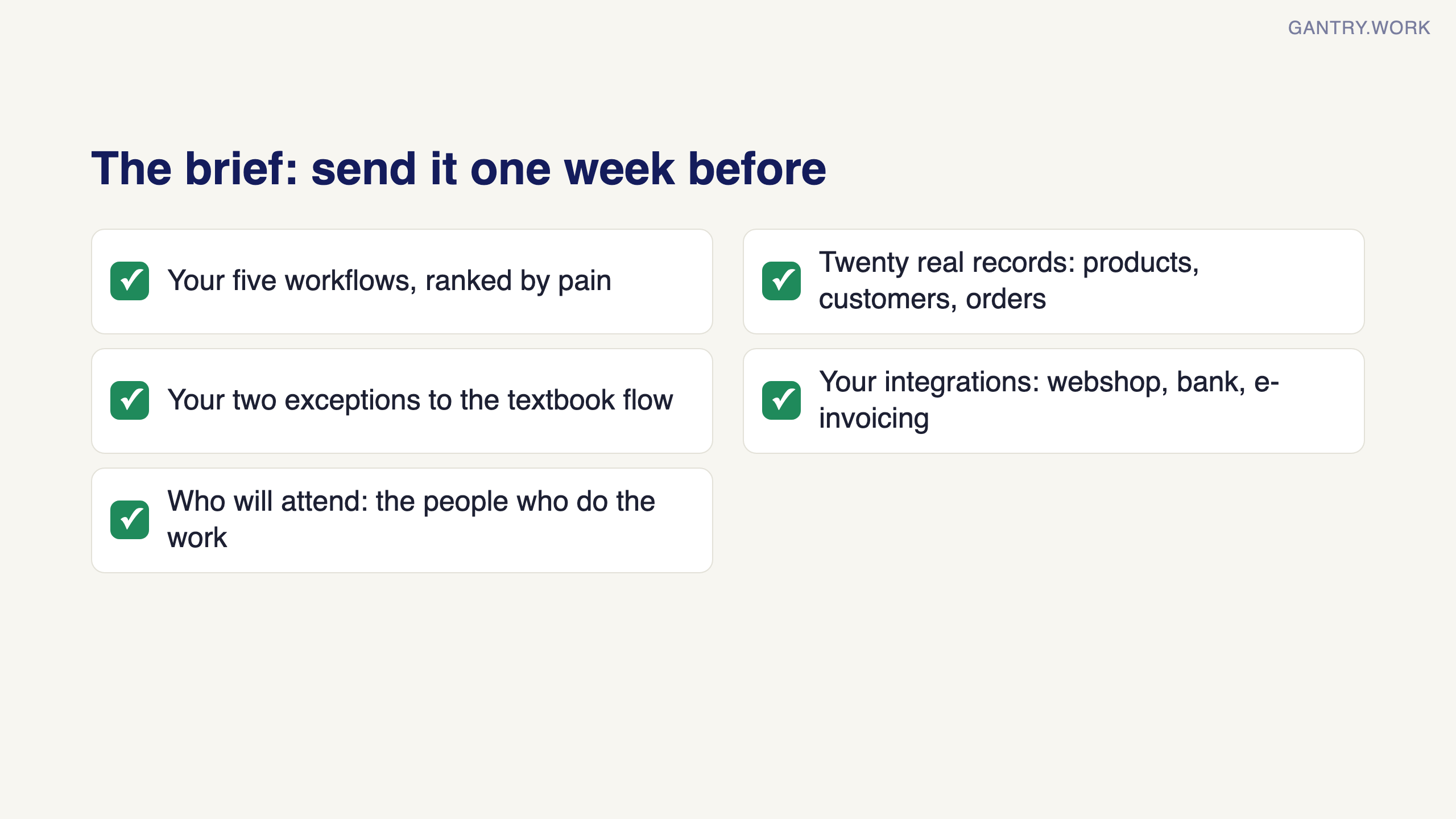
The best hour I ever spent on an ERP evaluation was the hour before the demo, writing down what I needed to see. Send the partner these five things:
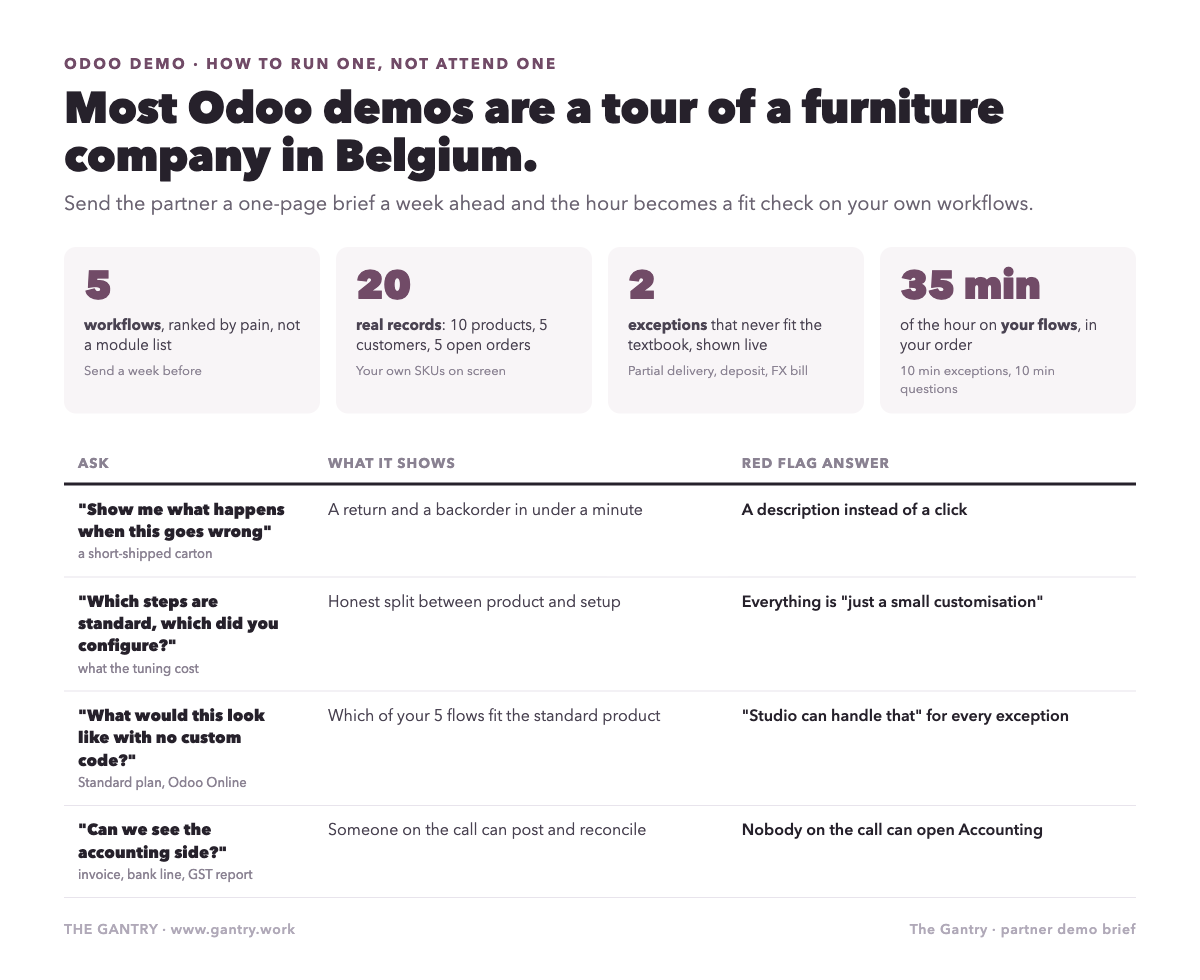
Your five workflows, in order of pain. Not a module list. Workflows. "A customer emails a PO, we check stock across two locations, we deliver partially and invoice the delivered part, then chase payment" is a workflow. "Sales and Inventory" is a module list. Rank them by how much they hurt today.
Twenty real records. Ten products with your actual codes, units and pack sizes. Five customers, including your most awkward one (the one with three delivery addresses and a special price list). Five open orders. A good partner will load these into the demo database. The moment you see your own SKU on screen, the evaluation becomes real.
Your two exceptions. Every business has a flow that does not fit the textbook. A partial delivery with a backorder. A customer who pays a deposit. A supplier who invoices in a foreign currency. Name two. How the presenter handles them tells you more than the happy path ever will.
Your integration list. The webshop, the bank, the e-invoicing network, the courier. Even if you do not need them on day one, you want to hear "yes, standard connector", "yes, but custom work", or "no" for each, in advance.
Who will attend. Bring the person who will actually use each workflow, not just the owner. Your warehouse lead will spot in five seconds what a director will miss in an hour.
That brief takes about ninety minutes to write. It is the cheapest piece of due diligence you will ever do, and it changes what the partner shows you.
How to structure the hour
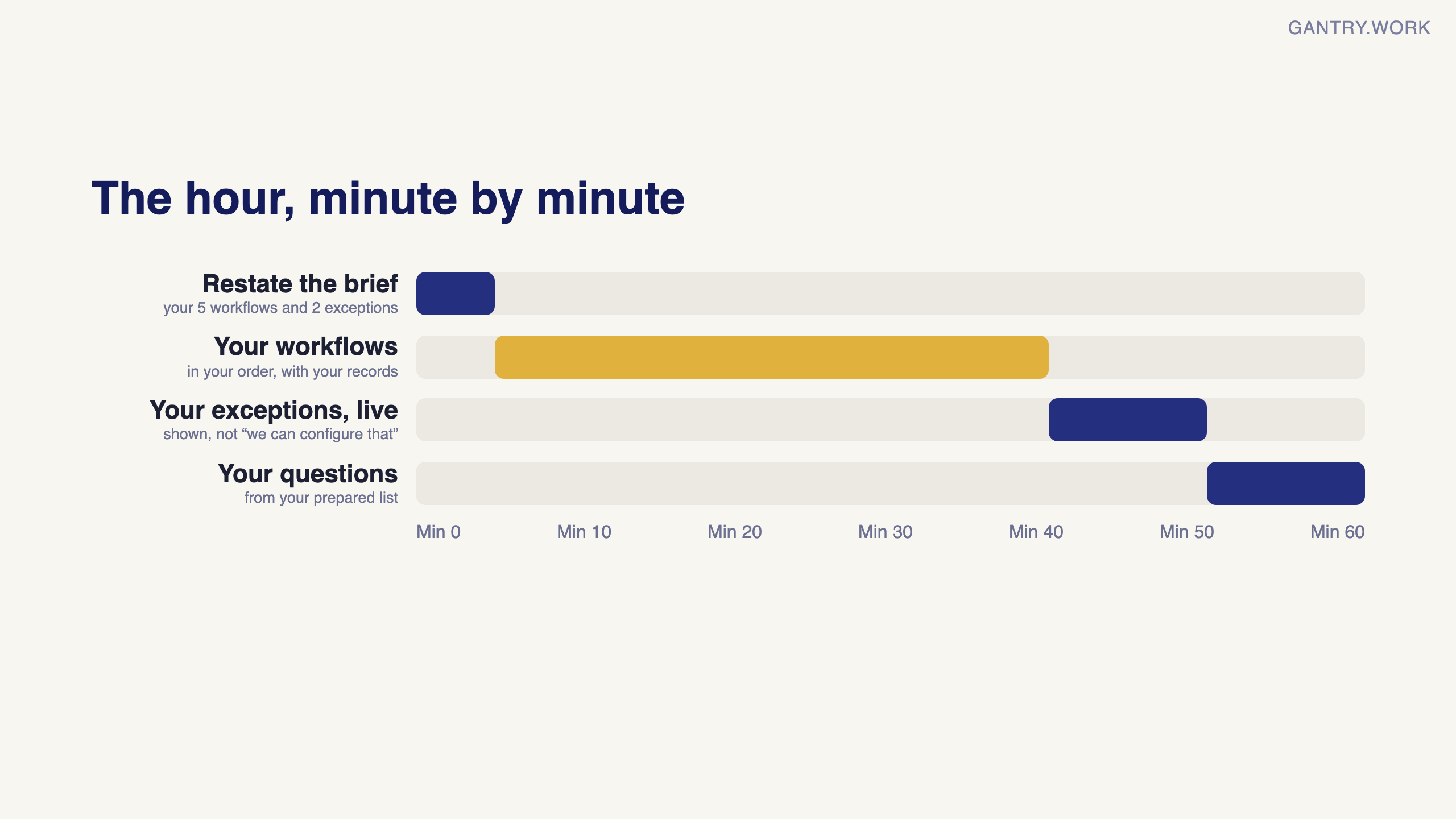
Ask for this agenda and hold the presenter to it:
Five minutes: the partner restates your five workflows and your two exceptions. If they cannot, they did not read the brief.
Thirty-five minutes: your workflows, in your order, with your records. Watch for the number of clicks, the number of screens, and where the presenter's hands hesitate.
Ten minutes: your two exceptions, live. Not "we can configure that". Show it.
Ten minutes: your questions, from the list below.
Anything about pricing plans, the Odoo roadmap, or the partner's other clients goes in a separate call. Fit first, commercials second.
The questions that separate implementers from salespeople
Ask these while the system is on screen, and watch whether the answer comes with a click or a promise.
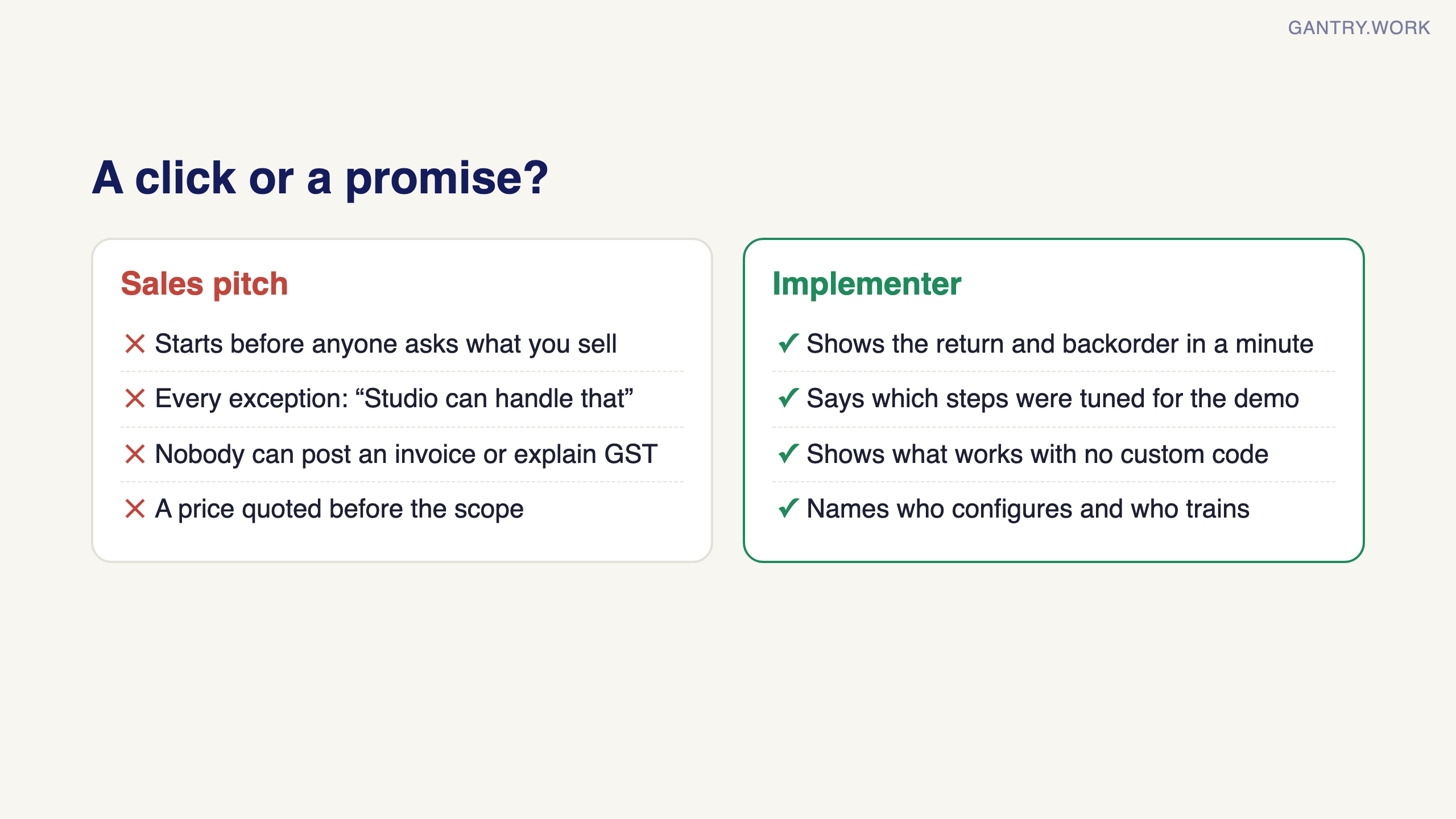
"Show me what happens when this goes wrong." Pick a delivery and ask what the warehouse does if they find a short-shipped carton. A person who has run a go-live will show you the return and the backorder in under a minute. A person who has not will describe it.
"Which of these steps is standard, and which did you configure for this demo?" Odoo out of the box does a lot, but every demo has been tuned. You want to know what the tuning cost, because you will be paying for it.
"What would this look like with no custom code at all?" On the Standard plan, hosted on Odoo Online, you cannot install custom modules. Many SMEs are better off there, and a good partner will tell you honestly which of your five workflows fit the standard product and which would push you onto the Custom plan. I wrote about that split in Odoo Community vs Enterprise.
"Who on your team would configure this, and who would train mine?" The presenter is often the best person in the firm. Ask who you actually get.
"How long from signature to my first live sales order?" Not the whole project. The first real transaction. A confident answer is measured in weeks. A vague one means the estimate does not exist yet.
"What do your last three clients wish they had done differently?" Every honest implementer has an answer. It is usually about data cleaning or about someone not showing up to training.
Red flags I would walk away from
The demo starts before anyone has asked what you sell.
Every exception is answered with "Studio can handle that" or "a small customisation". Some of that is true. All of it is a warning.
The presenter cannot show the accounting side. Sales demos are easy. If nobody on the call can post an invoice, reconcile a bank line and explain the GST report, the partner may be a sales-and-CRM shop learning finance on your project.
Pricing is quoted before scope. A number in the first call is a number designed to get a second call. Real estimates come after the workflows are known. I laid out what those estimates actually contain in What Odoo Actually Costs.
The answer to "can we see a reference client on a similar flow?" is a logo wall.
Real-world case: the demo that ended in court
In 2008 the US waste company Waste Management sued SAP over a failed ERP project it said had cost more than US$100 million. Among its claims: that the product demonstrations shown before the contract used specially prepared environments rather than the software it would actually receive. SAP denied the claims, and the two settled in 2010 with an undisclosed one-time payment to Waste Management (Computerworld, Computerworld).
The claims were never tested in court, but the risk they describe is real for anyone buying software: a polished demo proves that something can be shown, not that it will work on your data in your version.
The lesson for a small company: ask for the demo on your own products, customers and a real order, in the same edition and version you would buy. Afterwards, list the features you saw that matter most and have them written into the proposal as in scope. If the presenter cannot show something live, treat it as not proven.
What a demo cannot tell you
Even a perfect demo will not show you how your team behaves in month two, whether your data is clean enough to migrate, or whether the person in accounts will quietly keep the old spreadsheet running alongside. Those are the things that decide most projects, and they are yours to manage. A demo tells you whether the tool fits the work. Whether the work fits the company is a different conversation, and I would have it before signing anything. The switching guide is where I would start.
One last thing. Run the same brief past two partners, a week apart. The software will be identical. The difference in how they handle your two exceptions is the difference you are actually buying.
Which of your workflows would you put first in the brief?
If you want a number on what the current manual version of those workflows costs you each month, the free calculators will give you one in about three minutes.
From our projects: same software, different partner
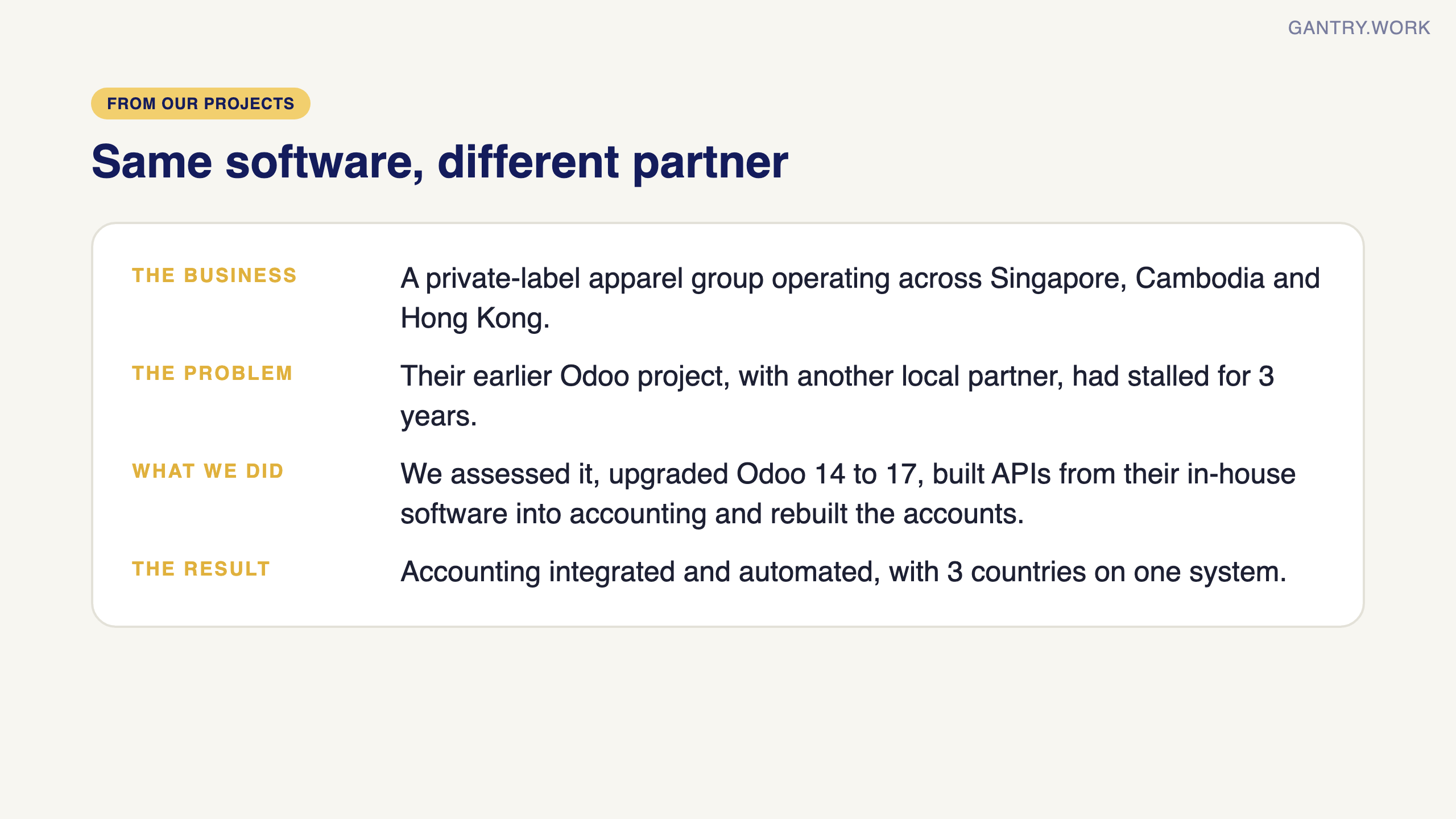
The point about comparing two partners is not theoretical. A private-label apparel group operating across Singapore, Cambodia and Hong Kong came to us after an Odoo project with another local partner had stalled for three years. We assessed it, recommended an upgrade from Odoo 14 to 17, built custom APIs from their in-house software into Odoo accounting, and rebuilt the accounts, opening balances and reporting. Today their accounting is integrated and automated, with three countries on one system: the same product, run differently.
How do you get an Odoo demo or free trial?
Odoo offers three official routes: the public demo database at demo.odoo.com, a free trial database from odoo.com/trial, and a demo call booked with an Odoo advisor.
The public Odoo demo database
Go to demo.odoo.com and Odoo creates a fresh shared demo database and logs you in as the administrator, with no registration. Odoo's documentation says each of these databases is only available for a few hours. You may land on an address such as demo3 or demo4.odoo.com: those are simply the servers Odoo spreads the demo databases across, so an "odoo demo3" address is the same official demo.
When I opened it on 7 October 2026, it was running Odoo 20 Enterprise with 37 apps installed and sample companies set up in the United States, trading in US dollars.
What you can test there:
How the menus, lists and forms feel, and how many clicks a sales order, delivery and invoice take.
Which apps exist and how they link, for example a confirmed order reserving stock.
Reports and dashboards on realistic sample data.
What you cannot test there:
Singapore accounting, because the sample companies are American.
Your own products, customers and exceptions in any lasting way, since the database disappears within hours.
Integrations with your bank, webshop or courier, or anything that needs custom code.
The free trial database
Start at odoo.com/trial, pick the apps you want, and you get your own database with no credit card required. Choose Singapore as the country so you can see local features such as PayNow QR codes on invoices. This is where to load the 20 real records from the brief in this guide. A trial with several apps is time-limited, so have your records ready before you start it.
A demo with Odoo or a partner
Odoo's pricing page offers appointments with an advisor, split by company size: 1 to 5 employees, 5 to 50, 50 to 250, and more than 250. Odoo says companies with more than 50 employees usually work with a local partner, which is the partner demo this guide is mostly about. Whichever route you take, send the one-week brief in this guide first and hold the presenter to its agenda.
Sources, checked 7 October 2026: Odoo Online documentation (shared demo databases, no registration, available for a few hours); demo.odoo.com (opened directly: redirects to a demoN.odoo.com server, Odoo 20 Enterprise, US sample companies); Odoo trial (free instant access, no credit card); Odoo pricing (advisor appointments by company size, partners for companies over 50 employees); Odoo Singapore localisation (PayNow QR codes).
Frequently asked questions
Is there a free Odoo demo? Yes. demo.odoo.com gives anyone a temporary demo database with sample data, and odoo.com/trial gives you your own free trial database without a credit card.
How long does the Odoo demo database last? Odoo says shared demo databases are only available for a few hours. For anything longer, start a free trial instead.
What is demo3.odoo.com? One of the servers that host Odoo's public demo databases. Visiting demo.odoo.com may send you to demo3, demo4 or a similar address; it is the same official demo.
Can I test Odoo with my own data before buying? Yes, in a free trial database or in a partner demo where the partner loads your records. The public demo is reset too quickly for that. If you want my take on what holds up after go-live, read my honest review of Odoo.
What a demo cannot show you is how the system behaves on your own data: that is what user acceptance testing is for, and the cutover plan is where a good demo partner proves it.
I'm Sayed. I work closely with business owners to automate their operations and build workflows that actually make sense. I write The Gantry about ERP and automation for SMEs.
Working on something similar? Connect with me on LinkedIn and tell me what you are working on. I read and reply to every message, and the questions people send become the next guides.
How I test everything and how this site makes money: How The Gantry works.
Before comparing systems, check whether your business is ready for one. The free ERP Readiness Scorecard takes about three minutes and tells you what to fix first.

The free ERP readiness scorecard at work: a few honest answers and a score with what to fix first. Click the animation to try it.