

In the AutoCount vs Xero choice, AutoCount wins for a Singapore trader that needs real stock control inside the accounts, and Xero wins for a lean team with simple stock, an accountant who already uses it and a need for apps. Odoo is the third option once sales, purchasing, warehouse and accounts need to run as one system. Prices below were checked on 6 October 2026.
Part of The Gantry's automation guides. Updated October 2026.
A disclosure: I implement Odoo for a living. Putting Odoo into a company that only needed AutoCount or Xero is an expensive mistake, so both get their genuine wins here.
AutoCount vs Xero vs Odoo: the short answer
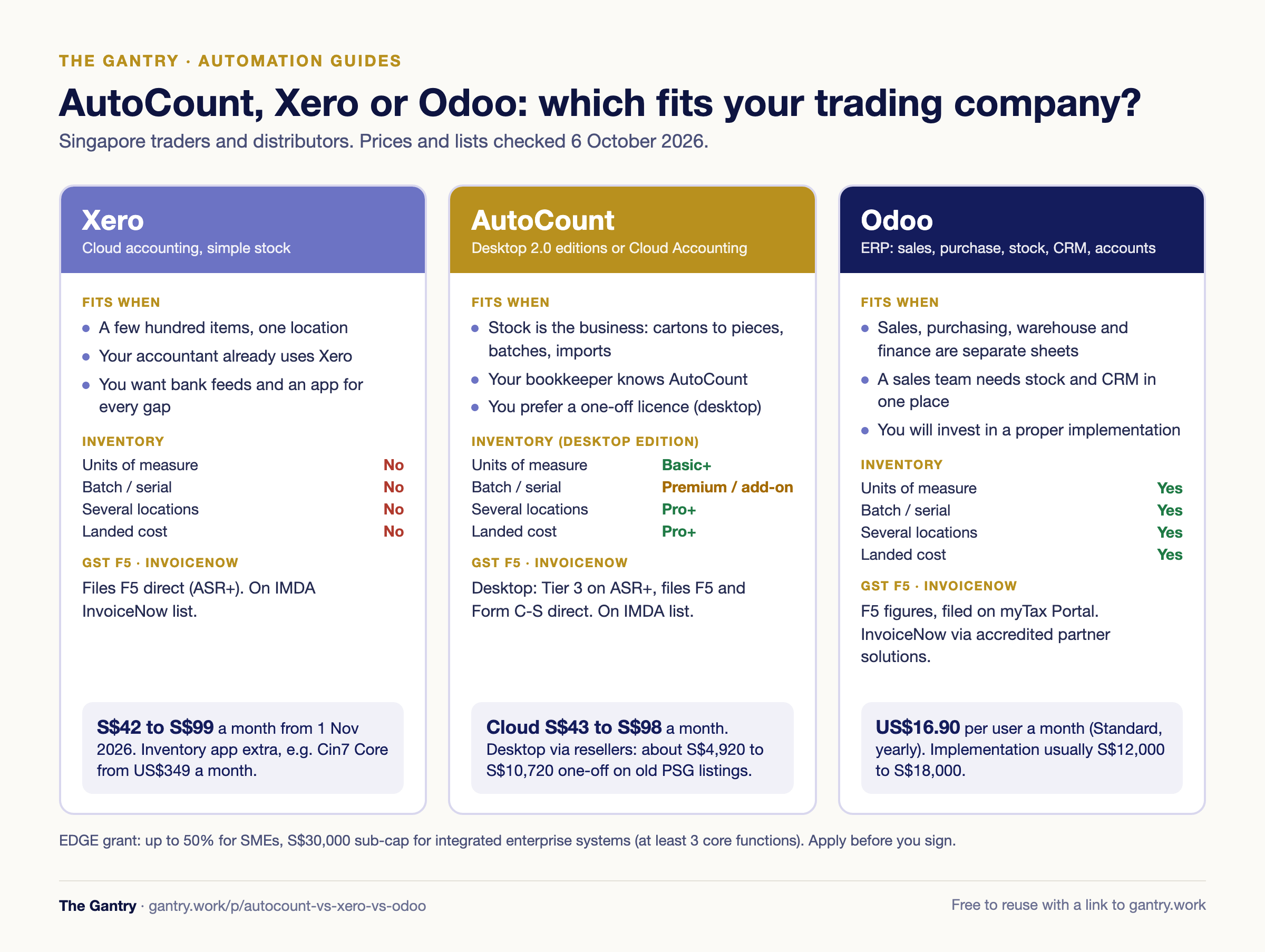
Choose Xero if: you hold a few hundred items in one location, your accountant works in Xero, and you want bank feeds, simple invoicing and an app for everything else.
Choose AutoCount if: stock is your business (units of measure, batches, landed cost, several locations), you want software local bookkeepers already know, and you prefer a one-off licence to a subscription.
Choose Odoo if: sales, purchasing, the warehouse and finance live in separate spreadsheets and you want one database with CRM on top.
What each one is
AutoCount comes in two forms. AutoCount Accounting 2.0 is Windows desktop software in five editions (Account Plus, Express Plus, Basic, Pro, Premium), bought once through local resellers. AutoCount Cloud Accounting is a separate browser product on monthly subscription, with lighter inventory.
Xero is cloud accounting: bank feeds, invoicing, bills, GST and reporting, with deliberately simple inventory. Its strengths are the app ecosystem and how many Singapore bookkeepers know it.
Odoo is a modular ERP. Accounting is one app beside sales, purchase, inventory, CRM and more, all included per user on the paid plans. For why accounting software is not an ERP, see is QuickBooks an ERP?; the same applies to Xero.
Accounting software with inventory: four tests for Singapore traders
Multiple units of measure (buy in cartons, sell in pieces): AutoCount Cloud has it on Plus and Pro. AutoCount desktop has basic multi-UOM from Basic and advanced multi-UOM from Pro. Xero has no unit conversion. Odoo has it as standard.
Batch and serial numbers: AutoCount desktop has batches in Premium and serial numbers as an optional module on any edition. AutoCount Cloud's plan table lists neither, and Xero has neither. Odoo has both as standard.
Several stock locations: AutoCount Cloud on Pro only, AutoCount desktop from Pro. Xero treats stock as one pool. Odoo handles multiple warehouses and locations.
Landed cost (freight and duty added to item cost): AutoCount desktop from Pro. Xero does not spread these costs onto items. Odoo has landed costs in its inventory app.
Xero's inventory page describes up to 4,000 tracked items. Past that, or once you need any test above, Xero users add an inventory app: two systems to pay for and reconcile. If you still guess when to reorder, read safety stock and reorder points first.
GST F5 and InvoiceNow readiness
GST-registered businesses must send invoice data to IRAS through InvoiceNow in phases: existing registrants with annual supplies up to S$200,000 from 1 April 2028, up to the largest (above S$4 million) from 1 April 2031. On IMDA's InvoiceNow-Ready Solution Providers list (1 October 2026) and IRAS's ASR+ listing:
AutoCount: AutoCount Accounting 2.0 is on the IMDA list and is Tier 3 on ASR+, so it files Form C-S and GST F5/F8 directly. AutoCount also offers a free GST InvoiceNow package until 31 March 2031. AutoCount Cloud advertises F5 filing and InvoiceNow on paid plans, but Cloud Lite has no GST module, so GST-registered firms need Basic or above.
Xero: on the IMDA list and on ASR+ for GST F5/F8 and InvoiceNow (not Form C-S). InvoiceNow registration runs through Xero's own Invoici app and Xero describes it as free.
Odoo: Odoo 19's release notes say Peppol PINT is supported for Singapore, but the official lists show Odoo only through partner-built solutions (for example Alitec and Port Cities), listed for InvoiceNow, not direct GST filing. Odoo prepares the F5 figures; you file on myTax Portal. Ask your implementer which accredited access point you will use.
Your own dates are in InvoiceNow: when your business must comply.
Pricing in SGD, checked 6 October 2026
AutoCount Cloud Accounting: Lite S$43, Basic S$58, Plus S$78, Pro S$98 a month on monthly billing. Pro includes 3 users plus an accountant; extra users are S$10 a month each on Plus and Pro. A limited-time offer takes 60% off a 12-month plan (Pro S$470.40 for the year). The page does not say whether GST is included.
AutoCount Accounting 2.0 desktop: AutoCount does not publish desktop prices; resellers quote them. One reseller's PSG package listings on GoBusiness ran from S$4,920 (Basic, 1 user) through S$6,920 (Pro, 1 user) and S$8,320 (Pro, 3 users) to S$10,720 (Premium, 3 users), including setup and training. That directory dropped Enterprise Singapore solutions on 30 September 2026, so get a written quote that includes the yearly support fee.
Xero (GST included): Starter S$39, Standard S$70, Premium S$95 a month, rising from 1 November 2026 to S$42, S$77 and S$99. Starter allows 20 invoices and 5 bills a month; multi-currency is Premium only.
Odoo (US dollars, tax excluded): one app free for unlimited users. Standard is US$16.90 per user per month billed yearly (about S$21.63 at US$1 = S$1.28); Custom is US$32.00 and adds Studio, multi-company and the external API. Implementation is the bigger number: see what Odoo actually costs in 2026.
What the add-ons cost
Xero plus inventory: Cin7 Core from US$349 a month (5 users, unlimited stock locations) or Unleashed from US$399 a month plus onboarding, both before tax.
AutoCount desktop: modules outside your edition, such as serial numbers, appear on the reseller quote.
Odoo: apps are included; the add-on is the implementation partner, plus Odoo.sh hosting if you need custom modules.
Worked example: a 15-person distributor with 2,000 SKUs
A typical distributor: 2,000 SKUs, US-dollar imports, a Tuas warehouse plus a showroom, 6 logins. Year-one software at list price, before setup:
Xero Premium plus Cin7 Core: S$99 × 12 = S$1,188, plus US$349 × 12 = US$4,188, about S$5,361. Total about S$6,549 a year.
AutoCount Cloud Pro: S$98 × 12 = S$1,176, plus 3 extra users × S$10 × 12 = S$360. Total S$1,536 a year, but its plan table lists no batches and no landed cost, which an importer usually needs.
AutoCount desktop Pro: roughly S$6,920 to S$8,320 one-off for 1 to 3 users on the old listings, more for 6, plus yearly support.
Odoo Standard: 6 × US$16.90 × 12 = US$1,216.80, about S$1,558 a year. Add the S$12,000 to S$18,000 implementation range from my cost guide and year one is about S$13,558 to S$19,558.
Licences are the small number; setup, data clean-up and any second system decide the real cost.
Which is the best accounting software for a trading company in Singapore?
A 5-person trader moving off Excel, a few hundred items, one store: Xero Standard or AutoCount Cloud Plus. If you buy in cartons and sell in pieces, AutoCount Cloud Plus converts units at S$78 a month. If your accountant lives in Xero, that counts. Use from spreadsheets to ERP to retire the sheets properly.
A 15-person distributor, 2,000 SKUs, imports: AutoCount desktop Pro or Premium if the team sits in one office. Odoo if you want sales orders, purchase orders, goods received notes and invoices in one flow reachable from anywhere. Xero only with an inventory app beside it.
A 40-person firm with a warehouse and a sales team: Odoo earns its cost here: CRM, quotations, stock reservations, picking and accounts in one database. AutoCount plus a separate CRM works, but someone keeps them in sync. See also the best cloud ERP for SMEs in 2026 and Odoo vs Xero in Singapore.
Not sure which fits your stock and your team? Bring your item count, invoices a month and the reports you rebuild in Excel to a free 20-minute systems review. I will tell you which of the three fits, or whether your current setup is fine for now.
Migration effort and the data you need
Whichever you choose, prepare:
Trial balance and chart of accounts at the cut-over date
Customers and suppliers with UEN, payment terms, currency and Peppol ID
Item master: code, description, unit conversions, cost and selling prices
Opening stock by location, with batch or serial numbers and unit cost
Open invoices, bills, sales orders and purchase orders
Rough planning ranges, not promises: Xero takes days to a few weeks, AutoCount a few weeks, a multi-module Odoo project two to three months. Most of it goes on cleaning the item master.
The EDGE grant note
PSG was replaced by the EDGE grant on 30 September 2026. Enterprise Singapore's EDGE FAQ says SMEs get up to 50% support, with digital solutions and integrated enterprise systems sharing a S$30,000 sub-cap inside the S$100,000 annual cap. An integrated ERP must cover at least 3 core functions; pre-approved vendors take about 1 week to process, your own vendor about 10. Apply before you sign. More in the EDGE grant for ERP.
Stuck on a step? Tell me where you're stuck and you'll get the fix, or a free 20-minute review if it's worth one.
Frequently asked questions
Is AutoCount better than Xero? For stock-heavy traders, usually: the right AutoCount edition has units of measure, batches, landed cost and locations. For services or simple stock, Xero is easier and has more apps.
AutoCount Cloud vs Xero: which is cheaper? AutoCount Cloud Plus is S$78 a month with inventory; Xero Standard is S$70 (S$77 from 1 November 2026) without unit conversion or locations. The gap widens once Xero needs an inventory app.
AutoCount vs Odoo: when is Odoo worth the extra? When the pain sits between departments: sales promising stock the warehouse lacks, purchasing in spreadsheets, reports rebuilt by hand. For finance and stock control alone, AutoCount is cheaper.
Can Odoo file GST F5 directly to IRAS? Not on today's ASR+ listing. Odoo prepares the F5 figures and you file on myTax Portal.
Related guides
What Odoo actually costs in 2026 · Landed cost · Safety stock and reorder point · From spreadsheets to ERP · Is QuickBooks an ERP?
Want this handled properly? I do a free 20-minute systems review. No pitch, just your questions answered.
I'm Sayed. I work closely with business owners to automate their operations and build workflows that actually make sense. I write The Gantry about ERP and automation for SMEs.