

Every week somebody asks me which inventory management software they should buy, and every week the first thing I do is ask how they know their stock figure today. The answer is usually a spreadsheet updated on Fridays, a number in the accounting package that nobody trusts, and a person in the warehouse who knows the truth. That gap between what the systems say and what the warehouse knows is the problem you are actually buying software to fix. Keep that in mind and the choice gets a lot simpler.
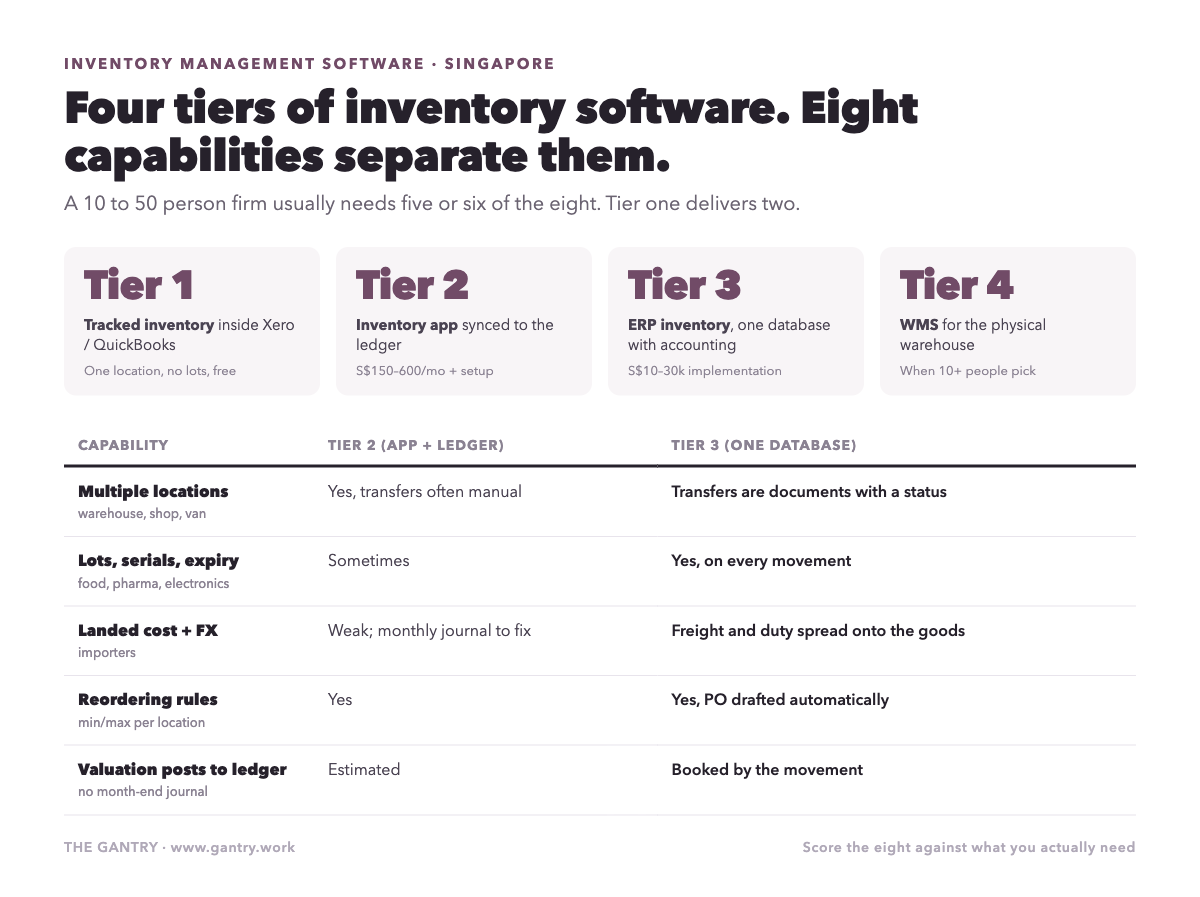
This is the guide I would want if I were a 10 to 50 person firm in Singapore choosing inventory software in 2026. It is organised around four tiers of tool, the capabilities that separate them, what they cost here, and which one fits which kind of business.
The four tiers
Tier one: tracked inventory inside your accounting package. Xero and QuickBooks both track quantities and average cost for simple items. One location, no lots, no units of measure beyond "each", no purchasing workflow. It is free with the subscription you already pay, and it is fine for a firm with a few dozen products, one store room and a supplier who never short-ships.
Tier two: a standalone inventory app synced to the ledger. Products such as Cin7 Core, Unleashed, Katana and Zoho Inventory sit on top of Xero or QuickBooks. They add locations, purchase orders, bundles, light manufacturing and better reporting, and they push invoices and bills across to the accounting package. This is where most Singapore SMEs land first, and it works until the sync starts needing a person to babysit it.
Tier three: inventory inside an ERP, sharing one database with accounting. Odoo, SAP Business One, NetSuite and Business Central all hold stock, purchasing, sales and the ledger in one place. A delivery confirmed in the warehouse moves stock, posts cost of goods sold and marks the order ready to invoice in the same transaction. There is no sync, because there is nothing to sync.
Tier four: a warehouse management system. A WMS runs the physical warehouse: bin locations, wave picking, put-away rules, handheld scanners, packing stations. It usually sits alongside an ERP rather than replacing it. If you have fewer than about ten people picking, you do not need one yet.
The mistake I see most is buying tier two when the business already needs tier three, then spending eighteen months reconciling two systems before admitting it. I wrote about the moment that happens in keep your accounting software or fold it into the operations system.
The eight capabilities that separate the tiers
When you compare products, ignore the feature list and check these eight things against your actual operation.
Multiple locations. Two warehouses, a shop and a van are four locations. Tier one cannot do it. Everything above can, but check whether transfers between locations are a document with a status or a manual adjustment.
Lots, serials and expiry. Food, pharmaceuticals, chemicals, electronics with warranties. If you need to answer "which customers received batch 4471", you need lot tracking on every movement, not a note in the description field.
Units of measure. You buy in cartons of 24, sell in pieces, and count in pallets. If the software cannot convert between them, your stock value is wrong on day one.
Landed cost. Freight, insurance and import duty added to the cost of the goods, not expensed separately. Without it, every imported product looks more profitable than it is. Given how much of Singapore's stock arrives by sea and air, this one is not optional for importers.
Reordering rules. Minimum and maximum levels per product per location, with a purchase order drafted automatically when stock falls below the line. This is the single capability that removes the most manual work; I described what it looks like in practice in the 3am purchase order.
Barcode operations. Receiving, picking, counting and transfers by scanner on a phone. Not because it is modern, but because it is the only way stock accuracy gets above 95 percent with a team that turns over.
Valuation that posts to the ledger. Stock value should be an accounting entry created by the movement, not a journal typed in at month-end from a report. Tier two products estimate it; tier three products book it.
Integration surface. Webshop, marketplaces, courier, InvoiceNow. Ask for the list of standard connectors and, for each one you need, whether it is two-way and who maintains it when the other side changes its API.
Score each product you are considering out of eight against the ones you actually need. Most 10 to 50 person firms need five or six. Tier one delivers one or two. Tier two delivers four or five. Tier three delivers all eight.
What it costs in Singapore
Rough 2026 ranges for a firm with three to eight users of the inventory function, excluding hardware:
Tier one: nothing beyond the accounting subscription.
Tier two: S$150 to S$600 a month in subscriptions, plus S$2,000 to S$8,000 to set up properly with a partner, or your own evenings if you set it up yourself.
Tier three: licences of roughly S$2,500 to S$6,000 a year for the users involved, plus implementation of S$10,000 to S$30,000 depending on how many flows go live and how clean your product data is. I broke down the licence and implementation maths in what Odoo actually costs, and the shape is similar across the tier.
Tier four: S$30,000 and up, and you will know if you need it.
Two things move those numbers more than the product you pick. The first is your product master. Cleaning 3,000 SKUs with inconsistent codes and units takes internal time no vendor can do for you, and the migration checklist explains why it decides the project. The second is grant funding: several inventory and ERP packages are on Singapore's pre-approved productivity grant lists, which can cover a meaningful share of a qualifying project. Ask the vendor whether their package is listed and what the current support level is, because the schemes are being restructured this year.
Which tier for which business
Trading and distribution, one warehouse, under 500 SKUs, no lots: tier two is usually enough for a year or two. Move to tier three when you add a location or start caring about margin by product.
Trading with imports, multiple currencies, landed cost, or lot tracking: tier three from the start. The tier two sync will not carry landed costs and FX cleanly, and you will end up correcting stock value by hand every month.
Retail with more than one outlet: tier three, with an integrated point of sale, so a sale at the till moves stock and posts revenue without a nightly upload. I cover the retail and F&B specifics in a separate post.
F&B with a central kitchen: tier three, because recipes are bills of materials and wastage is a stock adjustment with a reason code, and neither survives in tier two.
E-commerce selling on Shopee, Lazada and your own site: tier two can work if order volume is modest and the marketplace connectors are solid. Above a few hundred orders a month, tier three, because returns and partial fulfilment are where syncs break.
Light manufacturing or assembly: tier three. Tier two "bundles" are not a bill of materials, and you will discover the difference the first time a component runs short.
The three mistakes
Buying software before counting. Do a full physical count before you migrate anything. The software will faithfully reproduce whatever number you give it, and a wrong opening balance costs a quarter of corrections.
Skipping the barcode step. Owners often defer scanners to "phase two" to save a few hundred dollars. Phase two never arrives, and the team keeps typing quantities from memory. Budget the scanners in phase one.
Treating the sync as free. In tier two, someone owns the connection between the inventory app and the ledger. If nobody is named, the first month-end after go-live will be spent finding out which system is right. Name the person before you sign.
Still on a spreadsheet and Shopify? You can keep stock counts current before you buy anything. The free Make template Update inventory numbers on Google Sheets based on Shopify orders takes each sale off the count, and one more step emails the buyer at the reorder point (see safety stock and reorder points). When you need more than one warehouse, batches or purchase orders, that is the moment for real inventory software.
Affiliate links: if you sign up to Make through them, The Gantry may earn a commission at no extra cost to you. How I test tools and how this site makes money.
How to decide in one afternoon
Write down your locations, your SKU count, whether anything you sell has a lot or expiry, whether you import, and how many people touch stock. Score the eight capabilities you need. If the answer is five or fewer and you have one location, look at tier two. If it is six or more, or you have more than one location, go straight to tier three and save yourself the migration in eighteen months.
What does your stock figure say right now, and does the warehouse agree with it?
If the honest answer is "I would have to ask", the Cost of Manual Work calculator will show you what that gap costs each month. It takes three minutes.
Want a second pair of eyes on your setup? Bring the process that keeps going wrong to a free 20-minute systems review. I'll tell you honestly what to fix first, or whether you need anything new yet.
I'm Sayed. I work closely with business owners to automate their operations and build workflows that actually make sense. I write The Gantry about ERP and automation for SMEs.
Working on something similar? Connect with me on LinkedIn and tell me what you are working on. I read and reply to every message, and the questions people send become the next guides.
How I test everything and how this site makes money: How The Gantry works.
Before comparing systems, check whether your business is ready for one. The free ERP Readiness Scorecard takes about three minutes and tells you what to fix first.

The free ERP readiness scorecard at work: a few honest answers and a score with what to fix first. Click the animation to try it.