

Data migration is the line in an ERP quote that clients argue with most, and the line that decides whether the project works. It is rarely a technical problem. Moving rows from one database to another is the easy part. The hard part is deciding which rows deserve to move, cleaning them until they agree with each other, and proving, with numbers, that what arrived is what left.
This is the checklist I use. It is written for a 5 to 100 person company moving from accounting software plus spreadsheets, or from an older ERP, into a new system. The principles are the same whichever product is on either end.
The one decision that shapes everything else
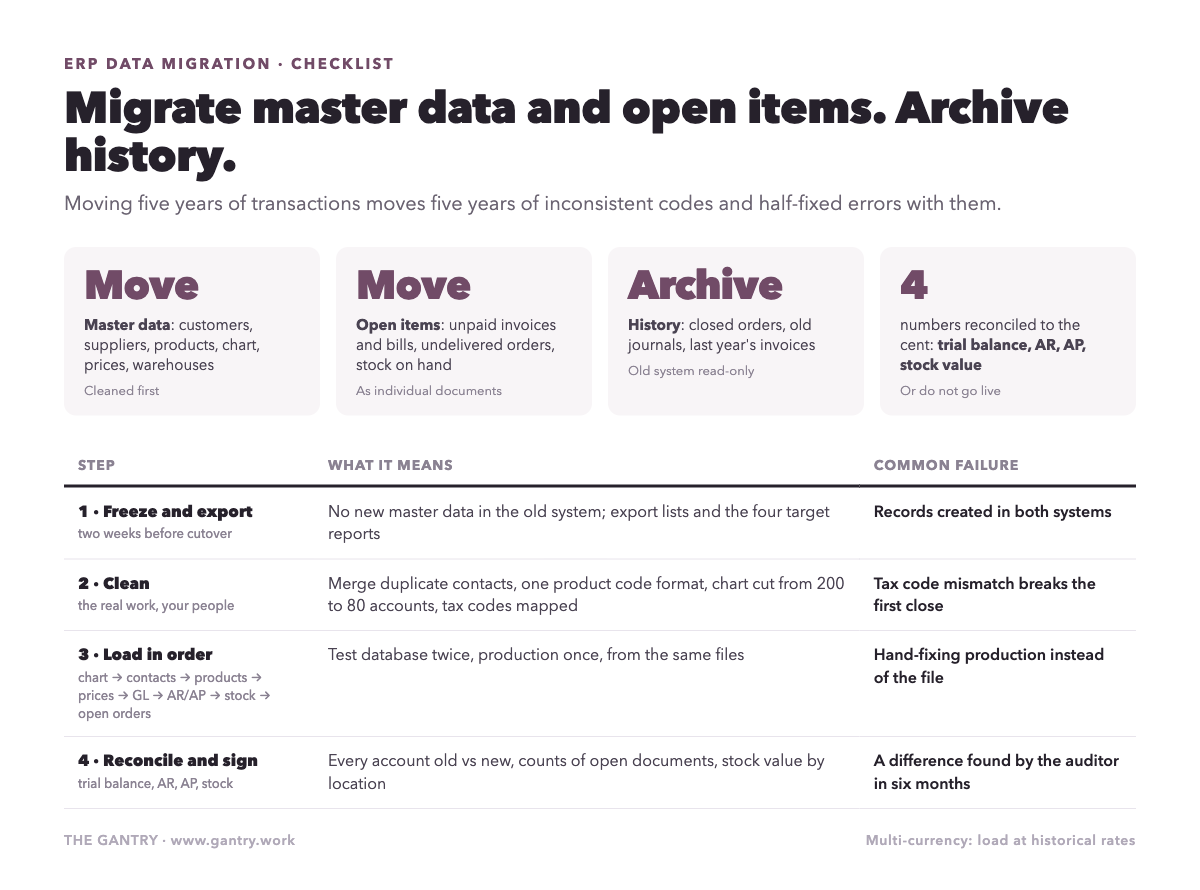
Migrate master data and open items. Archive history.
Master data is the list of things: customers, suppliers, products, chart of accounts, price lists, employees, warehouses. Open items are the transactions still alive on the cutover date: unpaid invoices, unpaid bills, undelivered orders, stock on hand. History is everything that is finished: last year's invoices, closed orders, old journals.
New owners always want the history moved. They imagine looking up a 2022 invoice in the new system. In practice, moving five years of transactions means five years of inconsistent product codes, changed tax rates, renamed customers and half-fixed errors coming along too, and the new system inherits every one of them. The old system stays available read-only for lookups, and the new one starts clean with opening balances that reconcile. Every migration I have seen go badly tried to move history. Every clean one did not.
If a regulator or your auditor needs historical detail accessible, keep the old system read-only or export the history to a searchable archive. That is a filing problem, not a migration problem.
The checklist
1. Freeze and export
Set a master data freeze date, two weeks before cutover. No new customers, products or suppliers in the old system after it. Anything new goes into the new system directly.
Export every master list to a spreadsheet, one tab per entity. This is your working copy and your audit trail.
Export the trial balance, aged receivables, aged payables and stock valuation as at the planned cutover date. These four reports are the targets you will reconcile against.
2. Clean master data (the real work)
Customers and suppliers. Merge duplicates. "ABC Trading", "ABC Trading Pte Ltd" and "ABC" are one customer. Decide the rule for naming and apply it. Drop any contact with no transaction in three years unless someone can say why it should stay.
Products. Agree one code format. Fix units of measure, because a product bought in cartons and sold in pieces needs both defined correctly or your stock value will be wrong on day one. Kill dead SKUs.
Chart of accounts. This is the moment to simplify. Most SME charts have grown to two hundred accounts through years of "just add one for this". Eighty is usually enough. Map every old account to a new one in a table, and have the accountant sign it.
Taxes and terms. Confirm the GST codes, payment terms and price lists in the new system match what the old data assumes. A tax code mismatch on import is the most common cause of a first month-end that does not balance.
Budget internal time for this, not just implementer time. The people who know whether a customer is still real are your people. In what Odoo actually costs I called data cleaning the line nobody budgets. Here it is again.
3. Load in the right order
Order matters because records depend on each other.
Chart of accounts, taxes, currencies, payment terms.
Contacts: customers and suppliers.
Products, with units, categories and the accounts they post to.
Price lists and supplier prices.
Opening general ledger balances, as a single journal on the day before cutover.
Open receivables and payables as individual documents, dated and numbered as in the old system, so payments can be matched to them.
Stock on hand by location, with lots and serials where used, valued to match the old stock report.
Open sales and purchase orders.
Each step gets loaded into a test database first, checked, then repeated into the production database from the same files. Never hand-fix the production database; fix the file and reload.
4. Reconcile four numbers
The migration is done when these four agree with the old system, to the cent, and someone has signed the comparison:
Trial balance: every account, old versus new.
Aged receivables total and count of open invoices.
Aged payables total and count of open bills.
Stock valuation total by location.
If any of the four is out, do not go live. The difference is a real error that will otherwise be found in six months, by an auditor, in a bad mood.
5. Rehearse
Do the full load at least twice into a test database before doing it once into production. The first rehearsal finds the format problems. The second confirms the fixes. The production load should be boring. I described how the rehearsal fits into the parallel run and go-live sequence in a separate post; the migration is the first half of that story.
Special cases
Moving from spreadsheets. There is no trial balance to reconcile against, because the accounts were never systematised. Build one first, even roughly, so you have a target. The spreadsheet-to-ERP guide covers what that involves.
Moving from QuickBooks or Xero. The accounting side migrates cleanly because the data is structured. The operational side, if it lived in apps bolted onto the ledger, needs the cleaning treatment above. What transfers and what does not, specifically, is in moving from QuickBooks to Odoo.
Multi-currency. Load opening balances in the transaction currency with the historical rate, or your realised exchange differences will be wrong forever. This is the item most often done lazily.
Serial and lot tracking. If you track it, migrate it. A stock quantity without its lots is a number you cannot ship against.
What "best practice" really means here
It means three things, none of them technical. Decide early what you are not moving. Give your own people the time to clean the lists, because nobody else can. And refuse to go live until four numbers match. Do that and the migration is a two-week task inside a larger project. Skip any of the three and it becomes the project.
How many of your customer records would survive the "transaction in the last three years" test?
If your month-end is slow today, the migration will not fix it on its own. The Month-End Close Cost calculator shows what the slowness is costing you first.
Want a second pair of eyes on your setup? Bring the process that keeps going wrong to a free 20-minute systems review. I'll tell you honestly what to fix first, or whether you need anything new yet.
I'm Sayed. I work closely with business owners to automate their operations and build workflows that actually make sense. I write The Gantry about ERP and automation for SMEs.
Working on something similar? Connect with me on LinkedIn and tell me what you are working on. I read and reply to every message, and the questions people send become the next guides.
How I test everything and how this site makes money: How The Gantry works.
Before comparing systems, check whether your business is ready for one. The free ERP Readiness Scorecard takes about three minutes and tells you what to fix first.

The free ERP readiness scorecard at work: a few honest answers and a score with what to fix first. Click the animation to try it.