

The best job costing software for a small business or contractor is the one that does four things without extra typing: puts every cost on a job, records labour hours against the job, compares budget to actual while the job is still running, and bills the customer from the same job. Xero and QuickBooks can do a basic version of this with tracking categories or their Projects features. Once you run more than a handful of jobs at once, draw materials from stock, or bill in progress claims, you need software that was built for job costing.
This guide explains what to look for, what each type of tool handles well, and the point where each one breaks. I'll use a fictional M&E contractor I set up in a demo system to show real screens and real numbers.
What job costing software actually has to do
Job costing means knowing what each job really cost you, not just what the company spent this month. Your P&L tells you whether the business made money. Job costing tells you which jobs made money, and which ones quietly ate the profit from the others.
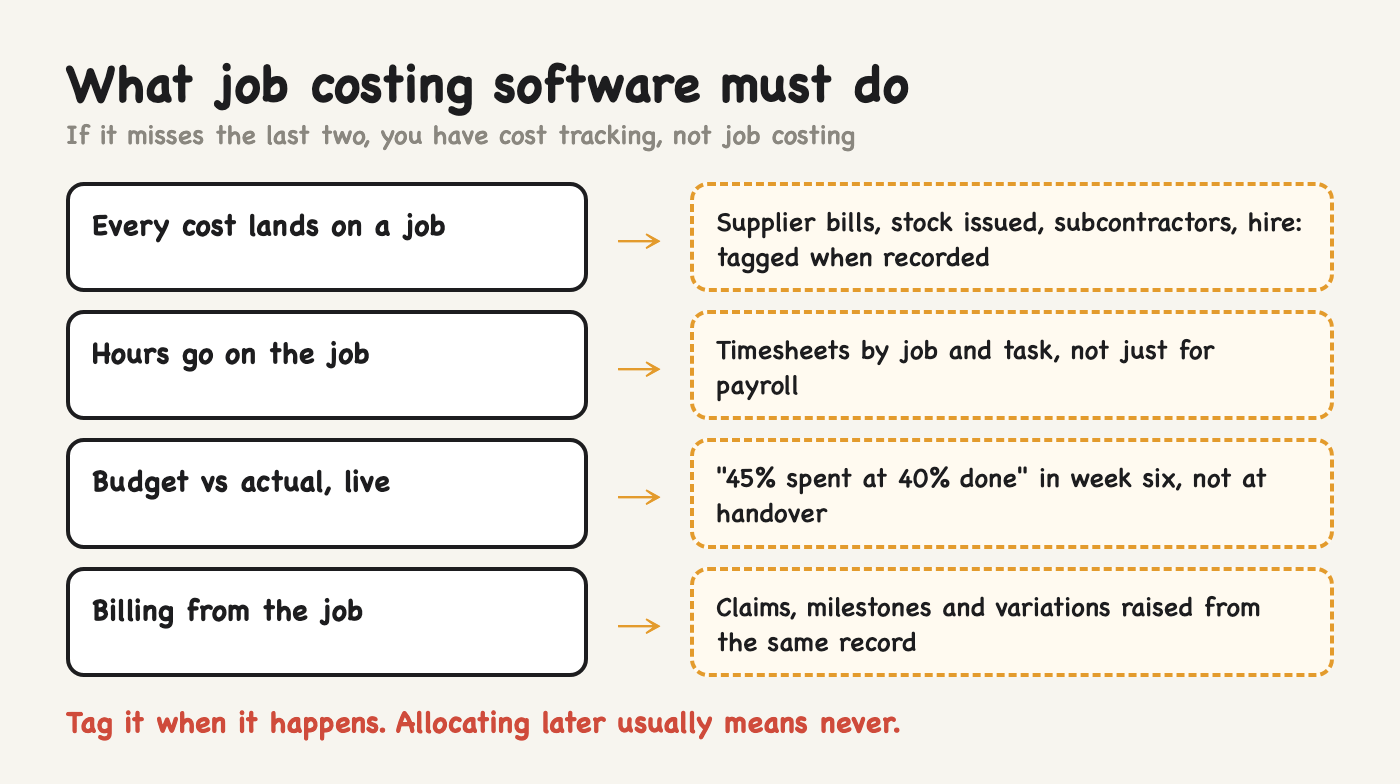
To do that, software has to handle four things:
Every cost lands on a job. Supplier bills, materials issued from your store, subcontractors, equipment hire, even petrol and parking if they are material. If a cost is not tagged at the moment it is recorded, someone has to allocate it later, and later usually means never.
Labour hours are recorded against the job. For most contractors and service firms, labour is the biggest cost and the most invisible one. A timesheet that only feeds payroll tells you nothing about which job used the hours.
Budget vs actual, while the job is running. Finding out at handover that a job lost money is too late. You want to see "45% of the budget spent, 40% of the work done" in week six, when you can still do something about it.
Billing comes from the job. Progress claims, milestones and variations should be raised from the same job record, so the system can show cost to date against billed to date.
If a tool does the first two but not the last two, you have cost tracking, not job costing.
Can you do job costing in Xero?
Yes, up to a point. There are two ways.
Tracking categories. Xero lets you run up to two active tracking categories, each with up to 100 active options. Many small contractors make one category "Job" and add each job as an option. Every bill and invoice line gets tagged, and you can run a P&L filtered by job. It is free and it works for a few jobs a month.
Where it breaks:
Labour is not in it. Payroll costs land as one lump unless someone splits them by job every month.
There is no budget per job. You can see what a job cost, but not whether that is over or under what you planned.
The 100-option limit means you have to archive old jobs to make room.
Materials bought in bulk and used across several jobs are hard to split fairly.
Xero Projects (available on some Xero plans, so check yours) adds time and cost tracking per project, with estimates and a profitability view. It is a real step up for service businesses that sell time. For contractors who buy materials, hold stock, and bill in stages, it is still thin: no stock, no purchase-order-to-job link, no progress-claim schedule.
QuickBooks Online has a similar Projects feature on its higher plans, with similar strengths and limits. If you are weighing the two, I compared them for Singapore firms in Odoo vs Xero in Singapore.
Job costing software options, compared
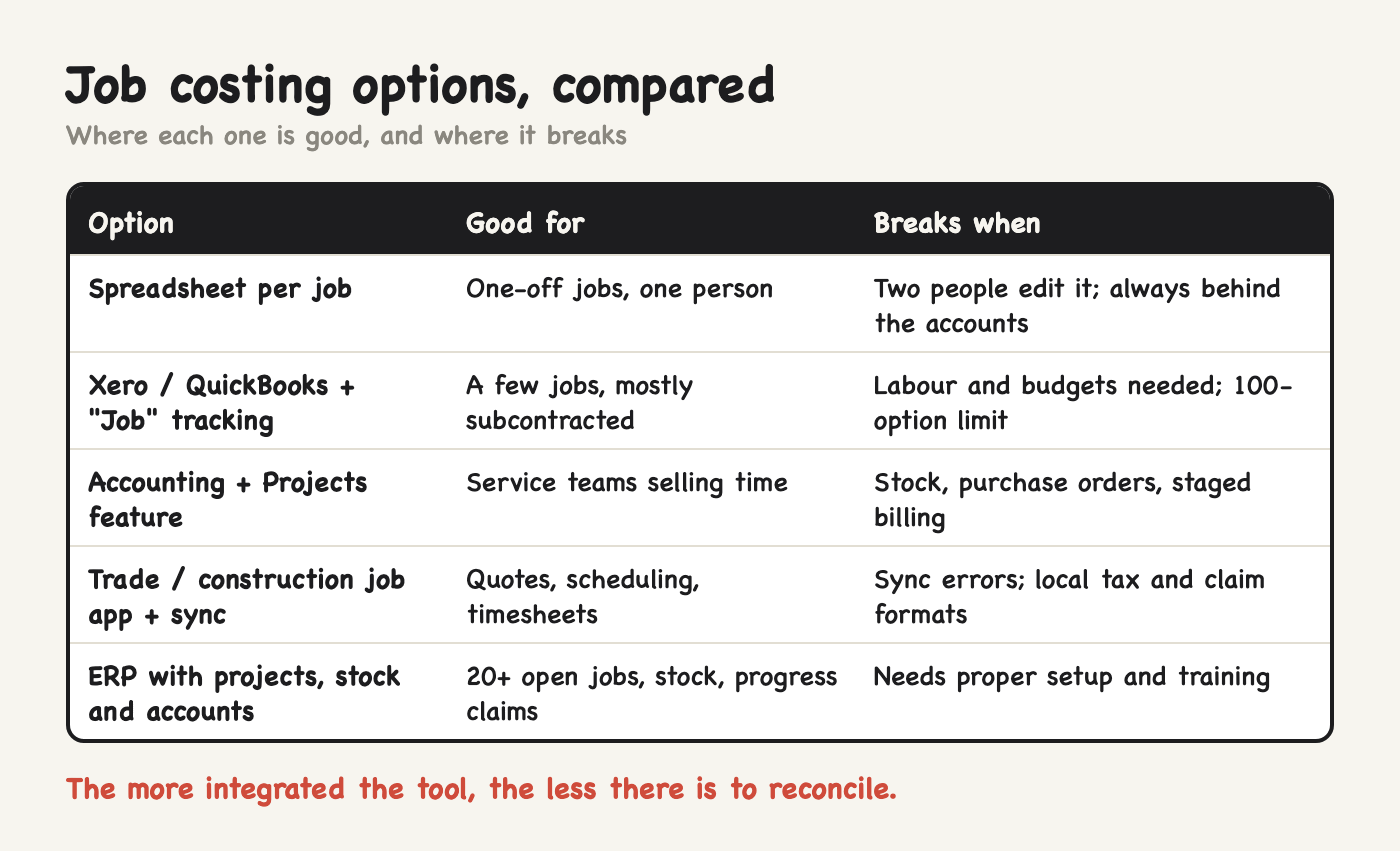
Broadly, there are five levels:
Spreadsheet per job. Fine for one-off jobs. It falls apart as soon as two people update it, and it is always a week behind the accounts.
Accounting software with tracking. Xero or QuickBooks with a "Job" category. Good for a handful of jobs and mostly subcontracted work.
Accounting software with a Projects feature. Adds time and estimates. Good for consultancies, agencies and small service teams.
A trade or construction job app that syncs to your accounting software. Tools like ServiceM8, Fergus or simPRO (for trades) and Buildertrend or Procore (for construction) do quoting, scheduling, timesheets and job costs, then push invoices to Xero. Many were built for Australia, New Zealand or the US, so check local tax, progress-claim and InvoiceNow support before you commit.
An ERP with project, purchasing, inventory and accounting in one database, such as Odoo, Microsoft Dynamics 365 Business Central or SAP Business One. Every purchase order, stock issue, timesheet and invoice already belongs to a project, so job costing is a report rather than a monthly exercise.
The honest trade-off: the more integrated the tool, the more setup it needs. A job app plus Xero can be live in a few weeks. An ERP takes longer, but it removes the sync between two systems, which is where most job-costing errors come from.
What it looks like when it works
Here is a fictional M&E contractor with three live jobs, set up in a demo system: a clinic ACMV and electrical fit-out, a kopitiam kitchen exhaust, and an office LED retrofit. Each job has a cost budget. Every supplier bill and every timesheet hour is tagged to the job when it is entered.
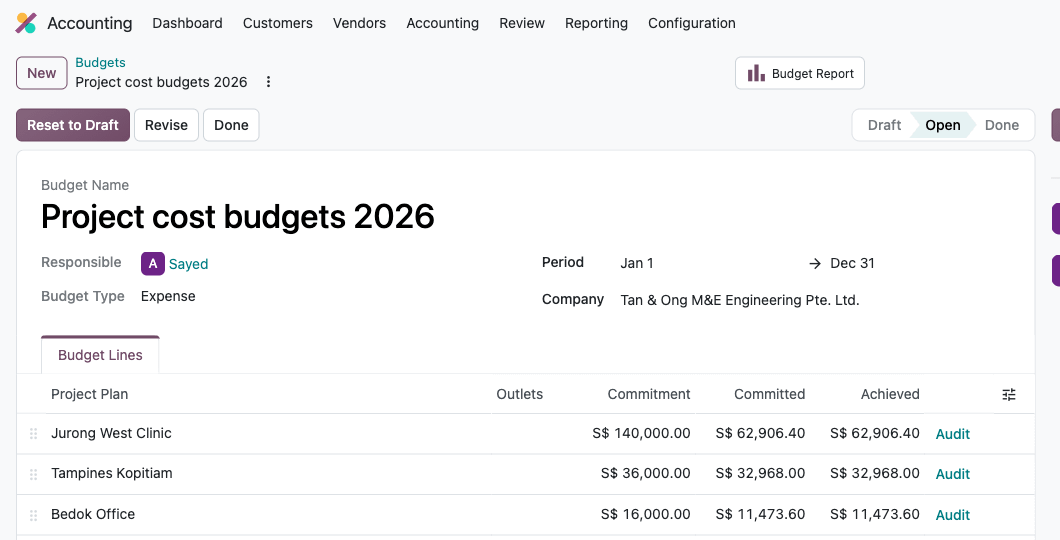
The budget screen shows the clinic job with a S$140,000 cost budget and S$62,906.40 of cost already committed. That number is not typed in by anyone. It is the sum of three supplier bills (aircon units, cables and boards, copper piping, S$54,400 in total) and 260 technician hours at each person's hourly cost (S$8,506.40).
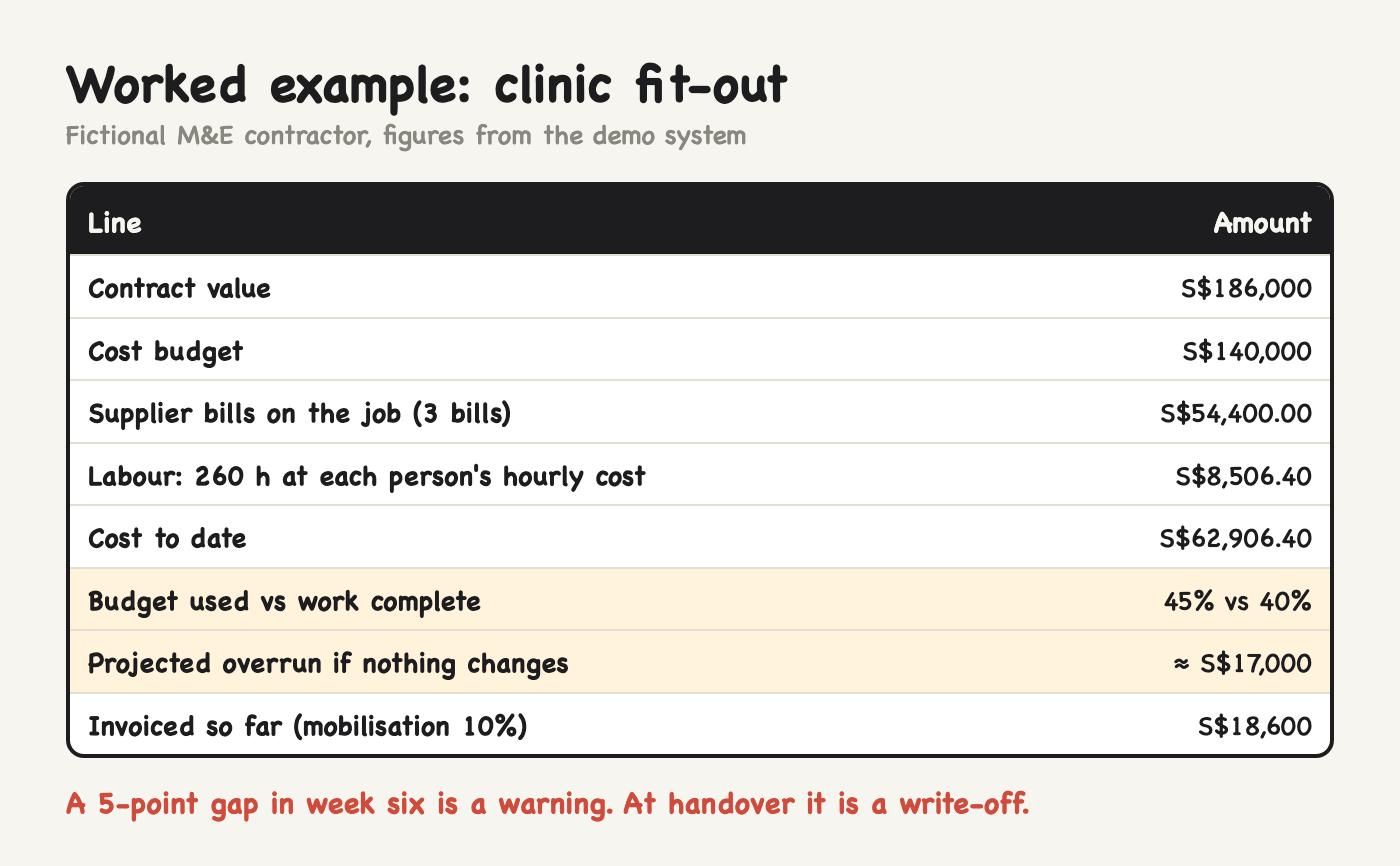
Now put that next to progress. The first fix is done, so the job is 40% complete. But 45% of the cost budget is gone. That 5-point gap is the early warning you want: on a S$140,000 budget it projects to roughly S$17,000 of overrun if nothing changes. In week six you can still check whether it is a timing issue (materials bought ahead of use) or a real overrun (more labour than planned). At handover you can only write it off.
The other half of the picture is billing. The contract is S$186,000 and only the 10% mobilisation claim has been invoiced, so S$55,800 of completed work is sitting unbilled while wages and suppliers are paid. I wrote about that gap in Progress claims and retention in construction ERP.
Labour: the cost most small firms cannot see
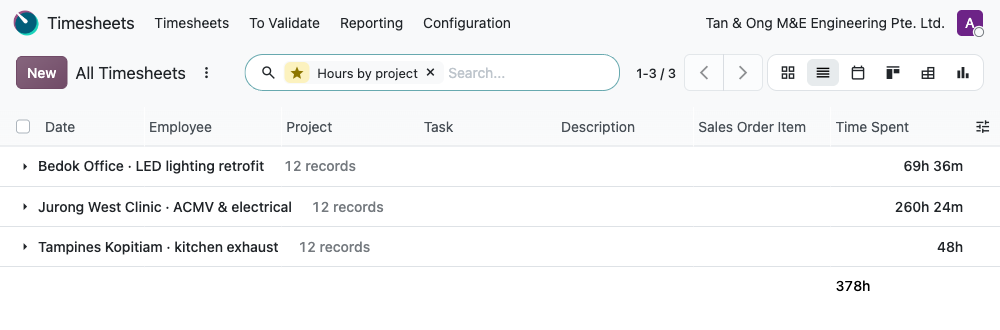
Hours by project is the screen most owners have never seen for their own business. In the demo, the clinic job has used 260 hours, the office retrofit 69 and the kitchen exhaust 48. If your quotes assume 200 hours for a job like the clinic, this is where you find out.
The same thing happens in a workshop. In a fictional stainless-steel fabricator, a job of four work tables planned welding at 60 minutes a table. The team clocked time against each operation:
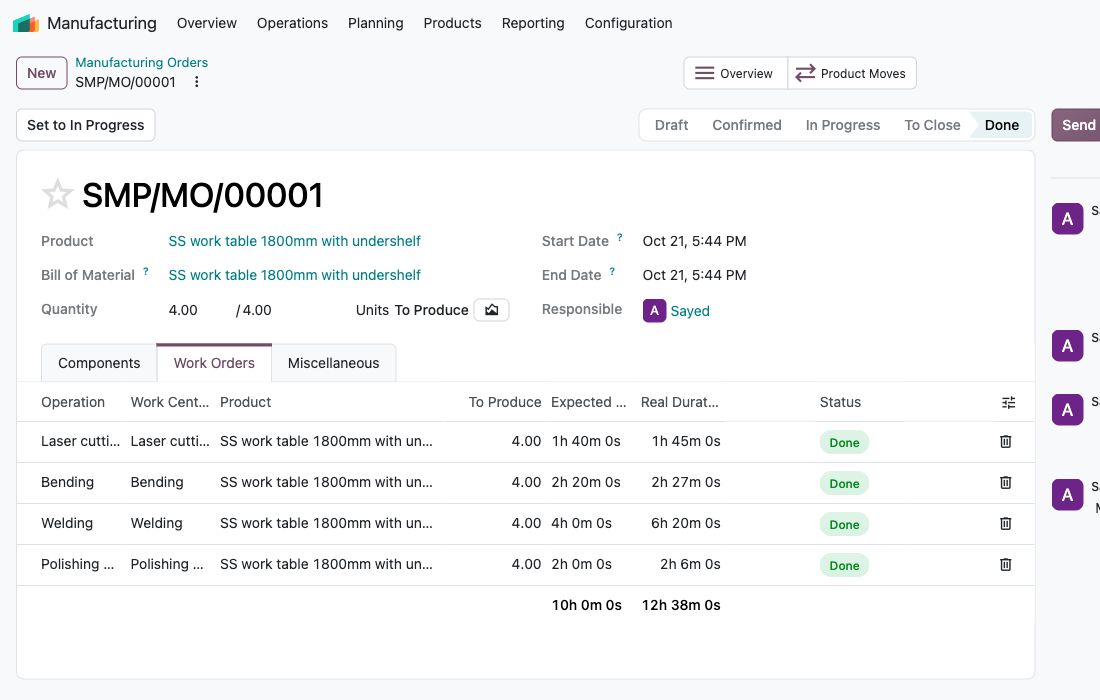
Welding took 6 hours 20 minutes against 4 hours planned. At the welding bay's S$70 an hour, that is about S$163 of labour nobody quoted for, on one job, in one operation. Without time recorded against the job and operation, that difference disappears into the monthly wage bill. If you need a quick way to total hours first, the free timesheet calculator does the arithmetic.
Job costing vs project accounting
You will see both terms when you shop for software.
Job costing answers: what did this job cost, and did it make money? It is about collecting costs (materials, labour, overheads) against a job and comparing them to the quote.
Project accounting is wider. It adds revenue recognition, billing schedules, work in progress, retention and the balance-sheet side of long jobs.
A small trade business usually needs job costing. A contractor with jobs longer than a month, progress claims and retention needs project accounting too, because the gap between cost incurred and amount billed is real money on the balance sheet.
How to choose job costing software
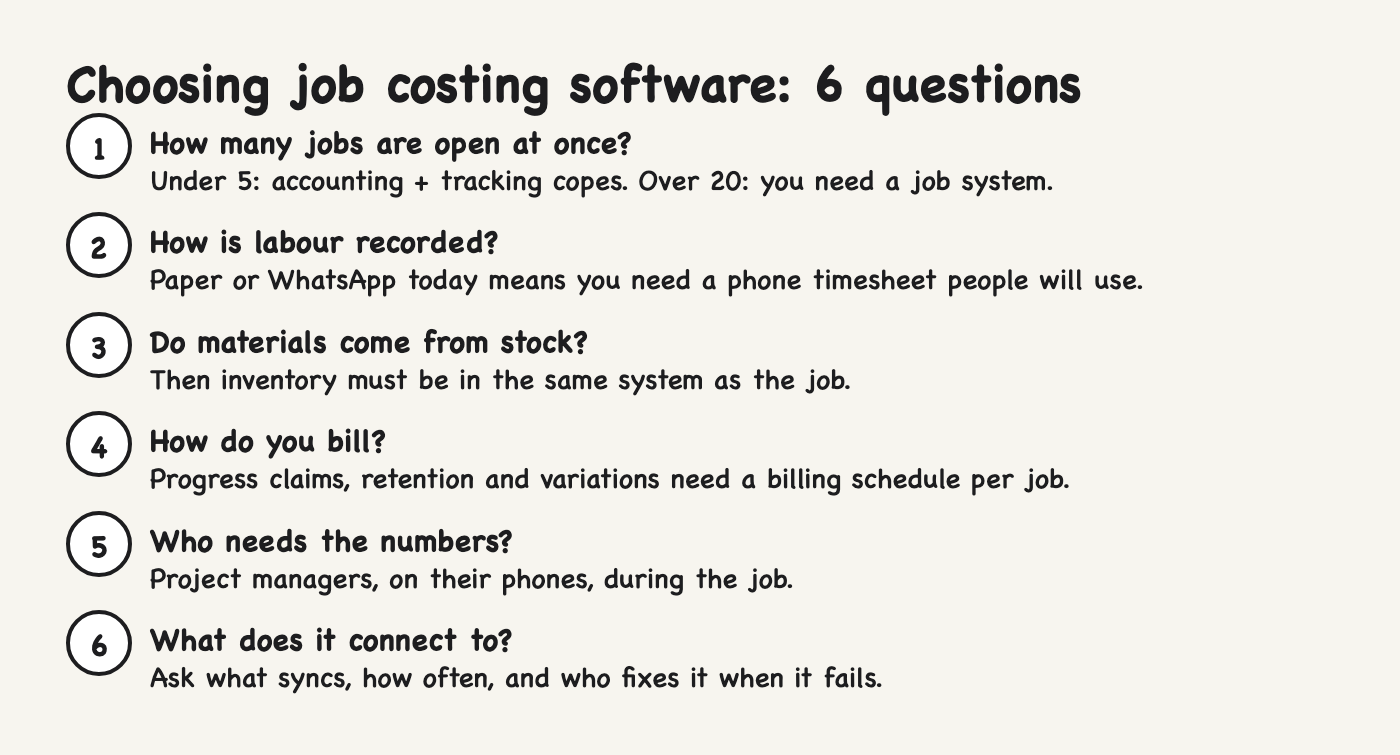
Six questions sort most firms in one meeting:
How many jobs are open at once? Under five, accounting software with tracking can cope. Over twenty, you need a job system.
How is labour recorded today? If hours are on paper or WhatsApp, the software must have a phone timesheet your team will actually use.
Do materials come from stock? If you hold stock and issue it to jobs, you need inventory in the same system or the job cost will always be wrong.
How do you bill? One invoice at the end is easy. Progress claims, milestones, retention and variations need a billing schedule per job.
Who needs to see the numbers? Project managers need budget vs actual on their phones, not in a month-end report.
What does it connect to? If the job tool and the accounting software are separate, ask what syncs, how often, and who fixes it when it fails.
If you answer "more than twenty jobs", "materials from stock" and "progress claims", you have outgrown accounting software plus spreadsheets. That is usually the point where an integrated system pays for itself, and in Singapore the EDGE grant can cover up to 50% of qualifying costs for eligible SMEs.
The bottom line
Start with the question, not the software: do you know, this week, which of your open jobs is losing money? If the answer is "not until the accountant closes the month", the tool you choose has to fix that first: costs and hours tagged to the job when they happen, and a budget to compare them with.
If you want a second opinion on where your job costs leak, I run a free 20-minute systems review. No pitch, just the gaps and what I would fix first.
Which part of your job costing is still done by hand: materials, labour, or billing?
Screens and figures come from a demo system set up with fictional companies; the logic is the same in a real business. Check current plans and features with each vendor before you buy.
I'm Sayed. I help business owners automate their operations and set up the systems behind them: ERP, accounting, inventory, CRM and workflows. I write The Gantry about what actually works.