

Some links on this page are affiliate links. If you sign up through them, The Gantry may earn a commission at no extra cost to you. I only recommend tools I would use on a client project.
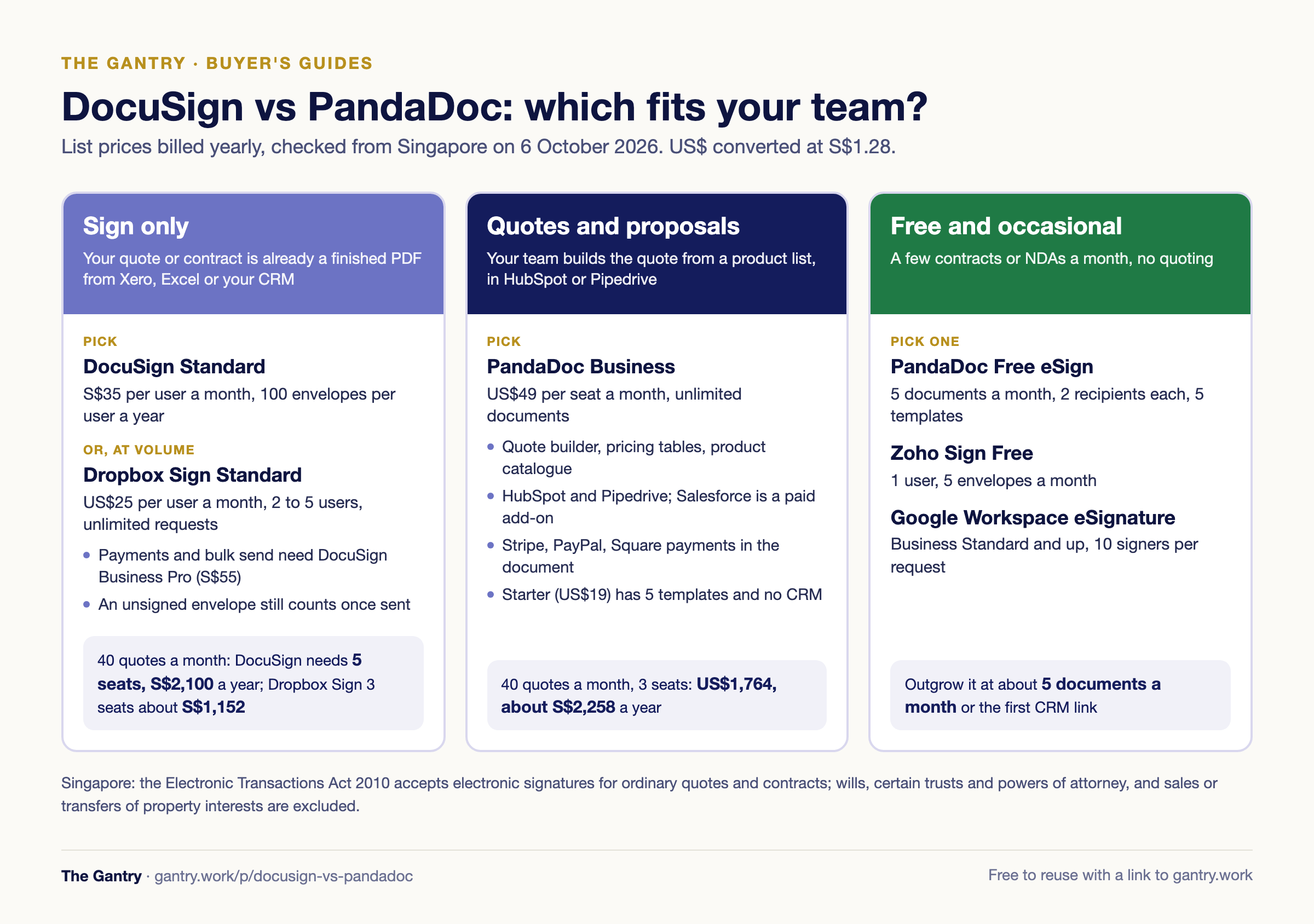
In the DocuSign vs PandaDoc decision, DocuSign is the better fit when you only need signatures on quotes and contracts you already produce, and PandaDoc is the better fit when your sales team builds the quote itself, with pricing tables, CRM data and payment, in the same document. For a 3-person team sending 40 quotes a month, DocuSign Standard costs S$2,100 a year (5 seats, to cover the envelope allowance) and PandaDoc Business about S$2,258. Every price below was checked on the vendor's own pages from Singapore on 6 October 2026.
Part of The Gantry's automation guides. Updated October 2026.
Make is the only affiliate link on this page. DocuSign, PandaDoc and the others are linked plainly, and each gets its genuine wins and limits.
Quick verdict: which e-signature tool fits which team?
DocuSign: best for signing PDFs and contracts you already create, when customers expect a name they recognise.
PandaDoc: best for sales teams that build quotes and proposals with pricing tables and push them from HubSpot or Pipedrive.
Adobe Acrobat Pro for teams: best if you also edit PDFs all day and want e-signatures included.
Dropbox Sign: best for 2 to 5 people who want unlimited signature requests without counting envelopes.
signNow: best for the lowest published per-seat price, if its limits suit you.
Zoho Sign Free or Google Workspace eSignature: best for a handful of documents a month.
DocuSign vs PandaDoc: what is the real difference?
DocuSign starts from the signature; PandaDoc starts from the document you are selling with.
DocuSign, the e-signature company most customers have already signed something on, takes a finished file (your quote PDF from Xero, Excel or your CRM), adds signature fields and tracks it. PandaDoc, a document automation platform for sales teams, builds the quote inside PandaDoc: a product catalogue, pricing tables, optional items the customer can tick, an approval step, then signature and payment. If your quote is already right when it leaves your accounting system, DocuSign is enough. If your team rebuilds every quote by hand, PandaDoc removes that step.
DocuSign vs PandaDoc pricing and plans in 2026
DocuSign bills Singapore customers in S$ and caps envelopes; PandaDoc bills in US$ and does not cap sending on paid plans.
DocuSign
Best for: signing documents produced elsewhere.
Price (Singapore page): Personal S$13 a month billed yearly (S$156) or S$20 monthly, 1 user; Standard S$35 per user a month billed yearly (S$420) or S$60 monthly; Business Pro S$55 yearly (S$660) or S$85 monthly; Enhanced on quote. The page adds "additional tax may apply".
Envelope limits: Personal 5 a month. Standard and Business Pro on yearly billing include up to 100 envelopes per user per year; monthly plans 10 per user per month. An envelope counts once sent, signed or not; correcting one in flight does not count. Extra envelopes are bought inside the account.
Templates: reusable templates on every plan; shared templates from Standard.
Payments: collect payment during signing on Business Pro.
CRM: DocuSign publishes a HubSpot integration and Pipedrive lists a DocuSign app. Salesforce, Microsoft Dynamics and NetSuite integrations sit on Enhanced plans.
API: a free developer sandbox; the APIs come with Business Pro.
Limits: no quote builder or pricing tables; bulk send, web forms and payments need Business Pro; self-serve stops at 50 users.
Singapore notes: S$ pricing and a Singapore sales number; SMS delivery from S$0.55 per delivery.
PandaDoc
Best for: teams sending quotes and proposals they build from a product list.
How much does PandaDoc cost? Free eSign US$0; Starter US$19 per seat a month billed yearly or US$35 monthly; Business US$49 yearly or US$65 monthly; Enterprise on quote. Figures from PandaDoc's plan comparison in its help centre, because its pricing page blocked automated checks on 6 October 2026.
Sending limits: unlimited documents on Starter, Business and Enterprise.
Templates: 5 on Free and Starter; unlimited from Business.
Quotes: quote builder, pricing tables and product catalogue from Business.
Payments: Stripe from Starter (the only gateway there); PayPal, Square, Authorize.net and QuickBooks Payments from Business.
CRM: HubSpot and Pipedrive integrations from Business, with products flowing into pricing tables. Pipedrive's integration attaches signed PDFs to the deal. Automations cost US$39 a month per account on Business; Salesforce is a paid add-on.
API: limited on Free and Starter; webhooks need Business, Enterprise or the API Developer plan.
Limits: Starter has no CRM integrations, auto reminders or approval workflows; bulk send is a paid add-on.
Singapore notes: billed in US$. PandaDoc's Stripe article says real-time payments and push bank transfers are not supported, so do not plan on taking PayNow inside the document.
Is PandaDoc free? What PandaDoc's free eSign plan includes
Yes, there is a free plan: PandaDoc Free eSign lets you send 5 documents a month, each to at most 2 recipients, with up to 5 templates.
Unlimited users, unlimited storage and unlimited fillable fields.
No integrations, no pricing tables or quote builder, and only the Admin role.
Documents with hyperlinks may be restricted.
Older annual Free accounts get 60 documents a year instead of 5 a month.
The separate 14-day free trial is the Business plan, with up to 50 documents. For a sales team, Free eSign is a signing tool, not a quoting tool.
Worked example: 3 salespeople, 40 quotes a month, 12 months
PandaDoc Business costs slightly more than DocuSign Standard here, but builds the quote; DocuSign's envelope cap forces extra seats. An illustration at list prices, yearly billing, US$1 = S$1.28 (mid-market, 6 October 2026), one envelope per quote.
40 quotes × 12 months = 480 envelopes a year.
DocuSign Standard, 3 seats: 3 × S$420 = S$1,260, but the allowance is 3 × 100 = 300 envelopes, 180 short. Extra envelopes are priced inside the account, not on the public page.
DocuSign Standard, 5 seats: 5 × 100 = 500 envelopes covers it. 5 × S$420 = S$2,100 a year. On Business Pro (for payments): 5 × S$660 = S$3,300.
DocuSign monthly billing: 10 envelopes per user per month, so 4 seats give exactly 40 with no headroom: 4 × S$60 × 12 = S$2,880.
PandaDoc Business, 3 seats: 3 × US$49 × 12 = US$1,764, about S$2,257.92 a year, unlimited documents. Monthly: 3 × US$65 × 12 = US$2,340, about S$2,995.20.
PandaDoc Starter, 3 seats: 3 × US$19 × 12 = US$684, about S$875.52, but only 5 templates and no quote builder or CRM.
Dropbox Sign Standard, 3 seats: 3 × US$25 × 12 = US$900, about S$1,152 a year, unlimited signature requests.
Revised quotes count too. If one in four goes out twice, you send 600 envelopes a year, and DocuSign needs 6 seats (S$2,520).
DocuSign vs Adobe Sign
Adobe Acrobat Pro for teams is cheaper per licence and includes PDF editing; DocuSign has the deeper e-signature plan ladder.
Adobe's e-signature for small teams now comes inside Acrobat: Acrobat Standard for teams at US$16.99 per licence a month (annual, billed monthly) or US$203.88 prepaid, and Acrobat Pro for teams at US$23.99 or US$287.88 a year. Both request and track signatures. Branding, web forms, bulk send, Braintree payments and the Microsoft and Box e-sign integrations are Pro only. Acrobat Sign Solutions, Adobe's enterprise e-signature product with system integrations and advanced authentication, is on quote.
Acrobat Pro at about S$30.71 a month undercuts DocuSign Standard (S$35) and Business Pro (S$55). Adobe's pricing page shows no envelope allowance, unlike DocuSign's 100 per user per year; get the limit confirmed before buying for volume.
DocuSign vs signNow
signNow, an e-signature tool from airSlate, publishes far lower per-seat prices than DocuSign. Its pricing app did not load for checking; signNow's own plans article lists Business at US$8 per user a month billed annually (US$20 monthly), Business Premium US$15 (US$30) and Enterprise US$30 (US$50), with a 7-day trial. It also mentions 100 invites per user per year, the same shape of cap as DocuSign. Confirm the price and allowance at checkout.
DocuSign vs Dropbox Sign
Dropbox Sign wins on volume for small teams: no envelope counting. DocuSign wins on plan depth and seats.
Dropbox Sign, formerly HelloSign, lists unlimited signature requests. Essentials is US$15 a month billed yearly (US$180) for 1 user and 5 templates; Standard is US$25 per user a month billed yearly for 2 to 5 users, 15 templates, branding, bulk send and HubSpot. Salesforce and unlimited templates need Premium, on quote. There is a 30-day free trial and a first-year promotion on some plans.
PandaDoc alternatives that are free
For occasional signing, three free routes work; none builds quotes.
PandaDoc Free eSign: 5 documents a month, unlimited users, 5 templates.
Zoho Sign Free: 1 user, 5 envelopes a month, reminders and an audit trail.
Google Workspace eSignature: in Google Docs and PDFs in Drive on Business Standard, Business Plus and Enterprise plans (when the admin enables it) and Workspace Individual. Up to 10 signers per request, automatic reminders.
If your quotes come out of an ERP such as Odoo (which I implement), check its built-in online acceptance before paying for a second tool.
Electronic signatures in Singapore: what the Electronic Transactions Act says
Under Singapore's Electronic Transactions Act 2010, an electronic signature satisfies a legal signature requirement if it identifies the person and their intention, by a reliable method.
Section 8 sets the test: a method that identifies the person and shows their intention about the record, and is either as reliable as appropriate for the purpose or proven in fact to have done so. Section 5 lets parties agree to exclude electronic signatures or add stricter requirements.
Section 4 and the First Schedule exclude four matters from those rules:
Creating or executing a will.
Indentures, declarations of trust and powers of attorney (implied, constructive and resulting trusts and lasting powers of attorney excepted).
Contracts for the sale or other disposition of immovable property, or any interest in it.
Conveying or transferring an interest in immovable property.
IMDA, the Infocomm Media Development Authority, administers the Act. Ordinary quotes, proposals and sales contracts are outside the exclusions; for anything touching property, ask your lawyer. This is general information, not legal advice.
From signed quote to cash: automate what happens next
The signature is the middle of order to cash, not the end: someone still has to raise the deposit invoice, update the deal and brief operations.
A Make scenario can do that the moment a document is completed:
Trigger on completion: PandaDoc's "Watch Documents" module (webhooks need Business) or DocuSign's "Watch Events" (Business Pro and higher, per Make's docs).
Save the signed PDF to the customer's Drive folder.
Move the deal to Won in HubSpot or Pipedrive.
Create a draft deposit invoice or sales order in Xero, QuickBooks or Odoo.
Post the order summary to the operations channel.
On Pipedrive with PandaDoc Business, step 2 is native, so check before you build. More ready-made flows are in Make templates for small business.
Who should NOT pick each one
Not DocuSign: teams sending well over 100 documents per seat a year, or that rebuild every quote by hand.
Not PandaDoc: teams that only sign finished PDFs (Business features go unused), Salesforce shops on a budget, or anyone needing PayNow inside the document.
Not Adobe Acrobat Pro: teams that want quotes generated from CRM data.
Not Dropbox Sign: more than 5 users or Salesforce without a Premium quote.
Not the free plans: any team sending more than 5 documents a month.
DocuSign or PandaDoc: my recommendation
Quotes and proposals built from a product list, from HubSpot or Pipedrive: PandaDoc Business.
Signing quotes and contracts you already produce, under 100 a seat a year: DocuSign Standard, or Business Pro if you collect payment at signing.
Signing at volume, 2 to 5 people: Dropbox Sign Standard.
Already paying for Acrobat Pro: use its e-signatures first.
A few documents a month: PandaDoc Free eSign, Zoho Sign Free or Google Workspace eSignature.
Not sure whether your quotes should come from your CRM, your accounting system or a proposal tool? Book a free 20-minute quote-to-cash check. Bring your monthly quote volume and the apps you use; I will tell you which plan fits, or whether you need a new tool at all.
Stuck on a step? Tell me where you're stuck and you'll get the fix, or a free 20-minute review if it's worth one.
Frequently asked questions
Is PandaDoc free? PandaDoc has a Free eSign plan: 5 documents a month, 2 recipients each, 5 templates, no integrations. Quotes, pricing tables and CRM links start on paid plans.
How much does PandaDoc cost? Starter is US$19 per seat a month billed yearly (US$35 monthly) and Business US$49 (US$65 monthly); Enterprise is on quote.
Is DocuSign free? No. DocuSign's cheapest plan in Singapore is Personal at S$13 a month billed yearly, for 5 envelopes a month; developers get a free sandbox.
Is PandaDoc better than DocuSign? For building and sending quotes, yes. For signing documents made elsewhere, DocuSign is simpler.
Does a DocuSign envelope count if nobody signs it? Yes. DocuSign counts an envelope once it is sent, whether or not it is completed.
Is there an electronic signature act in Singapore? Yes: the Electronic Transactions Act 2010 makes electronic signatures valid for most purposes, except wills, certain trusts and powers of attorney, and sales or transfers of property interests.
Related guides
Order to cash process · CRM in Singapore for SMEs · Make templates for small business · Make vs Zapier · Stripe ASEAN payment methods and reconciliation
Sources
All checked on 6 October 2026, from Singapore.
DocuSign eSignature pricing, Singapore: docusign.com/products-and-pricing: plans, S$ prices, envelope allowances and FAQ, features by plan, SMS add-on.
DocuSign developer plans: ecom.docusign.com developer: free developer account.
DocuSign for HubSpot: docusign.com/integrations/esignature-for-hubspot; Pipedrive's DocuSign integration: support.pipedrive.com.
PandaDoc plan comparison: Compare subscription plan features: prices, templates, quotes, payments, CRM. The pricing page confirms Starter US$19 and Business US$49 per seat a month billed annually.
PandaDoc free plan: Free plan guide and Free eSign vs 14-day trial.
PandaDoc API: Compare API feature access by plan.
PandaDoc integrations: HubSpot CRM, Pipedrive, Pipedrive automations, Stripe payments.
Adobe Acrobat for business pricing: adobe.com/acrobat/business/pricing-plans.html: teams prices and Pro-only e-sign features.
signNow plans: signnow.com/features/signnow-plans-and-pricing.
Dropbox Sign pricing: sign.dropbox.com pricing.
Zoho Sign pricing: zoho.com/sign/pricing.html: Free plan limits.
Google Workspace eSignature: Google Docs Editors Help: eligible plans and limits.
Electronic Transactions Act 2010: section 8, First Schedule and whole Act on Singapore Statutes Online.
Exchange rate: open.er-api.com USD rates, US$1 = S$1.2798.
Want this handled properly? I do a free 20-minute systems review. No pitch, just your questions answered.
I'm Sayed. I work closely with business owners to automate their operations and build workflows that actually make sense. I write The Gantry about ERP and automation for SMEs.