

Some links on this page are affiliate links. If you sign up through them, The Gantry may earn a commission at no extra cost to you. I only recommend tools I would use on a client project. How I test tools and how this site makes money.
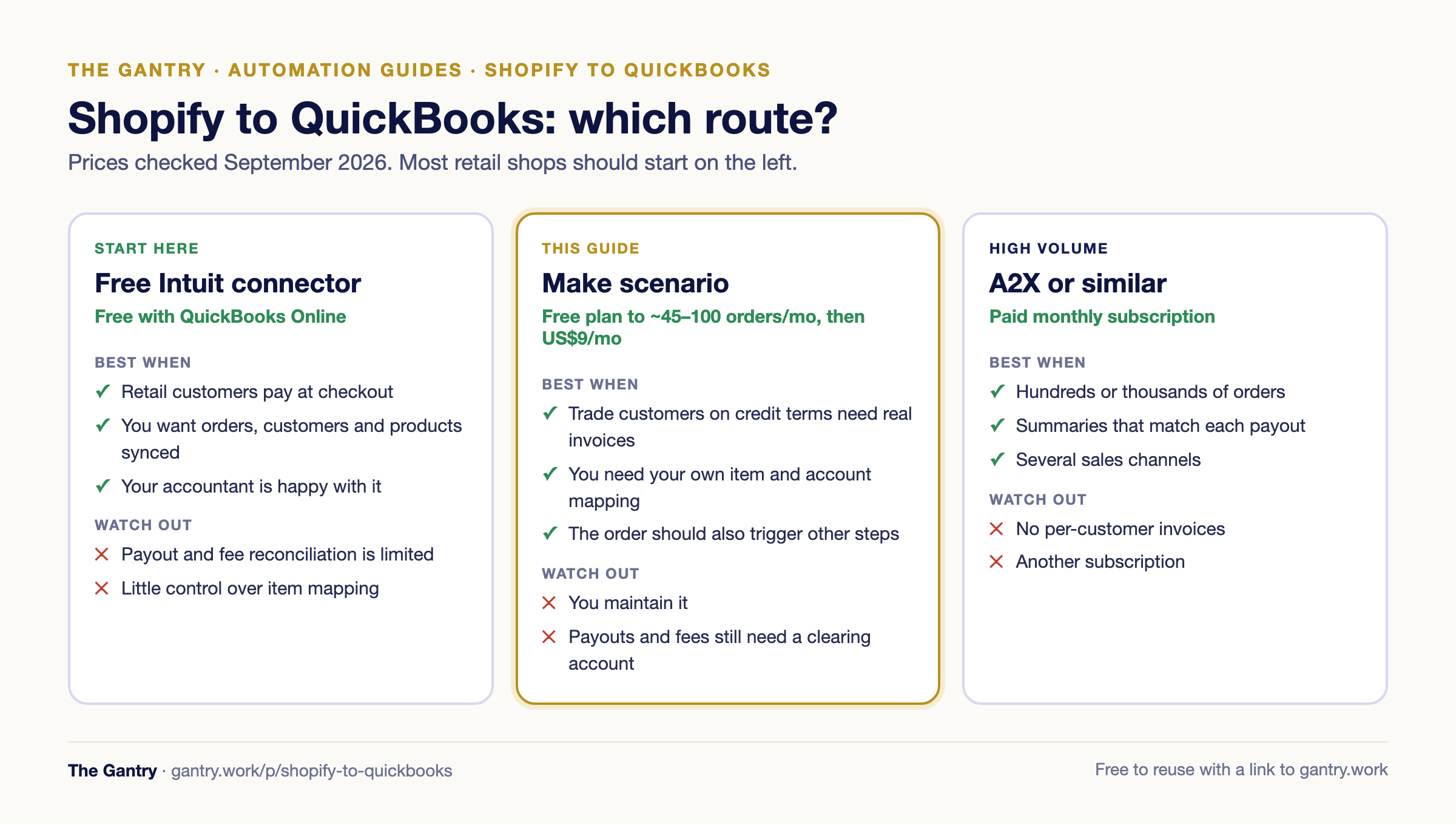
There are two good ways to get Shopify orders into QuickBooks Online: Intuit's free Shopify connector, which syncs sales, customers and products and suits most retail shops, or a Make scenario that creates one QuickBooks invoice per Shopify order with the right customer, which suits trade and wholesale orders. This guide shows how to choose, then how to set up the Make version from Make's official template, including the fixes the template needs before you trust it with real orders.
Part of The Gantry's automation guides. Updated September 2026.
First, check whether you need anything beyond the free connector
Intuit publishes a free Shopify connector for QuickBooks Online. You connect it from the QuickBooks app store, choose a start date (it can import up to a year back) and it brings in orders, customers and products, with categories mapped for you. If you run a normal retail shop where customers pay at checkout, start there. Your accountant will probably prefer it, because it keeps the books tidy without one record per order.
Specialist apps such as A2X and Link My Books go one step further and post daily or per-payout summaries, so the Shopify Payments deposit in your bank matches one entry in QuickBooks. If your volume is high, that is the reconciliation your accountant wants.
A Make scenario earns its place when you need something those apps do not do:
Trade customers on credit terms. A wholesale buyer who orders through Shopify and pays in 30 days needs a proper QuickBooks invoice in their name, not a line in a daily summary, so it shows in your receivables and your collections process.
Your own item mapping. Shopify product titles rarely match QuickBooks items one to one. A scenario can look each SKU up and post it to the right item and income account.
The invoice is only step one. Once an order exists in QuickBooks, the same scenario can add a row to the warehouse sheet, email the customer or alert your team on WhatsApp, which no accounting connector will do.
The Make blueprint
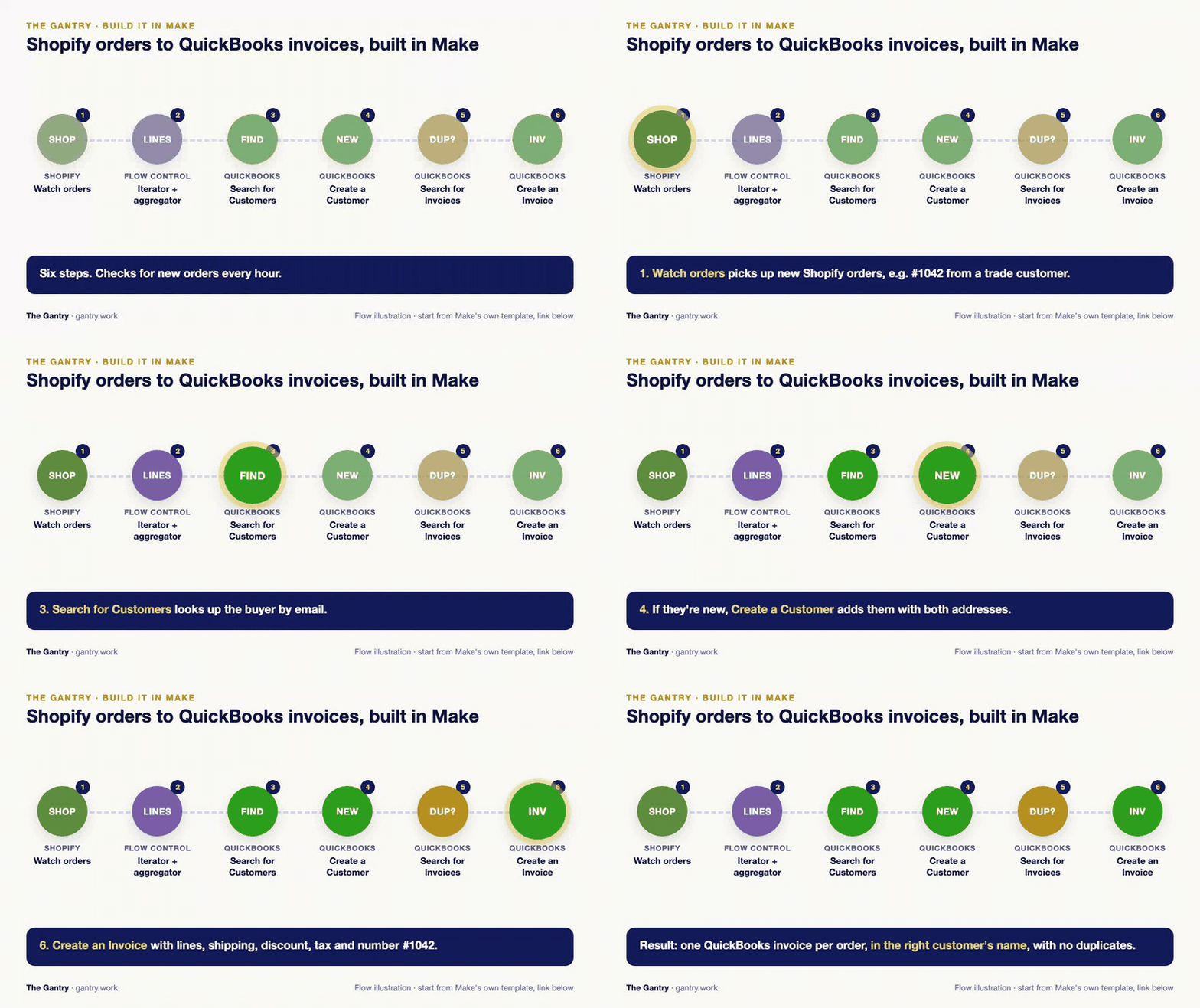
Make's official template, Create QuickBooks invoice from new Shopify orders, has been used more than 480 times and gives you the skeleton in six modules. You need a Make account (the free plan is enough to build and test), your Shopify store and QuickBooks Online. Here is what each module does, and the changes I make before it touches real orders.

1. Watch orders (Shopify)
This trigger checks Shopify on a schedule for new orders. The template watches open orders with any payment status. If only some orders should become invoices, for example trade customers, tag those customers in Shopify and add a filter after this module that lets through only orders carrying the tag.
Watch orders fires when an order is created or updated, so an order that is edited or fulfilled later can come through again. That is why step 5 below matters.
2. Iterator and Array aggregator (line items)
Make splits the order into its line items, then gathers them back into the list of lines QuickBooks expects. Open the aggregator and fix two fields:
Amount: the template maps the Shopify unit price here, so a line of 3 × $10 goes into QuickBooks as $10. Set Amount to the price multiplied by the quantity, and map the price to Unit price.
Item: the template leaves it empty, so QuickBooks puts every line on its default item. Either pick one item such as "Shopify sales", or add QuickBooks: Search for Items before the aggregator to find the item whose SKU matches.
3. Find or create the customer (QuickBooks)
Search for Customers looks for a QuickBooks customer with the order's email address. A router then sends the order one of two ways: if the customer exists, straight to the invoice; if not, through Create a Customer first, with the billing and shipping addresses from Shopify. This is the part that keeps your customer list clean, so keep it.
4. Create an Invoice (QuickBooks)
The template creates the invoice with the lines and the customer, and nothing else. Add:
Invoice number: set it to the Shopify order name (#1042), so anyone can match the two.
Shipping and discounts: add the order's shipping total as its own line on a "Shipping" item, and map the order discount into the discount field. Otherwise every invoice total will be wrong by exactly those amounts.
Tax: set the tax code your accountant uses for online sales. Check one invoice against the Shopify order before you switch the scenario on.
5. Stop duplicates
Add QuickBooks: Search for Invoices before the invoice step, searching by invoice number, with a filter that stops the order if one is found. Because the trigger also fires on updated orders, this one check prevents the most common mess I see: two invoices for the same order.
6. Invoice or sales receipt?
An invoice means "the customer owes you". If the customer already paid at checkout, you also need to record the payment against it. For orders paid upfront, a sales receipt is the cleaner record, and Make has a template for that too: Create a QuickBooks sales receipt from a new Shopify order. Many shops end up with both: sales receipts for retail orders, invoices for trade accounts on terms.
Credits: the Shopify trigger uses a credit every time it checks, even when there are no new orders. Checking every hour is about 720 credits a month. With the fixes above, each order uses about 6 more. On Make's free plan of 1,000 credits, that covers around 45 orders a month; checking every two hours instead (360 credits) covers about 100. A shop with 300 orders a month needs about 2,500 credits, which is Make's entry Core plan at US$9 a month billed annually. The numbers are in my Make pricing guide. Work out your own numbers with the free Make credit calculator.

The free Make credit calculator at work: pick a workflow and see how many credits a month it really uses. Click the animation to try it.
Stuck on a step? Tell me where you're stuck and you'll get the fix, or a free 20-minute review if it's worth one.
The part no order sync fixes: payouts and fees
Shopify Payments pays you the order total minus its fees, a few days later, often several orders in one deposit. Neither the Make template nor an order-level sync records that. The usual setup is a "Shopify clearing" account in QuickBooks: invoices or sales receipts are paid into it, the payout moves the money from clearing to your bank, and the fee is posted as an expense. If the clearing account does not come back to zero each month, something is missing. Agree this with your accountant before you automate anything, because it decides whether you post invoices, receipts or summaries.
Test checklist
Place a real test order with two different products, a quantity above one, shipping and a discount code. Click Run once in Make and compare the QuickBooks invoice with the Shopify order line by line.
Edit the same order in Shopify and run again. You should get no second invoice.
Order as a new customer and check that the customer is created once, with both addresses.
Refunds are not handled. Make has a separate template for refund receipts; until you add it, post refunds by hand.
Currencies: if you sell in more than one currency, the QuickBooks customer's currency must match the order's, or the invoice will fail.
When you have outgrown this
A scenario like this is the right answer for one shop, one set of books and a few hundred orders a month. When you also run stock in several places, sell through marketplaces and a wholesale portal, and need the sale, the stock movement and the delivery to agree, that is an order-to-cash process, and it belongs in one system. If you are wondering whether QuickBooks is still enough, read is QuickBooks an ERP?
Frequently asked questions
Does Shopify integrate with QuickBooks for free? Yes. Intuit's Shopify connector for QuickBooks Online is free to install and syncs orders, customers and products. Paid apps such as A2X add payout-level reconciliation.
Can Make create QuickBooks invoices from Shopify orders? Yes. Make's official template watches new Shopify orders, finds or creates the customer in QuickBooks and creates an invoice. Fix the line amounts and add a duplicate check before you use it on real orders.
Should Shopify orders go into QuickBooks as invoices or sales receipts? Orders paid at checkout are usually sales receipts, or summarised daily. Orders on credit terms, such as wholesale accounts, should be invoices so they appear in receivables.
Is Make free for this? Make's free plan includes 1,000 credits a month, enough to build, test and run around 45 to 100 orders a month depending on how often it checks. Above that you need the Core plan.
Does it work with Xero instead? Yes. The same pattern works with Xero; the scenario is almost the same, with Xero modules in place of QuickBooks.
Related guides
Save Gmail attachments to Google Drive · Order-to-cash process · Make pricing and review · Make vs Zapier · Free n8n templates
Want this set up and looked after for you instead? I do a free 20-minute systems review. No pitch, just your questions answered.
I'm Sayed. I work closely with business owners to automate their operations and build workflows that actually make sense. I write The Gantry about ERP and automation for SMEs.
Working on something similar? Connect with me on LinkedIn and tell me what you are working on. I read and reply to every message, and the questions people send become the next guides.
How I test everything and how this site makes money: How The Gantry works.