

Configuration data sets the rules your system follows, such as tax codes, numbering and approval limits. Master data describes the things you do business with and reuse, such as customers, products and the chart of accounts. Transactional data records events: something happened, on a date, for a quantity or an amount. Rules, things or events: that is the test.
My guide to master data vs transactional data covers the basic split, how one wrong master record spreads into hundreds of documents, and how to clean duplicates before a migration. This one is for when the line gets blurry: payment terms, purchase contracts, tax codes, exchange rates, and what it all means for a migration.
The five types of ERP data, not three
Most explanations stop at three. In practice I work with five, because two more categories explain most of the arguments:
Configuration data tells the system how to behave: document numbering, approval rules, the inventory valuation method, which accounts each posting hits. Dozens of records, changed a few times a year, owned by finance or whoever administers the system.
Reference data is a list of allowed values that other records must pick from: currencies, units of measure, GST tax codes, payment terms. Often defined outside your company (currency codes come from the ISO 4217 standard, Incoterms from the International Chamber of Commerce). Small, stable, shared.
Master data describes the things you trade with, sell, make or post to: customers, vendors, products, the chart of accounts, bills of materials. Thousands of records, changed weekly, reused by every transaction.
Transactional data records events: quotations, orders, deliveries, invoices, payments, stock moves, journals. Created all day, each one used once, then kept.
Snapshot or historical data is a frozen copy of something as it stood on a date: a closed month's trial balance, a year-end stock valuation, the audit log of who changed what.
Many people merge configuration and reference data into "setup data", and vendors draw the lines slightly differently. Microsoft Dynamics 365 Finance and Operations sorts its data entities into five categories: Parameter, Reference, Master, Document and Transaction, where Document means open, header-and-lines records such as sales orders and journals, and Transaction means posted records such as invoices. SAP calls configuration "Customizing" and groups master data and transaction data together as application data. Oracle's cloud applications move "setup data" between environments as configuration packages. Different words, same idea.
How to check master data and transactional data just by looking
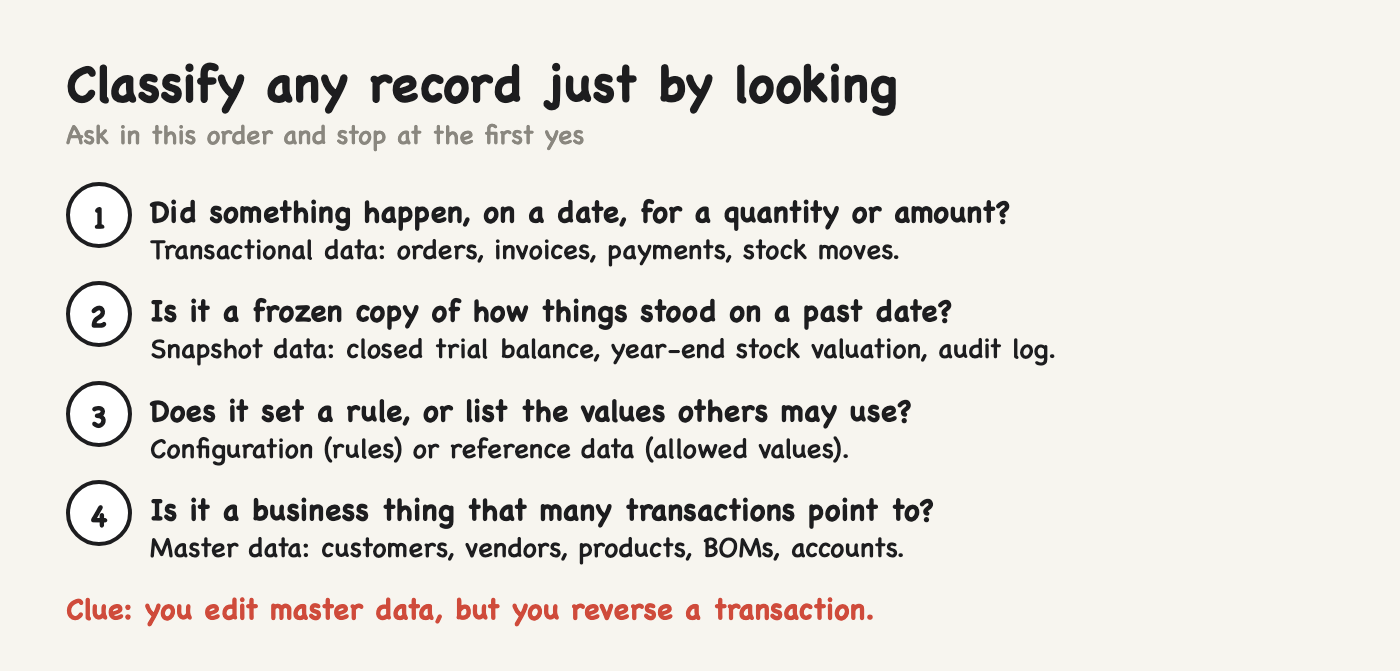
When I am handed a spreadsheet and asked what kind of data it is, I ask four questions in order and stop at the first yes:
Does each row record something that happened, with a date and a quantity or an amount? Then it is transactional.
Is it a copy of something as it stood on a past date, kept for reporting or audit? Then it is snapshot data.
Does it tell the system how to behave, or list the values other records may use? Then it is configuration (behaviour) or reference data (allowed values).
Is it a business thing that many transactions point to? Then it is master data.
Three clues back the answer up. How often it changes: configuration yearly, master data weekly, transactions every few minutes. How many rows there are: dozens, thousands, or tens of thousands a year. How you fix a mistake: you edit a master record and future documents pick up the change, but you correct a posted transaction with a credit note or a reversing journal, never an edit. If you can't just change it, it is a transaction.
40 everyday ERP records, sorted
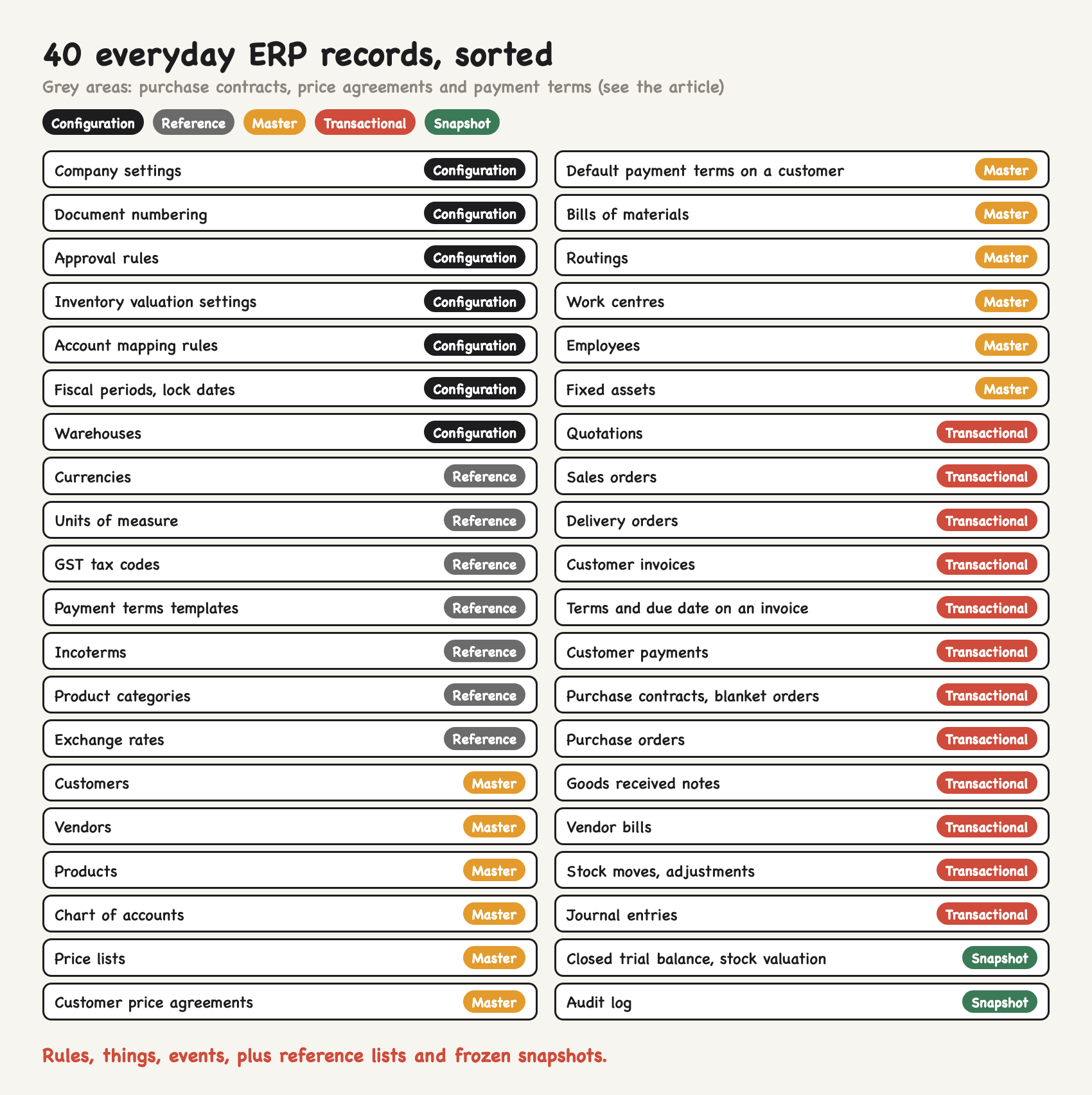
Here are 40 records you will meet in almost any small-business ERP, each with the reason it lands where it does.
Configuration data (sets rules)
Company settings (UEN, base currency, financial year end): define the legal entity every document belongs to.
Document numbering sequences: decide how every invoice and order is numbered.
Approval rules (purchase orders over S$5,000 need a director): a rule with no date, quantity or counterparty of its own.
Inventory valuation settings (FIFO, average or standard by product category): decide how every stock move is valued.
Account mapping rules: tell each posting which stock, cost of sales and GST accounts to use.
Fiscal periods and lock dates: decide which dates can still be posted.
Warehouses: part of your organisational structure, set up once; SAP-style systems call this organisational data.
Reference data (allowed values)
Currencies: a standard code list; you activate SGD, USD and MYR, you do not invent them.
Units of measure (piece, box of 12, kg): every product, order line and stock move must use one.
GST tax codes (standard-rated 9%, zero-rated, exempt): a short list that drives a calculation on every line.
Payment terms templates (cash on delivery, 30 days, 50% deposit): the menu of terms you can give.
Incoterms (FOB, CIF, DAP): published rules you select from.
Product categories: the groups used for reporting and default accounts.
Exchange rates: each rate carries a date, but no business happened between you and anyone, so this is reference data that changes daily.
Master data (things you reuse)
Customers and vendors: the parties every order, invoice and payment points to (two records).
Products: code, unit, cost, default tax code, used on every line.
Chart of accounts: the ledger structure; finance calls it master data, some implementers call it configuration.
Price lists: reused by every quotation until changed.
Customer price agreements (a contract price valid January to December): pricing master data with validity dates.
Default payment terms on a customer: a field on the master record, pointing at the reference list.
Bills of materials and routings: the recipe and the method, reused by every work order (two records).
Work centres: machines or teams with hourly rates, reused by every routing.
Employees: reused by every timesheet, payslip and claim.
Fixed assets: each asset in the register; its monthly depreciation entries are transactions.
Transactional data (events)
Quotations, sales orders and delivery orders: one customer, one date, specific quantities (three records).
Customer invoices: what you billed, posted on a date.
Payment terms and due date on an invoice: copied from the customer at that moment and frozen.
Customer payments: money received on a date.
Purchase contracts and blanket orders: a dated commitment with quantities, consumed by call-offs.
Purchase orders and goods received notes: what you committed to buy and what actually arrived (two records).
Vendor bills: what a supplier charged you.
Stock moves and adjustments: quantities moving between locations or written off.
Journal entries: accruals, corrections and month-end postings.
Snapshot data (frozen copies)
Closed-period trial balance and stock valuation: what the books said on a date, never recalculated.
Audit log: who changed which field, from what, to what, and when.
The grey areas, honestly
Four records cause most of the debates.
Are purchase contracts transactional data or master data?
A purchase contract or blanket order, say 12,000 kg of resin at S$2.10 per kg for 2027, called off monthly, behaves like master data: many purchase orders refer to it for months. But it is a commitment with a counterparty, a date, a quantity and a value, and it gets used up. Most ERPs store it as a purchasing document. SAP calls these outline agreements, split into contracts and scheduling agreements, and each release against a contract normally creates a new purchase order. I treat it as transactional, specifically an open document. In a migration you load what is left on it, not the original quantity.
Payment terms: master data vs transactional data
Payment terms live in three places, and each is a different type. The list of terms ("30 days", "50% deposit") is reference data. The default on a customer is a master data field. The terms and due date on a posted invoice are transactional: copied at the moment of posting and then frozen. If you move a customer from 30 to 60 days today, last month's invoices keep their 30-day due dates. That is correct behaviour, not a bug.
Price agreements
A customer-specific price valid for a year is master data, even though it carries dates. Validity dates describe when a rule applies; they are not the date of an event. The price on an actual quotation is transactional, because it was copied from the agreement on the day the quotation was made.
Does configuration data that sets rules for transactions fall under master data?
No. It is its own category, even if people loosely lump it in with master data. Keep it separate for three reasons: it has a different owner (finance or the system administrator, not sales or purchasing), changes to it should be tested before they reach the live system, and it has to exist before any master record can be created.
Why the distinction matters in a migration
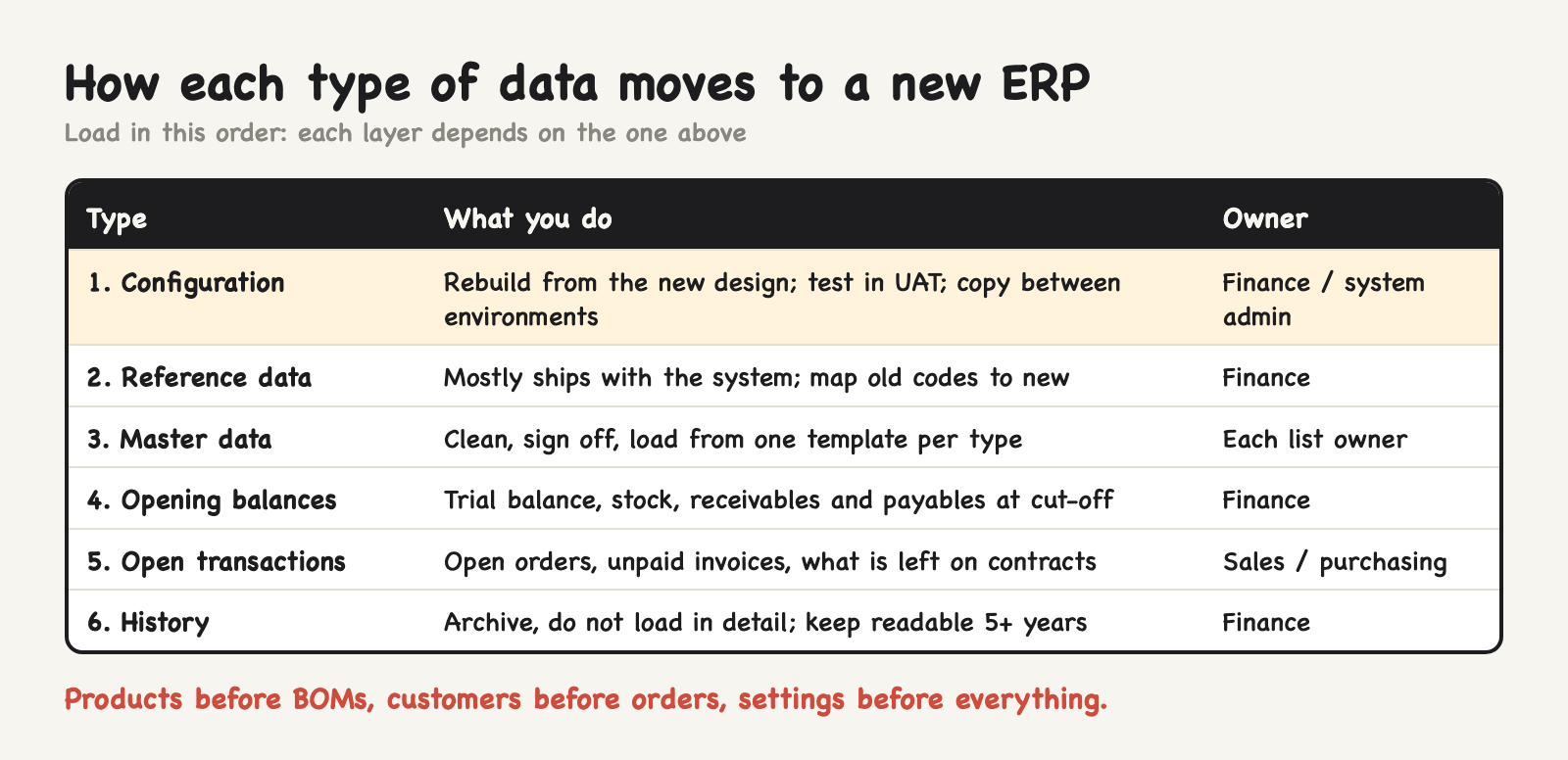
Each type is moved in a different way, and the load order follows the dependencies: configuration, then reference data, then master data, then opening balances and open transactions.
Configuration is rebuilt, not exported. Your old system's settings encode old habits. Decide the new rules during design, set them up, test them in UAT, and copy them between environments. Microsoft's implementation guidance recommends a separate "golden configuration environment" holding configuration only, with no transactions or test data.
Reference data is mapped. Currencies and units mostly ship with the system. The work is a mapping table: old tax code "SR" to the new 9% standard-rated code, old unit "CTN" to "box of 12".
Master data is loaded from templates, one file per type, cleaned and signed off by its owner. Products before bills of materials, because every BOM line points at a product code. On one manufacturing project with more than 16,000 SKUs and 13,000 multi-level BOMs, we structured the product master before loading a single BOM, for exactly that reason.
Transactional data becomes opening balances and open items. You load the trial balance, stock quantities and values, and receivables and payables at the cut-off date, plus open sales orders, open purchase orders and what remains on contracts. My guide to opening balances in an ERP migration shows how to load and reconcile them.
History usually stays behind. Microsoft's own documentation puts it plainly: transactions from a completed business process are generally migrated in summary, not in detail. Keep the old system or a full export readable, because IRAS requires companies to keep transaction records for at least five years from the relevant Year of Assessment.
The full sequence, with sign-offs, is in my ERP data migration checklist.
Mistakes I see when the types get mixed up
Exporting old configuration "to save time". You inherit numbering, tax mappings and approval rules nobody remembers the reasons for.
Editing master data to fix a transaction. Changing a customer's address does not fix last month's invoice, and in most systems it shouldn't.
Changing configuration straight in the live system. A changed account mapping posts to the wrong account until month-end reveals it. Change it in test first.
Treating BOMs as configuration. They are master data with an owner who keeps them current. The bill of materials and routing guide explains why.
Configuration is not the same as customisation, which means writing code; the difference is in ERP configuration vs customisation.
FAQ
A customer order is master, transactional or reference data?
Transactional. It records one customer committing to specific quantities on a specific date, and it copies its customer, products and prices from master data.
Is payment terms master data or transactional data?
Both, depending on where it sits. The list of terms is reference data, the default on a customer or vendor is master data, and the terms and due date on a posted invoice are transactional.
What is the difference between reference data and master data?
Reference data is a short list of allowed values, often defined by an outside standard, such as currencies, units of measure and tax codes. Master data describes your own business entities, such as customers and products, and is much larger and changes more often.
What is snapshot data compared with master and transactional data?
Snapshot data is a copy of information as it stood on a date, such as a closed month's trial balance or a year-end stock valuation. It is never recalculated, which is what makes it useful for audit and comparisons.
Are master data and transactional data cross-client in SAP?
No. In SAP's client concept, master data and transaction data are client-specific: each client has its own. Some Customizing settings are cross-client and apply to every client in the system.
The bottom line
Rules, things or events. Sort a record into one of those, plus reference lists and snapshots, and you know who owns it, how to fix it, and how to migrate it.
Planning a migration and not sure which of your spreadsheets are master data and which are history? I do a free 20-minute systems review. No pitch, just your questions answered.
General information as of October 2026. Vendor terms are taken from SAP, Microsoft and Oracle documentation; record-keeping rules from IRAS. Prices and quantities in the examples are illustrative.
I'm Sayed. I help business owners automate their operations and set up the systems behind them: ERP, accounting, inventory, CRM and workflows. I write The Gantry about what actually works.