

The short answer
Is n8n free? The self-hosted Community Edition is. Under n8n's Sustainable Use License you can run and modify it at no licence cost for your own internal business purposes, with no execution limit. What you cannot do is sell n8n itself to others as a hosted service.
What you actually pay: a server (S$11 to S$28 a month with backups), a domain (usually S$0, you already own one), and your time: four to eight hours to set up, then about two hours a month. At S$80 an hour, that is roughly S$170 to S$190 a month. n8n Cloud Starter is about S$29.
So: self-host if someone technical already looks after servers, your volume is high, or your data must stay in Singapore. Otherwise start on n8n Cloud or Make.
Part of The Gantry's automation guides. Prices checked October 2026.
n8n's own installation guide recommends self-hosting for expert users and warns that mistakes can mean data loss, security issues and downtime. That is not a reason to avoid it. It is a reason to know the full bill, set it up properly once, and keep a simple routine. This guide covers all three.
What "free" covers, and what it does not
The Community Edition is the same core n8n you get on Cloud: the editor, the integrations, unlimited workflows and users. The licence allows use for "your own internal business purposes", and n8n's licence FAQ reads that broadly: running your business on it, building automations for clients on your own instance (if they cannot edit them), and charging for setup or support are all fine. Hosting n8n so clients build their own workflows, white-labelling it or reselling access is not.
Two things are not free even when you self-host:
Enterprise features. Single sign-on and Git-based environments need a paid key; the self-hosted Business plan is €667 a month billed annually. A small business rarely needs it.
Everything around n8n. The AI model, WhatsApp provider or parser you call is billed by its own vendor, exactly as on Cloud.
The full plan list is in n8n pricing.
The real monthly cost, checked October 2026
Prices are from each provider's own pricing page, checked 22 October 2026, at S$1.28 to the US dollar and S$1.43 to the euro, excluding GST or VAT.
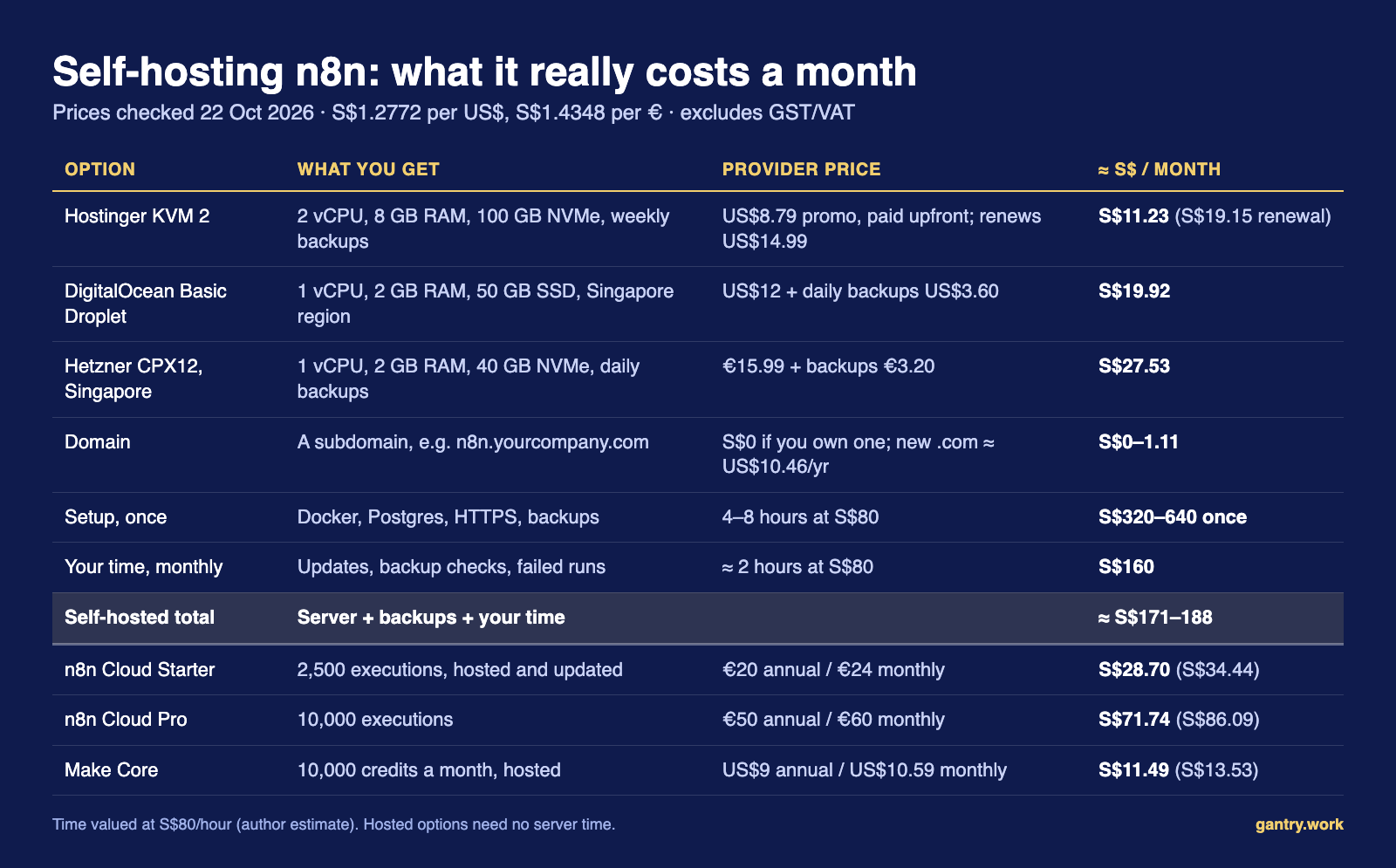
Pricing pages: Hostinger KVM 2 · DigitalOcean Basic Droplet · Hetzner CPX12, Singapore · n8n Cloud
Affiliate link: The Gantry may earn a commission if you sign up, at no extra cost to you. I only recommend tools I'd use on a client project.
What the table does not show:
Hostinger's headline price is prepaid. Plans are paid upfront, so check the term and renewal price at checkout. Its support covers the server, not your workflows.
Hetzner Singapore costs more than Hetzner Europe (€11.99 for the same server, with your data in Europe). Its page also showed these plans as "currently unavailable" when I checked.
2 GB of RAM is my floor, not n8n's. n8n publishes no minimum for a basic install, but you are running n8n, Postgres and a proxy on one machine. For the built-in AI Assistant's code sandbox, n8n asks for 4 GB and 2 vCPUs: about S$40 a month on DigitalOcean with backups.
The hours are the real price. If someone you already pay looks after Linux servers and has spare time, the S$160 is not new money. If the owner is learning Docker at night, it is.
Self-hosting only beats Cloud on price when that time is genuinely free, or when volume is high. The 50,000-execution Pro plan is about S$173 a month, roughly the self-hosted total. Above that, self-hosting wins, because the Community Edition has no execution quota.
When self-hosting makes sense: a checklist
Self-host if at least two are true:
Someone on your team, or a provider you already pay, maintains Linux servers and will own this one.
You expect to run more than about 10,000 executions a month, or a few workflows on tight schedules.
Your data must stay in Singapore or on infrastructure you control. n8n Cloud stores data in Frankfurt, Germany.
You need community or custom nodes, the local file system, or a local AI model.
Stay on Cloud or Make if any is true:
Nobody would notice for a week if the server stopped.
Your workflows send invoices, payment reminders or customer messages, and nobody is named to watch them.
You run fewer than about 2,500 executions a month. Starter covers you for about S$29.
The main reason is saving S$20 a month.
For a 10 to 50 person company with no in-house developer, I start on Cloud. Workflows export as JSON files, so moving later is easy; you reconnect the credentials.
How to set it up: the n8n-documented way
This follows n8n's Docker Compose guide, which puts n8n behind Traefik for automatic HTTPS, and adds Postgres from n8n's install guide and hosting repository, because n8n says SQLite is for trying things out and production should use Postgres. Below are only the parts you set or change. The stable version on 22 October 2026 was 2.44.5.
Step 1: A server, Docker and a subdomain
Start with a fresh Ubuntu LTS server from the table above. Install Docker Engine and the Compose plugin using Docker's own instructions, then check:
docker --version
docker compose version
n8n's guide also shows how to add your user to the docker group so you can run Docker without sudo; the commands below assume you did.
At your domain registrar, add an A record: name n8n, pointing to the server's IP address.
Step 2: Close every port except SSH and web
sudo ufw allow OpenSSH
sudo ufw allow 80/tcp
sudo ufw allow 443/tcp
sudo ufw enable
One trap: Docker's documentation says published container ports bypass ufw. So never publish Postgres's port, and keep n8n bound to 127.0.0.1 as n8n's Traefik file does. The withPostgres example publishes 5678:5678 to the world; don't copy that line to a public server. Add your provider's network firewall too.
Step 3: The .env file
mkdir n8n-compose
cd n8n-compose
mkdir local-files
Create .env. The first four lines come from n8n's guide; the rest add a pinned version, your own encryption key and Postgres:
DOMAIN_NAME=example.com
SUBDOMAIN=n8n
GENERIC_TIMEZONE=Asia/Singapore
SSL_EMAIL=you@example.com

N8N_VERSION=2.44.5
N8N_ENCRYPTION_KEY=paste-a-long-random-string
POSTGRES_USER=paste-a-username
POSTGRES_PASSWORD=paste-another-long-random-string
POSTGRES_DB=n8n
Generate each random string with openssl rand -hex 32. Don't skip the timezone: n8n defaults to New York time, so "daily at 8am" would run at 8pm or 9pm Singapore time.
Save N8N_ENCRYPTION_KEY in your password manager now. n8n encrypts every saved credential with it (docs). Lose it and a perfect backup restores with every Xero and Gmail login unreadable. Set it before the first start; once n8n has generated its own key, it keeps that one.
Step 4: The compose file
Copy compose.yaml from n8n's Docker Compose guide unchanged, then make three edits.
Pin the version, as n8n's withPostgres example does, so updates happen when you choose:
image: docker.n8n.io/n8nio/n8n:${N8N_VERSION}Add these lines to the n8n service's environment list, and make n8n wait for the database:
      - DB_TYPE=postgresdb
      - DB_POSTGRESDB_HOST=postgres
      - DB_POSTGRESDB_PORT=5432
      - DB_POSTGRESDB_DATABASE=${POSTGRES_DB}
      - DB_POSTGRESDB_USER=${POSTGRES_USER}
      - DB_POSTGRESDB_PASSWORD=${POSTGRES_PASSWORD}
      - N8N_ENCRYPTION_KEY=${N8N_ENCRYPTION_KEY}
    depends_on:
      postgres:
        condition: service_healthy
Add n8n's Postgres service under services, and db_storage: under volumes. There is deliberately no ports: line:
  postgres:
    image: postgres:18
    restart: always
    environment:
      POSTGRES_USER: ${POSTGRES_USER}
      POSTGRES_PASSWORD: ${POSTGRES_PASSWORD}
      POSTGRES_DB: ${POSTGRES_DB}
      PGDATA: /var/lib/postgresql/data
    volumes:
      - db_storage:/var/lib/postgresql/data
    healthcheck:
      test: ["CMD-SHELL", "pg_isready -h localhost -U ${POSTGRES_USER} -d ${POSTGRES_DB}"]
      interval: 5s
      timeout: 5s
      retries: 10
Keep the PGDATA line: n8n warns that without it Postgres 18 writes outside the volume and the database starts empty.
Step 5: Start it, create the owner, switch on 2FA
docker compose up -d
docker compose ps
Open https://n8n.example.com and create the owner account. Basic auth was removed in n8n 1.0; every instance has a login. Then enable two-factor authentication under Settings, Personal, and save the recovery codes. For email invites and password resets, add the SMTP settings from n8n's user management guide.
How to keep it safe: the monthly routine
Self-hosted n8n is as safe as your update habit. n8n published 49 security advisories on GitHub in September 2026 alone, 27 rated high, and another batch on 14 October. n8n advises updating at least monthly; I would check every two weeks.
Updates
Read the release notes, take a backup, change N8N_VERSION in .env, then run n8n's three update commands:
docker compose pull
docker compose down
docker compose up -d
Never add -v to down: n8n's hosting repository warns it deletes the volume holding your encryption key. And don't bump postgres:18 to a new major version without the dump-and-restore steps the repository documents.
Backups: the database and the .n8n folder
n8n's backup guide says a full backup is the .n8n folder (which holds the encryption key), the Postgres database, and your configuration. From the n8n-compose folder:
set -a && . ./.env && set +a
mkdir -p ~/n8n-backups
docker compose exec -T postgres pg_dumpall -U "$POSTGRES_USER" > ~/n8n-backups/db-$(date +%F).sql
grep -c "PostgreSQL database cluster dump complete" ~/n8n-backups/db-$(date +%F).sql
docker run --rm --volumes-from n8n-compose-n8n-1 -v ~/n8n-backups:/backup ubuntu tar czf /backup/n8n-home-$(date +%F).tgz /home/node/.n8n
The grep line must print 1, or the dump failed. The last line is Docker's standard volume-backup pattern; check your container name with docker compose ps. Put these lines in a script, run it nightly with cron, and copy ~/n8n-backups, .env and compose.yaml off the server. Provider backups live in the same account as the server, so keep one copy elsewhere.
Test a restore every quarter
A backup you have never restored is a guess. Create a second, hourly-billed server, copy the files and backups across, run docker compose pull, then block outbound traffic in the provider's firewall before starting anything, or the copy will run live schedules and email your customers twice. Start Postgres alone, load the dump with psql as in n8n's hosting repository, restore the .n8n volume, then start n8n. Log in, open one credential, run one workflow by hand, delete the server. It costs cents and about an hour.
Webhooks are public doors
A production webhook URL accepts requests from anyone who knows it. On every internet-facing Webhook node, set authentication (Basic, Header or JWT) or the IP allowlist, verify the sender's signature where it provides one, and switch off workflows you no longer use.
The checklist
Weekly, 10 minutes: scan failed executions; check last night's backups exist and are not empty.
Every two weeks: check n8n's GitHub security advisories and update if your version is affected.
Monthly:
sudo apt update && sudo apt upgrade, reboot if asked; check disk space withdf -h; run n8n's security audit (docker compose exec -u node n8n n8n audit); remove leavers.Quarterly: restore test; confirm the key in your password manager matches
.env.Optional: n8n's SSRF protection stops workflows reaching private addresses on your network.
One practical automation each week: a free tool, a tested setup and what it really costs. Free, no spam.
Start with a tested workflow
An empty instance tells you nothing about whether it was worth it, so import something that does a real job on day one. I published five free n8n workflows for small businesses: Xero overdue invoice reminders, supplier invoice email to sheet, a daily owner report from Xero, enquiry form to Google Sheets, and WhatsApp order intake. Each was imported into n8n 2.40 and run against sample data before publishing. Setup notes, running costs and test results are in n8n templates for small business. They run the same on Cloud and self-hosted.
If you don't want a server
Make Core, about S$11.49 a month billed annually for 10,000 credits. Hosted, visual and easier for non-developers. It bills per module run, so long workflows and loops cost more than on n8n. Try Make free, or read Make pricing and review first.
n8n Cloud, from €20 a month billed annually: the same workflows, with hosting, updates and backups done for you. See n8n.io/pricing.
The side-by-side is in n8n vs Make.
Frequently asked questions
Is n8n free for commercial use? Yes, for running your own business, including workflows whose results your customers see. You cannot sell n8n itself as a service where clients build workflows. For edge cases, n8n's licence FAQ points to license@n8n.io.
How much does it cost to self-host n8n? S$11 to S$28 a month for a server with backups (October 2026), plus four to eight hours of setup and about two hours a month. Counting time at S$80 an hour, about S$170 to S$190 a month, against S$29 for Cloud Starter.
Does self-hosted n8n have execution limits? No quota. Your limit is the server's memory and CPU.
What server do I need for n8n self-hosted? I would start at 2 GB of RAM with Postgres; 4 GB and 2 vCPUs if you want the AI Assistant's sandbox.
Is self-hosted n8n secure? It can be: keep it updated, use HTTPS, close unused ports, protect webhooks, turn on 2FA and back up the encryption key. Most trouble comes from instances left on old versions.
Related guides
n8n pricing · n8n alternatives · n8n tutorial for beginners · n8n vs Make · n8n AI agent for small business
The same hosted-versus-self-hosted trade-off for ERP: Odoo Online vs Odoo.sh vs on-premise.
Not sure whether to self-host, use Cloud or skip n8n altogether? I do a free 20-minute systems review. No pitch, just your questions answered.
I'm Sayed. I work closely with business owners to automate their operations and build workflows that actually make sense. I write The Gantry about ERP and automation for SMEs. Working on something similar? Connect with me on LinkedIn and tell me what you are working on. I read and reply to every message, and the questions people send become the next guides. How I test everything and how this site makes money: How The Gantry works.